
3.2 KiB
Anonymous Github
Anonymous Github is a system to anonymize Github repositories before referring to them in a double-blind paper submission. To start using Anonymous Github right now: http://anonymous.4open.science/
Indeed, in a double-blind review process, the open-science data or code that is in the online appendix must be anonymized, similarly to paper anonymization. The authors must
- anonymize URLs: the name of the institution/department/group/authors should not appear in the URLs of the open-science appendix
- anonymize the appendix content itself
Anonymizing an open-science appendix needs some work, but fortunately, this can be automated, this is what Anonymous Github is about.
Anonymous Github anonymizes:
- the Github owner / organization / repository name
- the content of the repository
- file contents (all extensions, md/txt/java/etc)
- file and directory names
Using Anonymous Github
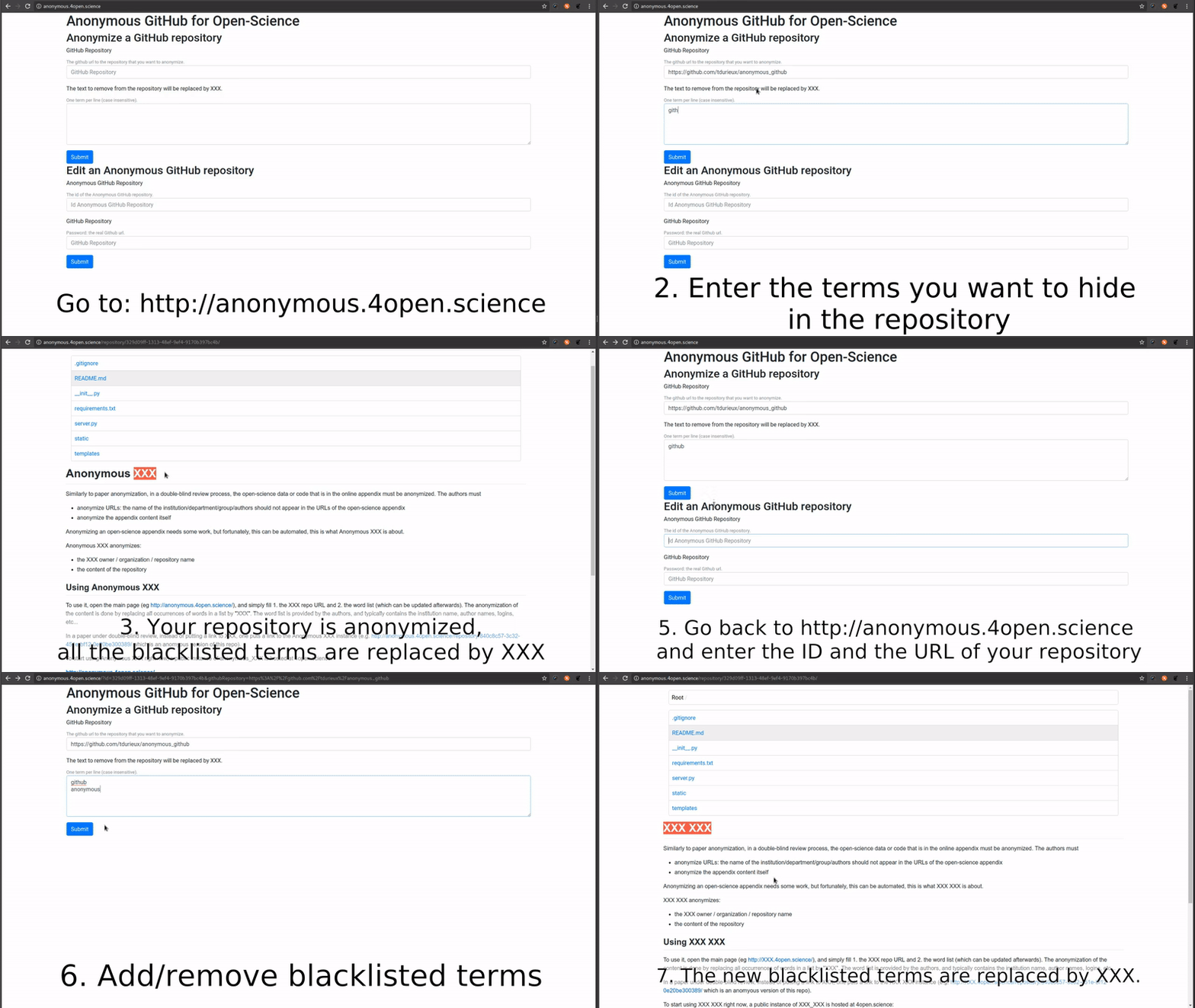
To use it, open the main page (eg http://anonymous.4open.science/), and simply fill 1. the Github repo URL and 2. the word list (which can be updated afterwards). The anonymization of the content is done by replacing all occurrences of words in a list by "XXX". The word list is provided by the authors, and typically contains the institution name, author names, logins, etc... The README is anonymized as well as all files of the repository. Even filenames are anonymized.
In a paper under double-blind review, instead of putting a link to Github, one puts a link to the Anonymous Github instance (e.g. http://anonymous.4open.science/repository/840c8c57-3c32-451e-bf12-0e20be300389/ which is an anomyous version of this repo).
To start using Anonymous Github right now, a public instance of anonymous_github is hosted at 4open.science:
http://anonymous.4open.science/
By default, Anonymous Github and http://anonymous.4open.science access public repositories. If you want to get a public anonymized URL of a private repository, you must give @tdurieux read access to the repo by adding him as collaborator.
Note that public Github repositories are not modified and hence are still visible on Github and Google, even after anonymization.
How it works?
The anonymization of the URL is achieved though proxying all requests.
Installing Anonymous Github
git clone https://github.com/tdurieux/anonymous_github/
cd anonymous_github
pip install -r requirements.txt
python server.py -token <github_auth_token>
See also
Todo
add support to:
- Specify a list to file to ignore
- Ignore file extensions given by the user
- Remove an anonymized repository
- Add a timeout on repo before automated removal (eg after the notification date)
- Customize the XXX
- Add support for custom Github tokens