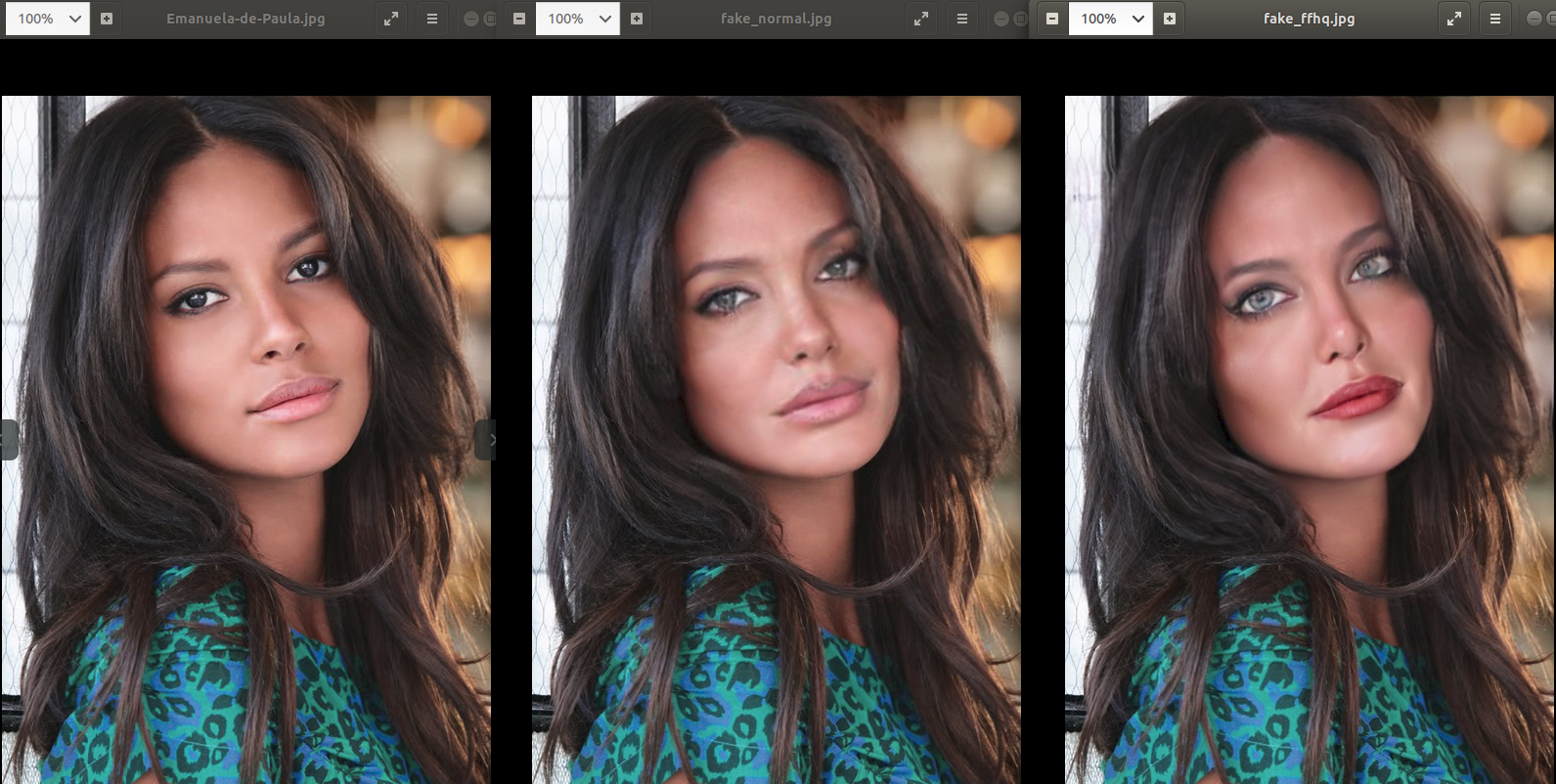
Simswap 512 (beta version) rendering #198

Closed
opened 2022-01-26 10:37:09 +01:00 by birolkuyumcu · 12 comments
birolkuyumcu commented 2022-01-26 10:37:09 +01:00 (Migrated from github.com)

with Simswap 512 ( mode ffhq ) face swap running without error but face not swapped
and shown as in image

image

and also with use_mask dont change result, generate similar image

with Simswap 512 ( mode ffhq ) face swap running without error but face not swapped and shown as in image ![image](https://user-images.githubusercontent.com/8981828/151138244-ee94f57c-8be9-43da-8e7d-f11fb0b22521.png) and also with use_mask dont change result, generate similar image
Krakatoa2035 commented 2022-01-26 14:53:05 +01:00 (Migrated from github.com)

I have the same problem

I have the same problem
Krakatoa2035 commented 2022-01-26 14:54:02 +01:00 (Migrated from github.com)

Help please

Help please
Krakatoa2035 commented 2022-01-26 14:57:07 +01:00 (Migrated from github.com)

Inten i9 rtx 3060 ti

Inten i9 rtx 3060 ti
Fibonacci134 commented 2022-02-08 12:58:20 +01:00 (Migrated from github.com)

Did you download 79999_iter.pth from preparation and place it in the correct destination? I believe you have made an error getting the dependencies and the folders into their proper location. Or you have altered something in reverse2original.py accidentally. Go through the preparation and confirm that you guys have all the files.

Did you download 79999_iter.pth from preparation and place it in the correct destination? I believe you have made an error getting the dependencies and the folders into their proper location. Or you have altered something in reverse2original.py accidentally. Go through the preparation and confirm that you guys have all the files.
birolkuyumcu commented 2022-02-08 13:31:16 +01:00 (Migrated from github.com)

Yes these are ( path + file ) correct . If not rises an error something not found... and not produce a output.
There is no error and produce a image shown in image above
i dont change anything at "reverse2original.py"

> Yes these are ( path + file ) correct . If not rises an error something not found... and not produce a output. There is no error and produce a image shown in image above i dont change anything at "reverse2original.py"
Fibonacci134 commented 2022-02-10 13:20:30 +01:00 (Migrated from github.com)

Is this only happening with 512? Because it seems like one of the files is either missing or corrupted. Where did you put the 512 folder?

Is this only happening with 512? Because it seems like one of the files is either missing or corrupted. Where did you put the 512 folder?
birolkuyumcu commented 2022-02-10 14:16:07 +01:00 (Migrated from github.com)

SimSwap/checkpoints/512/550000_net_G.pth

SimSwap/checkpoints/512/550000_net_G.pth
Fibonacci134 commented 2022-02-14 12:35:54 +01:00 (Migrated from github.com)

SimSwap/checkpoints/512/550000_net_G.pth

Hey, if you can, please take a picture of the exact filepath while inside the folder. It is definitely a small mistake that has been made somewhere. Have you tried removing it and downloading it again? Also what version of Pytorch are you using?

> SimSwap/checkpoints/512/550000_net_G.pth Hey, if you can, please take a picture of the exact filepath while inside the folder. It is definitely a small mistake that has been made somewhere. Have you tried removing it and downloading it again? Also what version of Pytorch are you using?
birolkuyumcu commented 2022-02-16 06:33:34 +01:00 (Migrated from github.com)

there is no filepath error
if so program rises

  warnings.warn(msg, SourceChangeWarning)
./checkpoints/512/550000_net_G.pth not exists yet!
...
File "/app/projects/SimSwap/models/base_model.py", line 58, in load_network
    raise('Generator must exist!')
TypeError: exceptions must derive from BaseException

i dont think model is corrupt during download .
downloaded file is zip . if corrupted we dont extracted file
redownloaded and try same result

remaining Pytroch version :
my version is 1.10.1
but Normal version of model is worked as expected

only difference during execution

Pretrained network G has fewer layers; The following are not initialized:
['first_layer', 'last_layer']
ffhq 512 550000
input mean and std: 127.5 127.5
find model: ./insightface_func/models/antelope/glintr100.onnx recognition
find model: ./insightface_func/models/antelope/scrfd_10g_bnkps.onnx detection
set det-size: (640, 640)

Normal


None 224 latest
input mean and std: 127.5 127.5
find model: ./insightface_func/models/antelope/glintr100.onnx recognition
find model: ./insightface_func/models/antelope/scrfd_10g_bnkps.onnx detection
set det-size: (640, 640)

there is no filepath error if so program rises ``` warnings.warn(msg, SourceChangeWarning) ./checkpoints/512/550000_net_G.pth not exists yet! ... File "/app/projects/SimSwap/models/base_model.py", line 58, in load_network raise('Generator must exist!') TypeError: exceptions must derive from BaseException ``` i dont think model is corrupt during download . downloaded file is zip . if corrupted we dont extracted file redownloaded and try same result remaining Pytroch version : my version is 1.10.1 but Normal version of model is worked as expected only difference during execution ``` Pretrained network G has fewer layers; The following are not initialized: ['first_layer', 'last_layer'] ffhq 512 550000 input mean and std: 127.5 127.5 find model: ./insightface_func/models/antelope/glintr100.onnx recognition find model: ./insightface_func/models/antelope/scrfd_10g_bnkps.onnx detection set det-size: (640, 640) ``` Normal ``` None 224 latest input mean and std: 127.5 127.5 find model: ./insightface_func/models/antelope/glintr100.onnx recognition find model: ./insightface_func/models/antelope/scrfd_10g_bnkps.onnx detection set det-size: (640, 640) ```
vladosShikos commented 2022-02-17 23:37:28 +01:00 (Migrated from github.com)

Check #162, it helped me

Check #162, it helped me
birolkuyumcu commented 2022-02-21 07:42:17 +01:00 (Migrated from github.com)

@vladosShikos thanks


opt.crop_size = 512
crop_size = opt.crop_size

solves problem it worked
image

from models.models import create_model
...
model = create_model(opt)

within create model
call

model.initialize(opt)

01a8d6d0a6/models/models.py (L18)

this function
050ed8a00a/models/fs_model.py (L45)
within this function "opt.crop_size" used so
setting opt.crop_size before solves problem

@vladosShikos thanks ``` opt.crop_size = 512 crop_size = opt.crop_size ``` solves problem it worked ![image](https://user-images.githubusercontent.com/8981828/154902358-6a452f98-44d9-479d-9612-c069e15f840a.png) ``` from models.models import create_model ... model = create_model(opt) ``` within create model call `model.initialize(opt)` https://github.com/neuralchen/SimSwap/blob/01a8d6d0a6fd7e7b0052a5832328fba33f2b8414/models/models.py#L18 this function https://github.com/neuralchen/SimSwap/blob/050ed8a00a190aafafe183fdfa6a0eb845ded89d/models/fs_model.py#L45 within this function "opt.crop_size" used so setting opt.crop_size before solves problem
woctezuma commented 2022-06-11 14:45:45 +02:00 (Migrated from github.com)

Interesting.

To clarify for people who are confused about this issue: this happens in a Colab notebook if you edit an official one such as this one.

In the following piece of code:

opt = TestOptions()
opt.initialize()
opt.parser.add_argument('-f') ## dummy arg to avoid bug
opt = opt.parse()
opt.pic_a_path = './demo_file/Iron_man.jpg' ## or replace it with image from your own google drive
opt.video_path = './demo_file/multi_people_1080p.mp4' ## or replace it with video from your own google drive
opt.output_path = './output/demo.mp4'
opt.temp_path = './tmp'
opt.Arc_path = './arcface_model/arcface_checkpoint.tar'
opt.isTrain = False
opt.use_mask = True  ## new feature up-to-date

crop_size = opt.crop_size

torch.nn.Module.dump_patches = True
model = create_model(opt)
model.eval()

You might be tempted by edit this line:

crop_size = opt.crop_size

to:

crop_size = 512

and you should NOT!

Instead, you want to set opt.crop_size to the non-default value (512 instead of the default value of 224):

opt.crop_size = 512

and keep the aforementioned line:

crop_size = opt.crop_size
Interesting. To clarify for people who are confused about this issue: this happens in a Colab notebook if you edit an official one such as [this one](https://colab.research.google.com/github/neuralchen/SimSwap/blob/main/SimSwap%20colab.ipynb). In the following piece of code: ```python opt = TestOptions() opt.initialize() opt.parser.add_argument('-f') ## dummy arg to avoid bug opt = opt.parse() opt.pic_a_path = './demo_file/Iron_man.jpg' ## or replace it with image from your own google drive opt.video_path = './demo_file/multi_people_1080p.mp4' ## or replace it with video from your own google drive opt.output_path = './output/demo.mp4' opt.temp_path = './tmp' opt.Arc_path = './arcface_model/arcface_checkpoint.tar' opt.isTrain = False opt.use_mask = True ## new feature up-to-date crop_size = opt.crop_size torch.nn.Module.dump_patches = True model = create_model(opt) model.eval() ``` You might be tempted by edit this line: ```python crop_size = opt.crop_size ``` to: ```python crop_size = 512 ``` **and you should NOT!** Instead, you want to set `opt.crop_size` to the non-default value (512 instead of the default value of 224): ```python opt.crop_size = 512 ``` and keep the aforementioned line: ```python crop_size = opt.crop_size ```
Sign in to join this conversation.