mirror of
https://github.com/Ed1s0nZ/CyberStrikeAI.git
synced 2026-05-17 13:43:31 +02:00
Compare commits
19 Commits
| Author | SHA1 | Date | |
|---|---|---|---|
 公明 公明
|
90508c9084 | ||
|
公明
|
361480f2d1 | ||
|
公明
|
538565117b | ||
|
公明
|
1c8742b7b6 | ||
|
公明
|
2fb6a1d1ef | ||
|
公明
|
6e390acb3d | ||
|
公明
|
d6236e285d | ||
|
公明
|
ad8efffbb4 | ||
|
公明
|
352d9b712c | ||
|
公明
|
acadbe19c6 | ||
|
公明
|
c265e66afb | ||
|
公明
|
647bb4b5e4 | ||
|
公明
|
dd311f7a3b | ||
|
公明
|
2e482a3baf | ||
|
公明
|
67d5e7f11e | ||
|
公明
|
7e0198a64c | ||
|
公明
|
1e50272229 | ||
|
公明
|
39b47a86fb | ||
|
公明
|
74738ee555 |
@@ -501,20 +501,6 @@ Compress the 5 MB nuclei report, summarize critical CVEs, and attach the artifac
|
||||
Build an attack chain for the latest engagement and export the node list with severity >= high.
|
||||
```
|
||||
|
||||
## Changelog
|
||||
|
||||
### Recent Highlights
|
||||
|
||||
- **2026-01-27** – OpenAPI documentation with interactive testing interface, supporting conversation management, message interaction, and result querying
|
||||
- **2026-01-15** – Skills system with 20+ predefined security testing skills
|
||||
- **2026-01-11** – Role-based testing with predefined security testing roles
|
||||
- **2026-01-08** – SSE transport mode support for external MCP servers
|
||||
- **2026-01-01** – Batch task management with queue-based execution
|
||||
- **2025-12-25** – Vulnerability management and conversation grouping features
|
||||
- **2025-12-20** – Knowledge base with vector search and hybrid retrieval
|
||||
|
||||
|
||||
|
||||
## 404Starlink
|
||||
|
||||
<img src="./images/404StarLinkLogo.png" width="30%">
|
||||
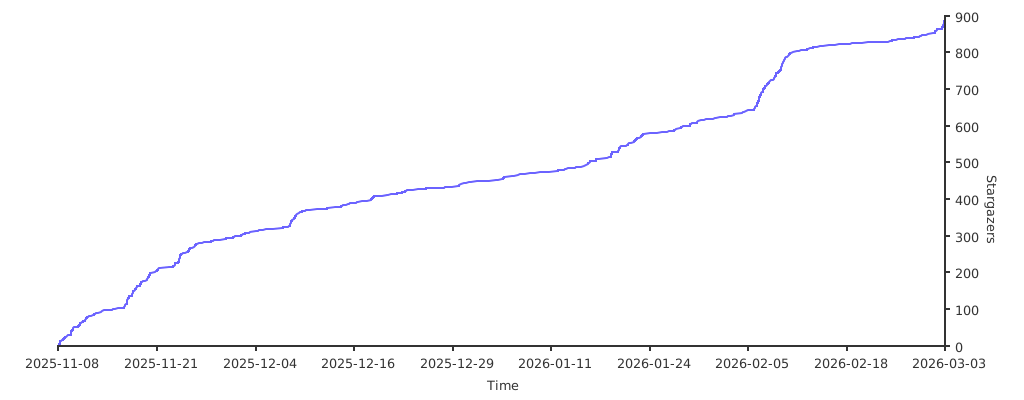
@@ -532,6 +518,22 @@ CyberStrikeAI has joined [404Starlink](https://github.com/knownsec/404StarLink)
|
||||
|
||||
|
||||
|
||||
---
|
||||
|
||||
## ⚠️ Disclaimer
|
||||
|
||||
**This tool is for educational and authorized testing purposes only!**
|
||||
|
||||
CyberStrikeAI is a professional security testing platform designed to assist security researchers, penetration testers, and IT professionals in conducting security assessments and vulnerability research **with explicit authorization**.
|
||||
|
||||
**By using this tool, you agree to:**
|
||||
- Use this tool only on systems where you have clear written authorization
|
||||
- Comply with all applicable laws, regulations, and ethical standards
|
||||
- Take full responsibility for any unauthorized use or misuse
|
||||
- Not use this tool for any illegal or malicious purposes
|
||||
|
||||
**The developers are not responsible for any misuse!** Please ensure your usage complies with local laws and regulations, and that you have obtained explicit authorization from the target system owner.
|
||||
|
||||
---
|
||||
|
||||
Need help or want to contribute? Open an issue or PR—community tooling additions are welcome!
|
||||
|
||||
+16
-13
@@ -500,19 +500,6 @@ CyberStrikeAI/
|
||||
构建最新一次测试的攻击链,只导出风险 >= 高的节点列表。
|
||||
```
|
||||
|
||||
## 更新日志
|
||||
|
||||
### 近期亮点
|
||||
|
||||
- **2026-01-27** – 新增 OpenAPI 文档,提供交互式测试界面,支持对话管理、消息交互和结果查询
|
||||
- **2026-01-15** – 新增 Skills 技能系统,内置 20+ 预设安全测试技能
|
||||
- **2026-01-11** – 新增角色化测试功能,支持预设安全测试角色
|
||||
- **2026-01-08** – 新增 SSE 传输模式支持,外部 MCP 联邦支持三种模式
|
||||
- **2026-01-01** – 新增批量任务管理功能,支持队列式任务执行
|
||||
- **2025-12-25** – 新增漏洞管理和对话分组功能
|
||||
- **2025-12-20** – 新增知识库功能,支持向量检索和混合搜索
|
||||
|
||||
|
||||
## 404星链计划
|
||||
<img src="./images/404StarLinkLogo.png" width="30%">
|
||||
|
||||
@@ -530,4 +517,20 @@ CyberStrikeAI 现已加入 [404星链计划](https://github.com/knownsec/404Star
|
||||
|
||||
---
|
||||
|
||||
## ⚠️ 免责声明
|
||||
|
||||
**本工具仅供教育和授权测试使用!**
|
||||
|
||||
CyberStrikeAI 是一个专业的安全测试平台,旨在帮助安全研究人员、渗透测试人员和IT专业人员在**获得明确授权**的情况下进行安全评估和漏洞研究。
|
||||
|
||||
**使用本工具即表示您同意:**
|
||||
- 仅在您拥有明确书面授权的系统上使用此工具
|
||||
- 遵守所有适用的法律法规和道德准则
|
||||
- 对任何未经授权的使用或滥用行为承担全部责任
|
||||
- 不会将本工具用于任何非法或恶意目的
|
||||
|
||||
**开发者不对任何滥用行为负责!** 请确保您的使用符合当地法律法规,并获得目标系统所有者的明确授权。
|
||||
|
||||
---
|
||||
|
||||
欢迎提交 Issue/PR 贡献新的工具模版或优化建议!
|
||||
|
||||
+1
-1
@@ -10,7 +10,7 @@
|
||||
# ============================================
|
||||
|
||||
# 前端显示的版本号(可选,不填则显示默认版本)
|
||||
version: "v1.3.11"
|
||||
version: "v1.3.16"
|
||||
|
||||
# 服务器配置
|
||||
server:
|
||||
|
||||
@@ -189,6 +189,9 @@ curl -X POST "http://localhost:8080/api/robot/test" \
|
||||
|
||||
按顺序检查:
|
||||
|
||||
0. **笔记本合盖睡眠 / 断网后**
|
||||
钉钉、飞书均使用长连接收消息,睡眠或断网后连接会断开。程序会**自动重连**(约 5 秒~60 秒内重试)。唤醒或恢复网络后稍等一会儿再发消息;若仍无反应,可重启 CyberStrikeAI 进程。
|
||||
|
||||
1. **Client ID / Client Secret 是否与开放平台完全一致**
|
||||
从「凭证与基础信息」里**复制粘贴**,不要手打。注意数字 **0** 与字母 **o**、数字 **1** 与字母 **l**(例如 `ding9gf9tiozuc504aer` 中间是 **504** 不是 5o4)。
|
||||
|
||||
|
||||
@@ -188,6 +188,9 @@ API: `POST /api/robot/test` (requires login). Body: `{"platform":"optional","use
|
||||
|
||||
Check in this order:
|
||||
|
||||
0. **After laptop sleep or network drop**
|
||||
DingTalk and Lark both use long-lived connections; they break when the machine sleeps or the network drops. The app **auto-reconnects** (retries within about 5–60 seconds). After wake or network recovery, wait a moment before sending; if there is still no response, restart the CyberStrikeAI process.
|
||||
|
||||
1. **Client ID / Client Secret match the open platform exactly**
|
||||
Copy from “Credentials and basic info”; avoid typing. Watch **0** vs **o** and **1** vs **l** (e.g. `ding9gf9tiozuc504aer` has **504**, not 5o4).
|
||||
|
||||
|
||||
@@ -5,8 +5,10 @@ go 1.23.0
|
||||
toolchain go1.24.4
|
||||
|
||||
require (
|
||||
github.com/creack/pty v1.1.24
|
||||
github.com/gin-gonic/gin v1.9.1
|
||||
github.com/google/uuid v1.5.0
|
||||
github.com/gorilla/websocket v1.5.0
|
||||
github.com/larksuite/oapi-sdk-go/v3 v3.4.22
|
||||
github.com/mattn/go-sqlite3 v1.14.18
|
||||
github.com/modelcontextprotocol/go-sdk v1.2.0
|
||||
@@ -28,7 +30,6 @@ require (
|
||||
github.com/goccy/go-json v0.10.2 // indirect
|
||||
github.com/gogo/protobuf v1.3.2 // indirect
|
||||
github.com/google/jsonschema-go v0.3.0 // indirect
|
||||
github.com/gorilla/websocket v1.5.0 // indirect
|
||||
github.com/json-iterator/go v1.1.12 // indirect
|
||||
github.com/klauspost/cpuid/v2 v2.2.4 // indirect
|
||||
github.com/leodido/go-urn v1.2.4 // indirect
|
||||
|
||||
@@ -4,6 +4,8 @@ github.com/bytedance/sonic v1.9.1/go.mod h1:i736AoUSYt75HyZLoJW9ERYxcy6eaN6h4BZX
|
||||
github.com/chenzhuoyu/base64x v0.0.0-20211019084208-fb5309c8db06/go.mod h1:DH46F32mSOjUmXrMHnKwZdA8wcEefY7UVqBKYGjpdQY=
|
||||
github.com/chenzhuoyu/base64x v0.0.0-20221115062448-fe3a3abad311 h1:qSGYFH7+jGhDF8vLC+iwCD4WpbV1EBDSzWkJODFLams=
|
||||
github.com/chenzhuoyu/base64x v0.0.0-20221115062448-fe3a3abad311/go.mod h1:b583jCggY9gE99b6G5LEC39OIiVsWj+R97kbl5odCEk=
|
||||
github.com/creack/pty v1.1.24 h1:bJrF4RRfyJnbTJqzRLHzcGaZK1NeM5kTC9jGgovnR1s=
|
||||
github.com/creack/pty v1.1.24/go.mod h1:08sCNb52WyoAwi2QDyzUCTgcvVFhUzewun7wtTfvcwE=
|
||||
github.com/davecgh/go-spew v1.1.0/go.mod h1:J7Y8YcW2NihsgmVo/mv3lAwl/skON4iLHjSsI+c5H38=
|
||||
github.com/davecgh/go-spew v1.1.1 h1:vj9j/u1bqnvCEfJOwUhtlOARqs3+rkHYY13jYWTU97c=
|
||||
github.com/davecgh/go-spew v1.1.1/go.mod h1:J7Y8YcW2NihsgmVo/mv3lAwl/skON4iLHjSsI+c5H38=
|
||||
|
||||
@@ -325,6 +325,7 @@ func New(cfg *config.Config, log *logger.Logger) (*App, error) {
|
||||
roleHandler.SetSkillsManager(skillsManager) // 设置Skills管理器到RoleHandler
|
||||
skillsHandler := handler.NewSkillsHandler(skillsManager, cfg, configPath, log.Logger)
|
||||
fofaHandler := handler.NewFofaHandler(cfg, log.Logger)
|
||||
terminalHandler := handler.NewTerminalHandler(log.Logger)
|
||||
if db != nil {
|
||||
skillsHandler.SetDB(db) // 设置数据库连接以便获取调用统计
|
||||
}
|
||||
@@ -431,6 +432,7 @@ func New(cfg *config.Config, log *logger.Logger) (*App, error) {
|
||||
roleHandler,
|
||||
skillsHandler,
|
||||
fofaHandler,
|
||||
terminalHandler,
|
||||
mcpServer,
|
||||
authManager,
|
||||
openAPIHandler,
|
||||
@@ -542,6 +544,7 @@ func setupRoutes(
|
||||
roleHandler *handler.RoleHandler,
|
||||
skillsHandler *handler.SkillsHandler,
|
||||
fofaHandler *handler.FofaHandler,
|
||||
terminalHandler *handler.TerminalHandler,
|
||||
mcpServer *mcp.Server,
|
||||
authManager *security.AuthManager,
|
||||
openAPIHandler *handler.OpenAPIHandler,
|
||||
@@ -628,6 +631,11 @@ func setupRoutes(
|
||||
protected.PUT("/config", configHandler.UpdateConfig)
|
||||
protected.POST("/config/apply", configHandler.ApplyConfig)
|
||||
|
||||
// 系统设置 - 终端(执行命令,提高运维效率)
|
||||
protected.POST("/terminal/run", terminalHandler.RunCommand)
|
||||
protected.POST("/terminal/run/stream", terminalHandler.RunCommandStream)
|
||||
protected.GET("/terminal/ws", terminalHandler.RunCommandWS)
|
||||
|
||||
// 外部MCP管理
|
||||
protected.GET("/external-mcp", externalMCPHandler.GetExternalMCPs)
|
||||
protected.GET("/external-mcp/stats", externalMCPHandler.GetExternalMCPStats)
|
||||
|
||||
+167
-7
@@ -2,10 +2,14 @@ package handler
|
||||
|
||||
import (
|
||||
"context"
|
||||
"crypto/rand"
|
||||
"encoding/base64"
|
||||
"encoding/json"
|
||||
"errors"
|
||||
"fmt"
|
||||
"net/http"
|
||||
"os"
|
||||
"path/filepath"
|
||||
"strconv"
|
||||
"strings"
|
||||
"time"
|
||||
@@ -108,11 +112,132 @@ func (h *AgentHandler) SetSkillsManager(manager *skills.Manager) {
|
||||
h.skillsManager = manager
|
||||
}
|
||||
|
||||
// ChatAttachment 聊天附件(用户上传的文件)
|
||||
type ChatAttachment struct {
|
||||
FileName string `json:"fileName"` // 文件名
|
||||
Content string `json:"content"` // 文本内容或 base64(由 MimeType 决定是否解码)
|
||||
MimeType string `json:"mimeType,omitempty"`
|
||||
}
|
||||
|
||||
// ChatRequest 聊天请求
|
||||
type ChatRequest struct {
|
||||
Message string `json:"message" binding:"required"`
|
||||
ConversationID string `json:"conversationId,omitempty"`
|
||||
Role string `json:"role,omitempty"` // 角色名称
|
||||
Message string `json:"message" binding:"required"`
|
||||
ConversationID string `json:"conversationId,omitempty"`
|
||||
Role string `json:"role,omitempty"` // 角色名称
|
||||
Attachments []ChatAttachment `json:"attachments,omitempty"`
|
||||
}
|
||||
|
||||
const (
|
||||
maxAttachments = 10
|
||||
chatUploadsDirName = "chat_uploads" // 对话附件保存的根目录(相对当前工作目录)
|
||||
)
|
||||
|
||||
// saveAttachmentsToDateAndConversationDir 将附件保存到 chat_uploads/YYYY-MM-DD/{conversationID}/,返回每个文件的保存路径(与 attachments 顺序一致)
|
||||
// conversationID 为空时使用 "_new" 作为目录名(新对话尚未有 ID)
|
||||
func saveAttachmentsToDateAndConversationDir(attachments []ChatAttachment, conversationID string, logger *zap.Logger) (savedPaths []string, err error) {
|
||||
if len(attachments) == 0 {
|
||||
return nil, nil
|
||||
}
|
||||
cwd, err := os.Getwd()
|
||||
if err != nil {
|
||||
return nil, fmt.Errorf("获取当前工作目录失败: %w", err)
|
||||
}
|
||||
dateDir := filepath.Join(cwd, chatUploadsDirName, time.Now().Format("2006-01-02"))
|
||||
convDirName := strings.TrimSpace(conversationID)
|
||||
if convDirName == "" {
|
||||
convDirName = "_new"
|
||||
} else {
|
||||
convDirName = strings.ReplaceAll(convDirName, string(filepath.Separator), "_")
|
||||
}
|
||||
targetDir := filepath.Join(dateDir, convDirName)
|
||||
if err = os.MkdirAll(targetDir, 0755); err != nil {
|
||||
return nil, fmt.Errorf("创建上传目录失败: %w", err)
|
||||
}
|
||||
savedPaths = make([]string, 0, len(attachments))
|
||||
for i, a := range attachments {
|
||||
raw, decErr := attachmentContentToBytes(a)
|
||||
if decErr != nil {
|
||||
return nil, fmt.Errorf("附件 %s 解码失败: %w", a.FileName, decErr)
|
||||
}
|
||||
baseName := filepath.Base(a.FileName)
|
||||
if baseName == "" || baseName == "." {
|
||||
baseName = "file"
|
||||
}
|
||||
baseName = strings.ReplaceAll(baseName, string(filepath.Separator), "_")
|
||||
ext := filepath.Ext(baseName)
|
||||
nameNoExt := strings.TrimSuffix(baseName, ext)
|
||||
suffix := fmt.Sprintf("_%s_%s", time.Now().Format("150405"), shortRand(6))
|
||||
var unique string
|
||||
if ext != "" {
|
||||
unique = nameNoExt + suffix + ext
|
||||
} else {
|
||||
unique = baseName + suffix
|
||||
}
|
||||
fullPath := filepath.Join(targetDir, unique)
|
||||
if err = os.WriteFile(fullPath, raw, 0644); err != nil {
|
||||
return nil, fmt.Errorf("写入文件 %s 失败: %w", a.FileName, err)
|
||||
}
|
||||
absPath, _ := filepath.Abs(fullPath)
|
||||
savedPaths = append(savedPaths, absPath)
|
||||
if logger != nil {
|
||||
logger.Debug("对话附件已保存", zap.Int("index", i+1), zap.String("fileName", a.FileName), zap.String("path", absPath))
|
||||
}
|
||||
}
|
||||
return savedPaths, nil
|
||||
}
|
||||
|
||||
func shortRand(n int) string {
|
||||
const letters = "0123456789abcdef"
|
||||
b := make([]byte, n)
|
||||
_, _ = rand.Read(b)
|
||||
for i := range b {
|
||||
b[i] = letters[int(b[i])%len(letters)]
|
||||
}
|
||||
return string(b)
|
||||
}
|
||||
|
||||
func attachmentContentToBytes(a ChatAttachment) ([]byte, error) {
|
||||
content := a.Content
|
||||
if decoded, err := base64.StdEncoding.DecodeString(content); err == nil && len(decoded) > 0 {
|
||||
return decoded, nil
|
||||
}
|
||||
return []byte(content), nil
|
||||
}
|
||||
|
||||
// userMessageContentForStorage 返回要存入数据库的用户消息内容:有附件时在正文后追加附件名(及路径),刷新后仍能显示,继续对话时大模型也能从历史中拿到路径
|
||||
func userMessageContentForStorage(message string, attachments []ChatAttachment, savedPaths []string) string {
|
||||
if len(attachments) == 0 {
|
||||
return message
|
||||
}
|
||||
var b strings.Builder
|
||||
b.WriteString(message)
|
||||
for i, a := range attachments {
|
||||
b.WriteString("\n📎 ")
|
||||
b.WriteString(a.FileName)
|
||||
if i < len(savedPaths) && savedPaths[i] != "" {
|
||||
b.WriteString(": ")
|
||||
b.WriteString(savedPaths[i])
|
||||
}
|
||||
}
|
||||
return b.String()
|
||||
}
|
||||
|
||||
// appendAttachmentsToMessage 仅将附件的保存路径追加到用户消息末尾,不再内联附件内容,避免上下文过长
|
||||
func appendAttachmentsToMessage(msg string, attachments []ChatAttachment, savedPaths []string) string {
|
||||
if len(attachments) == 0 {
|
||||
return msg
|
||||
}
|
||||
var b strings.Builder
|
||||
b.WriteString(msg)
|
||||
b.WriteString("\n\n[用户上传的文件已保存到以下路径(请按需读取文件内容,而不是依赖内联内容)]\n")
|
||||
for i, a := range attachments {
|
||||
if i < len(savedPaths) && savedPaths[i] != "" {
|
||||
b.WriteString(fmt.Sprintf("- %s: %s\n", a.FileName, savedPaths[i]))
|
||||
} else {
|
||||
b.WriteString(fmt.Sprintf("- %s: (路径未知,可能保存失败)\n", a.FileName))
|
||||
}
|
||||
}
|
||||
return b.String()
|
||||
}
|
||||
|
||||
// ChatResponse 聊天响应
|
||||
@@ -181,6 +306,12 @@ func (h *AgentHandler) AgentLoop(c *gin.Context) {
|
||||
h.logger.Info("从ReAct数据恢复历史上下文", zap.Int("count", len(agentHistoryMessages)))
|
||||
}
|
||||
|
||||
// 校验附件数量(非流式)
|
||||
if len(req.Attachments) > maxAttachments {
|
||||
c.JSON(http.StatusBadRequest, gin.H{"error": fmt.Sprintf("附件最多 %d 个", maxAttachments)})
|
||||
return
|
||||
}
|
||||
|
||||
// 应用角色用户提示词和工具配置
|
||||
finalMessage := req.Message
|
||||
var roleTools []string // 角色配置的工具列表
|
||||
@@ -206,9 +337,20 @@ func (h *AgentHandler) AgentLoop(c *gin.Context) {
|
||||
}
|
||||
}
|
||||
}
|
||||
var savedPaths []string
|
||||
if len(req.Attachments) > 0 {
|
||||
savedPaths, err = saveAttachmentsToDateAndConversationDir(req.Attachments, conversationID, h.logger)
|
||||
if err != nil {
|
||||
h.logger.Error("保存对话附件失败", zap.Error(err))
|
||||
c.JSON(http.StatusInternalServerError, gin.H{"error": "保存上传文件失败: " + err.Error()})
|
||||
return
|
||||
}
|
||||
}
|
||||
finalMessage = appendAttachmentsToMessage(finalMessage, req.Attachments, savedPaths)
|
||||
|
||||
// 保存用户消息(保存原始消息,不包含角色提示词)
|
||||
_, err = h.db.AddMessage(conversationID, "user", req.Message, nil)
|
||||
// 保存用户消息:有附件时一并保存附件名与路径,刷新后显示、继续对话时大模型也能从历史中拿到路径
|
||||
userContent := userMessageContentForStorage(req.Message, req.Attachments, savedPaths)
|
||||
_, err = h.db.AddMessage(conversationID, "user", userContent, nil)
|
||||
if err != nil {
|
||||
h.logger.Error("保存用户消息失败", zap.Error(err))
|
||||
c.JSON(http.StatusInternalServerError, gin.H{"error": "保存用户消息失败: " + err.Error()})
|
||||
@@ -618,6 +760,12 @@ func (h *AgentHandler) AgentLoopStream(c *gin.Context) {
|
||||
h.logger.Info("从ReAct数据恢复历史上下文", zap.Int("count", len(agentHistoryMessages)))
|
||||
}
|
||||
|
||||
// 校验附件数量
|
||||
if len(req.Attachments) > maxAttachments {
|
||||
sendEvent("error", fmt.Sprintf("附件最多 %d 个", maxAttachments), nil)
|
||||
return
|
||||
}
|
||||
|
||||
// 应用角色用户提示词和工具配置
|
||||
finalMessage := req.Message
|
||||
var roleTools []string // 角色配置的工具列表
|
||||
@@ -645,10 +793,22 @@ func (h *AgentHandler) AgentLoopStream(c *gin.Context) {
|
||||
}
|
||||
}
|
||||
}
|
||||
var savedPaths []string
|
||||
if len(req.Attachments) > 0 {
|
||||
savedPaths, err = saveAttachmentsToDateAndConversationDir(req.Attachments, conversationID, h.logger)
|
||||
if err != nil {
|
||||
h.logger.Error("保存对话附件失败", zap.Error(err))
|
||||
sendEvent("error", "保存上传文件失败: "+err.Error(), nil)
|
||||
return
|
||||
}
|
||||
}
|
||||
// 仅将附件保存路径追加到 finalMessage,避免将文件内容内联到大模型上下文中
|
||||
finalMessage = appendAttachmentsToMessage(finalMessage, req.Attachments, savedPaths)
|
||||
// 如果roleTools为空,表示使用所有工具(默认角色或未配置工具的角色)
|
||||
|
||||
// 保存用户消息(保存原始消息,不包含角色提示词)
|
||||
_, err = h.db.AddMessage(conversationID, "user", req.Message, nil)
|
||||
// 保存用户消息:有附件时一并保存附件名与路径,刷新后显示、继续对话时大模型也能从历史中拿到路径
|
||||
userContent := userMessageContentForStorage(req.Message, req.Attachments, savedPaths)
|
||||
_, err = h.db.AddMessage(conversationID, "user", userContent, nil)
|
||||
if err != nil {
|
||||
h.logger.Error("保存用户消息失败", zap.Error(err))
|
||||
}
|
||||
|
||||
+43
-28
@@ -138,43 +138,56 @@ func (h *RobotHandler) clearConversation(platform, userID string) (newConvID str
|
||||
func (h *RobotHandler) HandleMessage(platform, userID, text string) (reply string) {
|
||||
text = strings.TrimSpace(text)
|
||||
if text == "" {
|
||||
return "请输入内容或发送「帮助」查看命令。"
|
||||
return "请输入内容或发送「帮助」/ help 查看命令。"
|
||||
}
|
||||
|
||||
// 命令分发
|
||||
// 命令分发(支持中英文)
|
||||
switch {
|
||||
case text == robotCmdHelp || text == "help" || text == "?" || text == "?":
|
||||
return h.cmdHelp()
|
||||
case text == robotCmdList || text == robotCmdListAlt:
|
||||
case text == robotCmdList || text == robotCmdListAlt || text == "list":
|
||||
return h.cmdList()
|
||||
case strings.HasPrefix(text, robotCmdSwitch+" ") || strings.HasPrefix(text, robotCmdContinue+" "):
|
||||
case strings.HasPrefix(text, robotCmdSwitch+" ") || strings.HasPrefix(text, robotCmdContinue+" ") || strings.HasPrefix(text, "switch ") || strings.HasPrefix(text, "continue "):
|
||||
var id string
|
||||
if strings.HasPrefix(text, robotCmdSwitch+" ") {
|
||||
switch {
|
||||
case strings.HasPrefix(text, robotCmdSwitch+" "):
|
||||
id = strings.TrimSpace(text[len(robotCmdSwitch)+1:])
|
||||
} else {
|
||||
case strings.HasPrefix(text, robotCmdContinue+" "):
|
||||
id = strings.TrimSpace(text[len(robotCmdContinue)+1:])
|
||||
case strings.HasPrefix(text, "switch "):
|
||||
id = strings.TrimSpace(text[7:])
|
||||
default:
|
||||
id = strings.TrimSpace(text[9:])
|
||||
}
|
||||
return h.cmdSwitch(platform, userID, id)
|
||||
case text == robotCmdNew:
|
||||
case text == robotCmdNew || text == "new":
|
||||
return h.cmdNew(platform, userID)
|
||||
case text == robotCmdClear:
|
||||
case text == robotCmdClear || text == "clear":
|
||||
return h.cmdClear(platform, userID)
|
||||
case text == robotCmdCurrent:
|
||||
case text == robotCmdCurrent || text == "current":
|
||||
return h.cmdCurrent(platform, userID)
|
||||
case text == robotCmdStop || text == "stop":
|
||||
return h.cmdStop(platform, userID)
|
||||
case text == robotCmdRoles || text == robotCmdRolesList:
|
||||
case text == robotCmdRoles || text == robotCmdRolesList || text == "roles":
|
||||
return h.cmdRoles()
|
||||
case strings.HasPrefix(text, robotCmdRoles+" ") || strings.HasPrefix(text, robotCmdSwitchRole+" "):
|
||||
case strings.HasPrefix(text, robotCmdRoles+" ") || strings.HasPrefix(text, robotCmdSwitchRole+" ") || strings.HasPrefix(text, "role "):
|
||||
var roleName string
|
||||
if strings.HasPrefix(text, robotCmdRoles+" ") {
|
||||
switch {
|
||||
case strings.HasPrefix(text, robotCmdRoles+" "):
|
||||
roleName = strings.TrimSpace(text[len(robotCmdRoles)+1:])
|
||||
} else {
|
||||
case strings.HasPrefix(text, robotCmdSwitchRole+" "):
|
||||
roleName = strings.TrimSpace(text[len(robotCmdSwitchRole)+1:])
|
||||
default:
|
||||
roleName = strings.TrimSpace(text[5:])
|
||||
}
|
||||
return h.cmdSwitchRole(platform, userID, roleName)
|
||||
case strings.HasPrefix(text, robotCmdDelete+" "):
|
||||
convID := strings.TrimSpace(text[len(robotCmdDelete)+1:])
|
||||
case strings.HasPrefix(text, robotCmdDelete+" ") || strings.HasPrefix(text, "delete "):
|
||||
var convID string
|
||||
if strings.HasPrefix(text, robotCmdDelete+" ") {
|
||||
convID = strings.TrimSpace(text[len(robotCmdDelete)+1:])
|
||||
} else {
|
||||
convID = strings.TrimSpace(text[7:])
|
||||
}
|
||||
return h.cmdDelete(platform, userID, convID)
|
||||
case text == robotCmdVersion || text == "version":
|
||||
return h.cmdVersion()
|
||||
@@ -219,19 +232,21 @@ func (h *RobotHandler) HandleMessage(platform, userID, text string) (reply strin
|
||||
}
|
||||
|
||||
func (h *RobotHandler) cmdHelp() string {
|
||||
return `【CyberStrikeAI 机器人命令】
|
||||
· 帮助 — 显示本帮助
|
||||
· 列表 / 对话列表 — 列出所有对话标题与 ID
|
||||
· 切换 <对话ID> / 继续 <对话ID> — 指定对话继续
|
||||
· 新对话 — 开启新对话
|
||||
· 清空 — 清空当前上下文(等同于新对话)
|
||||
· 当前 — 显示当前对话 ID 与标题
|
||||
· 停止 — 中断当前正在执行的任务
|
||||
· 角色 / 角色列表 — 列出所有可用角色
|
||||
· 角色 <角色名> / 切换角色 <角色名> — 切换当前角色
|
||||
· 删除 <对话ID> — 删除指定对话
|
||||
· 版本 — 显示当前版本号
|
||||
除以上命令外,直接输入内容将发送给 AI 进行渗透测试/安全分析。`
|
||||
return "**【CyberStrikeAI 机器人命令】**\n\n" +
|
||||
"- `帮助` `help` — 显示本帮助 | Show this help\n" +
|
||||
"- `列表` `list` — 列出所有对话标题与 ID | List conversations\n" +
|
||||
"- `切换 <ID>` `switch <ID>` — 指定对话继续 | Switch to conversation\n" +
|
||||
"- `新对话` `new` — 开启新对话 | Start new conversation\n" +
|
||||
"- `清空` `clear` — 清空当前上下文 | Clear context\n" +
|
||||
"- `当前` `current` — 显示当前对话 ID 与标题 | Show current conversation\n" +
|
||||
"- `停止` `stop` — 中断当前任务 | Stop running task\n" +
|
||||
"- `角色` `roles` — 列出所有可用角色 | List roles\n" +
|
||||
"- `角色 <名>` `role <name>` — 切换当前角色 | Switch role\n" +
|
||||
"- `删除 <ID>` `delete <ID>` — 删除指定对话 | Delete conversation\n" +
|
||||
"- `版本` `version` — 显示当前版本号 | Show version\n\n" +
|
||||
"---\n" +
|
||||
"除以上命令外,直接输入内容将发送给 AI 进行渗透测试/安全分析。\n" +
|
||||
"Otherwise, send any text for AI penetration testing / security analysis."
|
||||
}
|
||||
|
||||
func (h *RobotHandler) cmdList() string {
|
||||
|
||||
@@ -0,0 +1,257 @@
|
||||
package handler
|
||||
|
||||
import (
|
||||
"bytes"
|
||||
"context"
|
||||
"encoding/json"
|
||||
"net/http"
|
||||
"os"
|
||||
"os/exec"
|
||||
"path/filepath"
|
||||
"runtime"
|
||||
"strings"
|
||||
"time"
|
||||
|
||||
"github.com/gin-gonic/gin"
|
||||
"go.uber.org/zap"
|
||||
)
|
||||
|
||||
const (
|
||||
terminalMaxCommandLen = 4096
|
||||
terminalMaxOutputLen = 256 * 1024 // 256KB
|
||||
terminalTimeout = 120 * time.Second
|
||||
)
|
||||
|
||||
// TerminalHandler 处理系统设置中的终端命令执行
|
||||
type TerminalHandler struct {
|
||||
logger *zap.Logger
|
||||
}
|
||||
|
||||
// maskTerminalCommand 对可能包含敏感信息的终端命令做脱敏,避免在日志中直接记录密码等内容
|
||||
func maskTerminalCommand(cmd string) string {
|
||||
trimmed := strings.TrimSpace(cmd)
|
||||
lower := strings.ToLower(trimmed)
|
||||
if strings.Contains(lower, "sudo") || strings.Contains(lower, "password") {
|
||||
return "[masked sensitive terminal command]"
|
||||
}
|
||||
if len(trimmed) > 256 {
|
||||
return trimmed[:256] + "..."
|
||||
}
|
||||
return trimmed
|
||||
}
|
||||
|
||||
// NewTerminalHandler 创建终端处理器
|
||||
func NewTerminalHandler(logger *zap.Logger) *TerminalHandler {
|
||||
return &TerminalHandler{logger: logger}
|
||||
}
|
||||
|
||||
// RunCommandRequest 执行命令请求
|
||||
type RunCommandRequest struct {
|
||||
Command string `json:"command"`
|
||||
Shell string `json:"shell,omitempty"`
|
||||
Cwd string `json:"cwd,omitempty"`
|
||||
}
|
||||
|
||||
// RunCommandResponse 执行命令响应
|
||||
type RunCommandResponse struct {
|
||||
Stdout string `json:"stdout"`
|
||||
Stderr string `json:"stderr"`
|
||||
ExitCode int `json:"exit_code"`
|
||||
Error string `json:"error,omitempty"`
|
||||
}
|
||||
|
||||
// RunCommand 执行终端命令(需登录)
|
||||
func (h *TerminalHandler) RunCommand(c *gin.Context) {
|
||||
var req RunCommandRequest
|
||||
if err := c.ShouldBindJSON(&req); err != nil {
|
||||
c.JSON(http.StatusBadRequest, gin.H{"error": "请求体无效,需要 command 字段"})
|
||||
return
|
||||
}
|
||||
|
||||
cmdStr := strings.TrimSpace(req.Command)
|
||||
if cmdStr == "" {
|
||||
c.JSON(http.StatusBadRequest, gin.H{"error": "command 不能为空"})
|
||||
return
|
||||
}
|
||||
if len(cmdStr) > terminalMaxCommandLen {
|
||||
c.JSON(http.StatusBadRequest, gin.H{"error": "命令过长"})
|
||||
return
|
||||
}
|
||||
|
||||
shell := req.Shell
|
||||
if shell == "" {
|
||||
if runtime.GOOS == "windows" {
|
||||
shell = "cmd"
|
||||
} else {
|
||||
shell = "sh"
|
||||
}
|
||||
}
|
||||
|
||||
ctx, cancel := context.WithTimeout(c.Request.Context(), terminalTimeout)
|
||||
defer cancel()
|
||||
|
||||
var cmd *exec.Cmd
|
||||
if runtime.GOOS == "windows" {
|
||||
cmd = exec.CommandContext(ctx, "cmd", "/c", cmdStr)
|
||||
} else {
|
||||
cmd = exec.CommandContext(ctx, shell, "-c", cmdStr)
|
||||
// 无 TTY 时设置 COLUMNS/TERM,使 ping 等工具的 usage 排版与真实终端一致
|
||||
cmd.Env = append(os.Environ(), "COLUMNS=120", "LINES=40", "TERM=xterm-256color")
|
||||
}
|
||||
|
||||
if req.Cwd != "" {
|
||||
absCwd, err := filepath.Abs(req.Cwd)
|
||||
if err != nil {
|
||||
c.JSON(http.StatusBadRequest, gin.H{"error": "工作目录无效"})
|
||||
return
|
||||
}
|
||||
cur, _ := os.Getwd()
|
||||
curAbs, _ := filepath.Abs(cur)
|
||||
rel, err := filepath.Rel(curAbs, absCwd)
|
||||
if err != nil || strings.HasPrefix(rel, "..") || rel == ".." {
|
||||
c.JSON(http.StatusBadRequest, gin.H{"error": "工作目录必须在当前进程目录下"})
|
||||
return
|
||||
}
|
||||
cmd.Dir = absCwd
|
||||
}
|
||||
|
||||
var stdout, stderr bytes.Buffer
|
||||
cmd.Stdout = &stdout
|
||||
cmd.Stderr = &stderr
|
||||
|
||||
err := cmd.Run()
|
||||
stdoutBytes := stdout.Bytes()
|
||||
stderrBytes := stderr.Bytes()
|
||||
|
||||
// 限制输出长度,防止内存占用过大(复制后截断,避免修改原 buffer)
|
||||
truncSuffix := []byte("\n...(输出已截断)\n")
|
||||
if len(stdoutBytes) > terminalMaxOutputLen {
|
||||
tmp := make([]byte, terminalMaxOutputLen+len(truncSuffix))
|
||||
n := copy(tmp, stdoutBytes[:terminalMaxOutputLen])
|
||||
copy(tmp[n:], truncSuffix)
|
||||
stdoutBytes = tmp
|
||||
}
|
||||
if len(stderrBytes) > terminalMaxOutputLen {
|
||||
tmp := make([]byte, terminalMaxOutputLen+len(truncSuffix))
|
||||
n := copy(tmp, stderrBytes[:terminalMaxOutputLen])
|
||||
copy(tmp[n:], truncSuffix)
|
||||
stderrBytes = tmp
|
||||
}
|
||||
|
||||
exitCode := 0
|
||||
if err != nil {
|
||||
if exitErr, ok := err.(*exec.ExitError); ok {
|
||||
exitCode = exitErr.ExitCode()
|
||||
} else {
|
||||
exitCode = -1
|
||||
}
|
||||
if ctx.Err() == context.DeadlineExceeded {
|
||||
so := strings.ReplaceAll(string(stdoutBytes), "\r\n", "\n")
|
||||
so = strings.ReplaceAll(so, "\r", "\n")
|
||||
se := strings.ReplaceAll(string(stderrBytes), "\r\n", "\n")
|
||||
se = strings.ReplaceAll(se, "\r", "\n")
|
||||
resp := RunCommandResponse{
|
||||
Stdout: so,
|
||||
Stderr: se,
|
||||
ExitCode: -1,
|
||||
Error: "命令执行超时(" + terminalTimeout.String() + ")",
|
||||
}
|
||||
c.JSON(http.StatusOK, resp)
|
||||
return
|
||||
}
|
||||
h.logger.Debug("终端命令执行异常", zap.String("command", maskTerminalCommand(cmdStr)), zap.Error(err))
|
||||
}
|
||||
|
||||
// 统一为 \n,避免前端因 \r 出现错位/对角线排版
|
||||
stdoutStr := strings.ReplaceAll(string(stdoutBytes), "\r\n", "\n")
|
||||
stdoutStr = strings.ReplaceAll(stdoutStr, "\r", "\n")
|
||||
stderrStr := strings.ReplaceAll(string(stderrBytes), "\r\n", "\n")
|
||||
stderrStr = strings.ReplaceAll(stderrStr, "\r", "\n")
|
||||
|
||||
resp := RunCommandResponse{
|
||||
Stdout: stdoutStr,
|
||||
Stderr: stderrStr,
|
||||
ExitCode: exitCode,
|
||||
}
|
||||
if err != nil && exitCode != 0 {
|
||||
resp.Error = err.Error()
|
||||
}
|
||||
c.JSON(http.StatusOK, resp)
|
||||
}
|
||||
|
||||
// streamEvent SSE 事件
|
||||
type streamEvent struct {
|
||||
T string `json:"t"` // "out" | "err" | "exit"
|
||||
D string `json:"d,omitempty"`
|
||||
C int `json:"c"` // exit code(不用 omitempty,否则 0 不序列化导致前端显示 [exit undefined])
|
||||
}
|
||||
|
||||
// RunCommandStream 流式执行命令,输出实时推送到前端(SSE)
|
||||
func (h *TerminalHandler) RunCommandStream(c *gin.Context) {
|
||||
var req RunCommandRequest
|
||||
if err := c.ShouldBindJSON(&req); err != nil {
|
||||
c.JSON(http.StatusBadRequest, gin.H{"error": "请求体无效,需要 command 字段"})
|
||||
return
|
||||
}
|
||||
cmdStr := strings.TrimSpace(req.Command)
|
||||
if cmdStr == "" {
|
||||
c.JSON(http.StatusBadRequest, gin.H{"error": "command 不能为空"})
|
||||
return
|
||||
}
|
||||
if len(cmdStr) > terminalMaxCommandLen {
|
||||
c.JSON(http.StatusBadRequest, gin.H{"error": "命令过长"})
|
||||
return
|
||||
}
|
||||
shell := req.Shell
|
||||
if shell == "" {
|
||||
if runtime.GOOS == "windows" {
|
||||
shell = "cmd"
|
||||
} else {
|
||||
shell = "sh"
|
||||
}
|
||||
}
|
||||
ctx, cancel := context.WithTimeout(c.Request.Context(), terminalTimeout)
|
||||
defer cancel()
|
||||
|
||||
var cmd *exec.Cmd
|
||||
if runtime.GOOS == "windows" {
|
||||
cmd = exec.CommandContext(ctx, "cmd", "/c", cmdStr)
|
||||
} else {
|
||||
cmd = exec.CommandContext(ctx, shell, "-c", cmdStr)
|
||||
cmd.Env = append(os.Environ(), "COLUMNS=120", "LINES=40", "TERM=xterm-256color")
|
||||
}
|
||||
if req.Cwd != "" {
|
||||
absCwd, err := filepath.Abs(req.Cwd)
|
||||
if err != nil {
|
||||
c.JSON(http.StatusBadRequest, gin.H{"error": "工作目录无效"})
|
||||
return
|
||||
}
|
||||
cur, _ := os.Getwd()
|
||||
curAbs, _ := filepath.Abs(cur)
|
||||
rel, err := filepath.Rel(curAbs, absCwd)
|
||||
if err != nil || strings.HasPrefix(rel, "..") || rel == ".." {
|
||||
c.JSON(http.StatusBadRequest, gin.H{"error": "工作目录必须在当前进程目录下"})
|
||||
return
|
||||
}
|
||||
cmd.Dir = absCwd
|
||||
}
|
||||
|
||||
c.Header("Content-Type", "text/event-stream")
|
||||
c.Header("Cache-Control", "no-cache")
|
||||
c.Header("Connection", "keep-alive")
|
||||
c.Header("X-Accel-Buffering", "no")
|
||||
c.Writer.WriteHeader(http.StatusOK)
|
||||
flusher, ok := c.Writer.(http.Flusher)
|
||||
if !ok {
|
||||
cancel()
|
||||
return
|
||||
}
|
||||
|
||||
sendEvent := func(ev streamEvent) {
|
||||
body, _ := json.Marshal(ev)
|
||||
c.SSEvent("", string(body))
|
||||
flusher.Flush()
|
||||
}
|
||||
|
||||
runCommandStreamImpl(cmd, sendEvent, ctx)
|
||||
}
|
||||
@@ -0,0 +1,46 @@
|
||||
//go:build !windows
|
||||
|
||||
package handler
|
||||
|
||||
import (
|
||||
"bufio"
|
||||
"context"
|
||||
"os/exec"
|
||||
"strings"
|
||||
|
||||
"github.com/creack/pty"
|
||||
)
|
||||
|
||||
const ptyCols = 120
|
||||
const ptyRows = 40
|
||||
|
||||
// runCommandStreamImpl 在 Unix 下用 PTY 执行,使 ping 等命令按终端宽度排版(isatty 为真)
|
||||
func runCommandStreamImpl(cmd *exec.Cmd, sendEvent func(streamEvent), ctx context.Context) {
|
||||
ptmx, err := pty.StartWithSize(cmd, &pty.Winsize{Cols: ptyCols, Rows: ptyRows})
|
||||
if err != nil {
|
||||
sendEvent(streamEvent{T: "exit", C: -1})
|
||||
return
|
||||
}
|
||||
defer ptmx.Close()
|
||||
|
||||
normalize := func(s string) string {
|
||||
s = strings.ReplaceAll(s, "\r\n", "\n")
|
||||
return strings.ReplaceAll(s, "\r", "\n")
|
||||
}
|
||||
sc := bufio.NewScanner(ptmx)
|
||||
for sc.Scan() {
|
||||
sendEvent(streamEvent{T: "out", D: normalize(sc.Text())})
|
||||
}
|
||||
exitCode := 0
|
||||
if err := cmd.Wait(); err != nil {
|
||||
if exitErr, ok := err.(*exec.ExitError); ok {
|
||||
exitCode = exitErr.ExitCode()
|
||||
} else {
|
||||
exitCode = -1
|
||||
}
|
||||
}
|
||||
if ctx.Err() == context.DeadlineExceeded {
|
||||
exitCode = -1
|
||||
}
|
||||
sendEvent(streamEvent{T: "exit", C: exitCode})
|
||||
}
|
||||
@@ -0,0 +1,65 @@
|
||||
//go:build windows
|
||||
|
||||
package handler
|
||||
|
||||
import (
|
||||
"bufio"
|
||||
"context"
|
||||
"os/exec"
|
||||
"strings"
|
||||
"sync"
|
||||
)
|
||||
|
||||
// runCommandStreamImpl 在 Windows 下用 stdout/stderr 管道执行
|
||||
func runCommandStreamImpl(cmd *exec.Cmd, sendEvent func(streamEvent), ctx context.Context) {
|
||||
stdoutPipe, err := cmd.StdoutPipe()
|
||||
if err != nil {
|
||||
sendEvent(streamEvent{T: "exit", C: -1})
|
||||
return
|
||||
}
|
||||
stderrPipe, err := cmd.StderrPipe()
|
||||
if err != nil {
|
||||
sendEvent(streamEvent{T: "exit", C: -1})
|
||||
return
|
||||
}
|
||||
if err := cmd.Start(); err != nil {
|
||||
sendEvent(streamEvent{T: "exit", C: -1})
|
||||
return
|
||||
}
|
||||
|
||||
normalize := func(s string) string {
|
||||
s = strings.ReplaceAll(s, "\r\n", "\n")
|
||||
return strings.ReplaceAll(s, "\r", "\n")
|
||||
}
|
||||
|
||||
var wg sync.WaitGroup
|
||||
wg.Add(2)
|
||||
go func() {
|
||||
defer wg.Done()
|
||||
sc := bufio.NewScanner(stdoutPipe)
|
||||
for sc.Scan() {
|
||||
sendEvent(streamEvent{T: "out", D: normalize(sc.Text())})
|
||||
}
|
||||
}()
|
||||
go func() {
|
||||
defer wg.Done()
|
||||
sc := bufio.NewScanner(stderrPipe)
|
||||
for sc.Scan() {
|
||||
sendEvent(streamEvent{T: "err", D: normalize(sc.Text())})
|
||||
}
|
||||
}()
|
||||
|
||||
wg.Wait()
|
||||
exitCode := 0
|
||||
if err := cmd.Wait(); err != nil {
|
||||
if exitErr, ok := err.(*exec.ExitError); ok {
|
||||
exitCode = exitErr.ExitCode()
|
||||
} else {
|
||||
exitCode = -1
|
||||
}
|
||||
}
|
||||
if ctx.Err() == context.DeadlineExceeded {
|
||||
exitCode = -1
|
||||
}
|
||||
sendEvent(streamEvent{T: "exit", C: exitCode})
|
||||
}
|
||||
@@ -0,0 +1,95 @@
|
||||
//go:build !windows
|
||||
|
||||
package handler
|
||||
|
||||
import (
|
||||
"net/http"
|
||||
"os"
|
||||
"os/exec"
|
||||
"time"
|
||||
|
||||
"github.com/creack/pty"
|
||||
"github.com/gin-gonic/gin"
|
||||
"github.com/gorilla/websocket"
|
||||
)
|
||||
|
||||
// wsUpgrader 仅用于系统设置中的终端 WebSocket,会复用已有的登录保护(JWT 中间件在上层路由组)
|
||||
var wsUpgrader = websocket.Upgrader{
|
||||
CheckOrigin: func(r *http.Request) bool {
|
||||
// 由于已在 Gin 路由层做了认证,这里放宽 Origin,方便在同一域名下通过 HTTPS/WSS 访问
|
||||
return true
|
||||
},
|
||||
}
|
||||
|
||||
// RunCommandWS 提供真正交互式 Shell:基于 WebSocket + PTY 的长会话
|
||||
// 前端建立 WebSocket 连接后,所有键盘输入都会透传到 Shell,Shell 的输出也会实时写回前端。
|
||||
func (h *TerminalHandler) RunCommandWS(c *gin.Context) {
|
||||
conn, err := wsUpgrader.Upgrade(c.Writer, c.Request, nil)
|
||||
if err != nil {
|
||||
return
|
||||
}
|
||||
defer conn.Close()
|
||||
|
||||
// 启动交互式 Shell,这里优先使用 bash,找不到则退回 sh
|
||||
shell := "bash"
|
||||
if _, err := exec.LookPath(shell); err != nil {
|
||||
shell = "sh"
|
||||
}
|
||||
cmd := exec.Command(shell)
|
||||
cmd.Env = append(os.Environ(),
|
||||
"COLUMNS=120",
|
||||
"LINES=40",
|
||||
"TERM=xterm-256color",
|
||||
)
|
||||
|
||||
ptmx, err := pty.StartWithSize(cmd, &pty.Winsize{Cols: ptyCols, Rows: ptyRows})
|
||||
if err != nil {
|
||||
return
|
||||
}
|
||||
defer ptmx.Close()
|
||||
|
||||
// Shell -> WebSocket:将 PTY 输出实时发给前端
|
||||
doneChan := make(chan struct{})
|
||||
go func() {
|
||||
buf := make([]byte, 4096)
|
||||
for {
|
||||
n, err := ptmx.Read(buf)
|
||||
if n > 0 {
|
||||
_ = conn.WriteMessage(websocket.TextMessage, buf[:n])
|
||||
}
|
||||
if err != nil {
|
||||
break
|
||||
}
|
||||
}
|
||||
close(doneChan)
|
||||
}()
|
||||
|
||||
// WebSocket -> Shell:将前端输入写入 PTY(包括 sudo 密码、Ctrl+C 等)
|
||||
conn.SetReadLimit(64 * 1024)
|
||||
_ = conn.SetReadDeadline(time.Now().Add(terminalTimeout))
|
||||
conn.SetPongHandler(func(string) error {
|
||||
_ = conn.SetReadDeadline(time.Now().Add(terminalTimeout))
|
||||
return nil
|
||||
})
|
||||
|
||||
for {
|
||||
msgType, data, err := conn.ReadMessage()
|
||||
if err != nil {
|
||||
_ = cmd.Process.Kill()
|
||||
break
|
||||
}
|
||||
if msgType != websocket.TextMessage && msgType != websocket.BinaryMessage {
|
||||
continue
|
||||
}
|
||||
if len(data) == 0 {
|
||||
continue
|
||||
}
|
||||
if _, err := ptmx.Write(data); err != nil {
|
||||
_ = cmd.Process.Kill()
|
||||
break
|
||||
}
|
||||
}
|
||||
|
||||
<-doneChan
|
||||
}
|
||||
|
||||
+57
-18
@@ -6,6 +6,7 @@ import (
|
||||
"encoding/json"
|
||||
"net/http"
|
||||
"strings"
|
||||
"time"
|
||||
|
||||
"cyberstrike-ai/internal/config"
|
||||
|
||||
@@ -15,30 +16,54 @@ import (
|
||||
"go.uber.org/zap"
|
||||
)
|
||||
|
||||
const (
|
||||
dingReconnectInitial = 5 * time.Second // 首次重连间隔
|
||||
dingReconnectMax = 60 * time.Second // 最大重连间隔
|
||||
)
|
||||
|
||||
// StartDing 启动钉钉 Stream 长连接(无需公网),收到消息后调用 handler 并通过 SessionWebhook 回复。
|
||||
// ctx 被取消时长连接会退出,便于配置变更时重启。
|
||||
// 断线(如笔记本睡眠、网络中断)后会自动重连;ctx 被取消时退出,便于配置变更时重启。
|
||||
func StartDing(ctx context.Context, cfg config.RobotDingtalkConfig, h MessageHandler, logger *zap.Logger) {
|
||||
if !cfg.Enabled || cfg.ClientID == "" || cfg.ClientSecret == "" {
|
||||
return
|
||||
}
|
||||
streamClient := client.NewStreamClient(
|
||||
client.WithAppCredential(client.NewAppCredentialConfig(cfg.ClientID, cfg.ClientSecret)),
|
||||
client.WithSubscription(dingutils.SubscriptionTypeKCallback, "/v1.0/im/bot/messages/get",
|
||||
chatbot.NewDefaultChatBotFrameHandler(func(ctx context.Context, msg *chatbot.BotCallbackDataModel) ([]byte, error) {
|
||||
go handleDingMessage(ctx, msg, h, logger)
|
||||
return nil, nil
|
||||
}).OnEventReceived),
|
||||
)
|
||||
logger.Info("钉钉 Stream 正在连接…", zap.String("client_id", cfg.ClientID))
|
||||
go func() {
|
||||
go runDingLoop(ctx, cfg, h, logger)
|
||||
}
|
||||
|
||||
// runDingLoop 循环维持钉钉长连接:断开且 ctx 未取消时按退避间隔重连。
|
||||
func runDingLoop(ctx context.Context, cfg config.RobotDingtalkConfig, h MessageHandler, logger *zap.Logger) {
|
||||
backoff := dingReconnectInitial
|
||||
for {
|
||||
streamClient := client.NewStreamClient(
|
||||
client.WithAppCredential(client.NewAppCredentialConfig(cfg.ClientID, cfg.ClientSecret)),
|
||||
client.WithSubscription(dingutils.SubscriptionTypeKCallback, "/v1.0/im/bot/messages/get",
|
||||
chatbot.NewDefaultChatBotFrameHandler(func(ctx context.Context, msg *chatbot.BotCallbackDataModel) ([]byte, error) {
|
||||
go handleDingMessage(ctx, msg, h, logger)
|
||||
return nil, nil
|
||||
}).OnEventReceived),
|
||||
)
|
||||
logger.Info("钉钉 Stream 正在连接…", zap.String("client_id", cfg.ClientID))
|
||||
err := streamClient.Start(ctx)
|
||||
if err != nil && ctx.Err() == nil {
|
||||
logger.Error("钉钉 Stream 长连接退出", zap.Error(err))
|
||||
} else if ctx.Err() != nil {
|
||||
if ctx.Err() != nil {
|
||||
logger.Info("钉钉 Stream 已按配置重启关闭")
|
||||
return
|
||||
}
|
||||
}()
|
||||
logger.Info("钉钉 Stream 已启动(无需公网),等待收消息", zap.String("client_id", cfg.ClientID))
|
||||
if err != nil {
|
||||
logger.Warn("钉钉 Stream 长连接断开(如睡眠/断网),将自动重连", zap.Error(err), zap.Duration("retry_after", backoff))
|
||||
}
|
||||
select {
|
||||
case <-ctx.Done():
|
||||
return
|
||||
case <-time.After(backoff):
|
||||
// 下次重连间隔递增,上限 60 秒,避免频繁重试
|
||||
if backoff < dingReconnectMax {
|
||||
backoff *= 2
|
||||
if backoff > dingReconnectMax {
|
||||
backoff = dingReconnectMax
|
||||
}
|
||||
}
|
||||
}
|
||||
}
|
||||
}
|
||||
|
||||
func handleDingMessage(ctx context.Context, msg *chatbot.BotCallbackDataModel, h MessageHandler, logger *zap.Logger) {
|
||||
@@ -73,9 +98,23 @@ func handleDingMessage(ctx context.Context, msg *chatbot.BotCallbackDataModel, h
|
||||
userID = msg.ConversationId
|
||||
}
|
||||
reply := h.HandleMessage("dingtalk", userID, content)
|
||||
// 使用 markdown 类型以便正确展示标题、列表、代码块等格式
|
||||
title := reply
|
||||
if idx := strings.IndexAny(reply, "\n"); idx > 0 {
|
||||
title = strings.TrimSpace(reply[:idx])
|
||||
}
|
||||
if len(title) > 50 {
|
||||
title = title[:50] + "…"
|
||||
}
|
||||
if title == "" {
|
||||
title = "回复"
|
||||
}
|
||||
body := map[string]interface{}{
|
||||
"msgtype": "text",
|
||||
"text": map[string]string{"content": reply},
|
||||
"msgtype": "markdown",
|
||||
"markdown": map[string]string{
|
||||
"title": title,
|
||||
"text": reply,
|
||||
},
|
||||
}
|
||||
bodyBytes, _ := json.Marshal(body)
|
||||
req, err := http.NewRequestWithContext(ctx, http.MethodPost, msg.SessionWebhook, bytes.NewReader(bodyBytes))
|
||||
|
||||
+42
-17
@@ -4,45 +4,70 @@ import (
|
||||
"context"
|
||||
"encoding/json"
|
||||
"strings"
|
||||
"time"
|
||||
|
||||
"cyberstrike-ai/internal/config"
|
||||
|
||||
lark "github.com/larksuite/oapi-sdk-go/v3"
|
||||
larkcore "github.com/larksuite/oapi-sdk-go/v3/core"
|
||||
"github.com/larksuite/oapi-sdk-go/v3/event/dispatcher"
|
||||
larkim "github.com/larksuite/oapi-sdk-go/v3/service/im/v1"
|
||||
lark "github.com/larksuite/oapi-sdk-go/v3"
|
||||
larkws "github.com/larksuite/oapi-sdk-go/v3/ws"
|
||||
"go.uber.org/zap"
|
||||
)
|
||||
|
||||
const (
|
||||
larkReconnectInitial = 5 * time.Second // 首次重连间隔
|
||||
larkReconnectMax = 60 * time.Second // 最大重连间隔
|
||||
)
|
||||
|
||||
type larkTextContent struct {
|
||||
Text string `json:"text"`
|
||||
}
|
||||
|
||||
// StartLark 启动飞书长连接(无需公网),收到消息后调用 handler 并回复。
|
||||
// ctx 被取消时长连接会退出,便于配置变更时重启。
|
||||
// 断线(如笔记本睡眠、网络中断)后会自动重连;ctx 被取消时退出,便于配置变更时重启。
|
||||
func StartLark(ctx context.Context, cfg config.RobotLarkConfig, h MessageHandler, logger *zap.Logger) {
|
||||
if !cfg.Enabled || cfg.AppID == "" || cfg.AppSecret == "" {
|
||||
return
|
||||
}
|
||||
larkClient := lark.NewClient(cfg.AppID, cfg.AppSecret)
|
||||
eventHandler := dispatcher.NewEventDispatcher("", "").OnP2MessageReceiveV1(func(ctx context.Context, event *larkim.P2MessageReceiveV1) error {
|
||||
go handleLarkMessage(ctx, event, h, larkClient, logger)
|
||||
return nil
|
||||
})
|
||||
wsClient := larkws.NewClient(cfg.AppID, cfg.AppSecret,
|
||||
larkws.WithEventHandler(eventHandler),
|
||||
larkws.WithLogLevel(larkcore.LogLevelInfo),
|
||||
)
|
||||
go func() {
|
||||
go runLarkLoop(ctx, cfg, h, logger)
|
||||
}
|
||||
|
||||
// runLarkLoop 循环维持飞书长连接:断开且 ctx 未取消时按退避间隔重连。
|
||||
func runLarkLoop(ctx context.Context, cfg config.RobotLarkConfig, h MessageHandler, logger *zap.Logger) {
|
||||
backoff := larkReconnectInitial
|
||||
for {
|
||||
larkClient := lark.NewClient(cfg.AppID, cfg.AppSecret)
|
||||
eventHandler := dispatcher.NewEventDispatcher("", "").OnP2MessageReceiveV1(func(ctx context.Context, event *larkim.P2MessageReceiveV1) error {
|
||||
go handleLarkMessage(ctx, event, h, larkClient, logger)
|
||||
return nil
|
||||
})
|
||||
wsClient := larkws.NewClient(cfg.AppID, cfg.AppSecret,
|
||||
larkws.WithEventHandler(eventHandler),
|
||||
larkws.WithLogLevel(larkcore.LogLevelInfo),
|
||||
)
|
||||
logger.Info("飞书长连接正在连接…", zap.String("app_id", cfg.AppID))
|
||||
err := wsClient.Start(ctx)
|
||||
if err != nil && ctx.Err() == nil {
|
||||
logger.Error("飞书长连接退出", zap.Error(err))
|
||||
} else if ctx.Err() != nil {
|
||||
if ctx.Err() != nil {
|
||||
logger.Info("飞书长连接已按配置重启关闭")
|
||||
return
|
||||
}
|
||||
}()
|
||||
logger.Info("飞书长连接已启动(无需公网)", zap.String("app_id", cfg.AppID))
|
||||
if err != nil {
|
||||
logger.Warn("飞书长连接断开(如睡眠/断网),将自动重连", zap.Error(err), zap.Duration("retry_after", backoff))
|
||||
}
|
||||
select {
|
||||
case <-ctx.Done():
|
||||
return
|
||||
case <-time.After(backoff):
|
||||
if backoff < larkReconnectMax {
|
||||
backoff *= 2
|
||||
if backoff > larkReconnectMax {
|
||||
backoff = larkReconnectMax
|
||||
}
|
||||
}
|
||||
}
|
||||
}
|
||||
}
|
||||
|
||||
func handleLarkMessage(ctx context.Context, event *larkim.P2MessageReceiveV1, h MessageHandler, client *lark.Client, logger *zap.Logger) {
|
||||
|
||||
@@ -1582,12 +1582,106 @@ header {
|
||||
box-sizing: border-box;
|
||||
}
|
||||
|
||||
.chat-input-container > .chat-input-with-files {
|
||||
flex: 1;
|
||||
display: flex;
|
||||
flex-direction: column;
|
||||
min-width: 0;
|
||||
gap: 6px;
|
||||
}
|
||||
|
||||
.chat-input-container > .chat-input-field {
|
||||
flex: 1;
|
||||
display: flex;
|
||||
min-width: 0;
|
||||
}
|
||||
|
||||
.chat-file-list {
|
||||
display: flex;
|
||||
flex-wrap: wrap;
|
||||
gap: 6px;
|
||||
align-items: center;
|
||||
min-height: 0;
|
||||
}
|
||||
|
||||
.chat-file-chip {
|
||||
display: inline-flex;
|
||||
align-items: center;
|
||||
gap: 6px;
|
||||
padding: 4px 10px;
|
||||
background: rgba(0, 102, 255, 0.08);
|
||||
border: 1px solid rgba(0, 102, 255, 0.2);
|
||||
border-radius: 8px;
|
||||
font-size: 12px;
|
||||
color: var(--text-primary);
|
||||
max-width: 200px;
|
||||
}
|
||||
|
||||
.chat-file-chip-name {
|
||||
overflow: hidden;
|
||||
text-overflow: ellipsis;
|
||||
white-space: nowrap;
|
||||
}
|
||||
|
||||
.chat-file-chip-remove {
|
||||
flex-shrink: 0;
|
||||
width: 18px;
|
||||
height: 18px;
|
||||
padding: 0;
|
||||
border: none;
|
||||
background: rgba(0, 0, 0, 0.08);
|
||||
border-radius: 50%;
|
||||
cursor: pointer;
|
||||
color: var(--text-muted);
|
||||
display: flex;
|
||||
align-items: center;
|
||||
justify-content: center;
|
||||
transition: background 0.2s, color 0.2s;
|
||||
}
|
||||
|
||||
.chat-file-chip-remove:hover {
|
||||
background: rgba(0, 0, 0, 0.12);
|
||||
color: var(--text-primary);
|
||||
}
|
||||
|
||||
.chat-file-input-hidden {
|
||||
position: absolute;
|
||||
width: 0;
|
||||
height: 0;
|
||||
opacity: 0;
|
||||
overflow: hidden;
|
||||
pointer-events: none;
|
||||
}
|
||||
|
||||
.chat-upload-btn {
|
||||
display: flex;
|
||||
align-items: center;
|
||||
justify-content: center;
|
||||
width: 40px;
|
||||
height: 40px;
|
||||
padding: 0;
|
||||
border: 1px solid rgba(0, 0, 0, 0.1);
|
||||
border-radius: 12px;
|
||||
background: #ffffff;
|
||||
color: var(--text-muted);
|
||||
cursor: pointer;
|
||||
transition: border-color 0.2s, color 0.2s, background 0.2s;
|
||||
flex-shrink: 0;
|
||||
}
|
||||
|
||||
.chat-upload-btn:hover {
|
||||
border-color: var(--accent-color);
|
||||
color: var(--accent-color);
|
||||
background: rgba(0, 102, 255, 0.04);
|
||||
}
|
||||
|
||||
.chat-input-container.drag-over {
|
||||
background: rgba(0, 102, 255, 0.06);
|
||||
border-radius: 12px;
|
||||
outline: 2px dashed rgba(0, 102, 255, 0.35);
|
||||
outline-offset: -2px;
|
||||
}
|
||||
|
||||
.chat-input-field {
|
||||
flex: 1;
|
||||
position: relative;
|
||||
@@ -3038,6 +3132,164 @@ header {
|
||||
line-height: 1.6;
|
||||
}
|
||||
|
||||
/* 系统设置 - 终端 */
|
||||
.terminal-wrapper {
|
||||
border: 1px solid var(--border-color);
|
||||
border-radius: 6px;
|
||||
overflow: hidden;
|
||||
background: #0d1117;
|
||||
}
|
||||
|
||||
.terminal-tabs {
|
||||
display: flex;
|
||||
align-items: center;
|
||||
flex-wrap: wrap;
|
||||
gap: 0;
|
||||
padding: 6px 10px 0;
|
||||
background: #161b22;
|
||||
border-bottom: 1px solid var(--border-color);
|
||||
min-height: 36px;
|
||||
}
|
||||
|
||||
.terminal-tab {
|
||||
display: flex;
|
||||
align-items: center;
|
||||
gap: 6px;
|
||||
padding: 5px 8px 5px 12px;
|
||||
font-size: 0.8125rem;
|
||||
color: #8b949e;
|
||||
background: transparent;
|
||||
border: none;
|
||||
border-radius: 4px 4px 0 0;
|
||||
cursor: pointer;
|
||||
margin-right: 2px;
|
||||
}
|
||||
|
||||
.terminal-tab-label {
|
||||
cursor: pointer;
|
||||
}
|
||||
|
||||
.terminal-tab-close {
|
||||
padding: 0;
|
||||
width: 18px;
|
||||
height: 18px;
|
||||
font-size: 1.1rem;
|
||||
line-height: 1;
|
||||
color: #8b949e;
|
||||
background: transparent;
|
||||
border: none;
|
||||
border-radius: 4px;
|
||||
cursor: pointer;
|
||||
display: flex;
|
||||
align-items: center;
|
||||
justify-content: center;
|
||||
}
|
||||
|
||||
.terminal-tab-close:hover {
|
||||
color: #ff7b72;
|
||||
background: rgba(255, 123, 114, 0.15);
|
||||
}
|
||||
|
||||
.terminal-tab:hover {
|
||||
color: #e6edf3;
|
||||
background: rgba(255, 255, 255, 0.06);
|
||||
}
|
||||
|
||||
.terminal-tab.active {
|
||||
color: #e6edf3;
|
||||
background: #0d1117;
|
||||
font-weight: 500;
|
||||
}
|
||||
|
||||
.terminal-tab-new {
|
||||
margin-left: 4px;
|
||||
width: 28px;
|
||||
height: 28px;
|
||||
font-size: 1.125rem;
|
||||
line-height: 1;
|
||||
color: #8b949e;
|
||||
background: transparent;
|
||||
border: 1px solid transparent;
|
||||
border-radius: 6px;
|
||||
cursor: pointer;
|
||||
display: flex;
|
||||
align-items: center;
|
||||
justify-content: center;
|
||||
}
|
||||
|
||||
.terminal-tab-new:hover {
|
||||
color: #58a6ff;
|
||||
background: rgba(88, 166, 255, 0.1);
|
||||
border-color: rgba(88, 166, 255, 0.3);
|
||||
}
|
||||
|
||||
.terminal-toolbar {
|
||||
display: flex;
|
||||
align-items: center;
|
||||
justify-content: space-between;
|
||||
padding: 10px 16px;
|
||||
background: #161b22;
|
||||
border-bottom: 1px solid var(--border-color);
|
||||
}
|
||||
|
||||
.terminal-toolbar-title {
|
||||
font-size: 0.8125rem;
|
||||
font-weight: 600;
|
||||
color: #8b949e;
|
||||
letter-spacing: 0.02em;
|
||||
}
|
||||
|
||||
.terminal-btn {
|
||||
padding: 6px 12px;
|
||||
font-size: 0.8125rem;
|
||||
color: var(--text-secondary);
|
||||
background: transparent;
|
||||
border: 1px solid var(--border-color);
|
||||
border-radius: 6px;
|
||||
cursor: pointer;
|
||||
transition: color 0.15s, background 0.15s, border-color 0.15s;
|
||||
}
|
||||
|
||||
.terminal-btn:hover {
|
||||
color: var(--text-primary);
|
||||
background: rgba(255, 255, 255, 0.06);
|
||||
border-color: #8b949e;
|
||||
}
|
||||
|
||||
.terminal-panes {
|
||||
position: relative;
|
||||
min-height: 400px;
|
||||
}
|
||||
|
||||
.terminal-pane {
|
||||
display: none;
|
||||
min-height: 400px;
|
||||
}
|
||||
|
||||
.terminal-pane.active {
|
||||
display: block;
|
||||
}
|
||||
|
||||
.terminal-container {
|
||||
min-height: 400px;
|
||||
padding: 8px;
|
||||
box-sizing: border-box;
|
||||
}
|
||||
|
||||
.terminal-container .xterm {
|
||||
padding: 0;
|
||||
}
|
||||
|
||||
.terminal-container .xterm-viewport {
|
||||
border-radius: 0;
|
||||
}
|
||||
|
||||
.terminal-error {
|
||||
color: #ff7b72;
|
||||
padding: 16px;
|
||||
font-size: 0.875rem;
|
||||
}
|
||||
|
||||
.settings-section {
|
||||
margin-bottom: 32px;
|
||||
}
|
||||
|
||||
+165
-15
@@ -22,6 +22,12 @@ const DRAFT_STORAGE_KEY = 'cyberstrike-chat-draft';
|
||||
let draftSaveTimer = null;
|
||||
const DRAFT_SAVE_DELAY = 500; // 500ms防抖延迟
|
||||
|
||||
// 对话文件上传相关(后端会拼接路径与内容发给大模型,前端不再重复发文件列表)
|
||||
const MAX_CHAT_FILES = 10;
|
||||
const CHAT_FILE_DEFAULT_PROMPT = '请根据上传的文件内容进行分析。';
|
||||
/** @type {{ fileName: string, content: string, mimeType: string }[]} */
|
||||
let chatAttachments = [];
|
||||
|
||||
// 保存输入框草稿到localStorage(防抖版本)
|
||||
function saveChatDraftDebounced(content) {
|
||||
// 清除之前的定时器
|
||||
@@ -107,14 +113,22 @@ function adjustTextareaHeight(textarea) {
|
||||
// 发送消息
|
||||
async function sendMessage() {
|
||||
const input = document.getElementById('chat-input');
|
||||
const message = input.value.trim();
|
||||
|
||||
if (!message) {
|
||||
let message = input.value.trim();
|
||||
const hasAttachments = chatAttachments && chatAttachments.length > 0;
|
||||
|
||||
if (!message && !hasAttachments) {
|
||||
return;
|
||||
}
|
||||
|
||||
// 显示用户消息
|
||||
addMessage('user', message);
|
||||
// 有附件且用户未输入时,发一句简短默认提示即可(后端会拼接路径和文件内容给大模型)
|
||||
if (hasAttachments && !message) {
|
||||
message = CHAT_FILE_DEFAULT_PROMPT;
|
||||
}
|
||||
|
||||
// 显示用户消息(含附件名,便于用户确认)
|
||||
const displayMessage = hasAttachments
|
||||
? message + '\n' + chatAttachments.map(a => '📎 ' + a.fileName).join('\n')
|
||||
: message;
|
||||
addMessage('user', displayMessage);
|
||||
|
||||
// 清除防抖定时器,防止在清空输入框后重新保存草稿
|
||||
if (draftSaveTimer) {
|
||||
@@ -135,7 +149,24 @@ async function sendMessage() {
|
||||
input.value = '';
|
||||
// 强制重置输入框高度为初始高度(40px)
|
||||
input.style.height = '40px';
|
||||
|
||||
|
||||
// 构建请求体(含附件)
|
||||
const body = {
|
||||
message: message,
|
||||
conversationId: currentConversationId,
|
||||
role: typeof getCurrentRole === 'function' ? getCurrentRole() : ''
|
||||
};
|
||||
if (hasAttachments) {
|
||||
body.attachments = chatAttachments.map(a => ({
|
||||
fileName: a.fileName,
|
||||
content: a.content,
|
||||
mimeType: a.mimeType || ''
|
||||
}));
|
||||
}
|
||||
// 发送后清空附件列表
|
||||
chatAttachments = [];
|
||||
renderChatFileChips();
|
||||
|
||||
// 创建进度消息容器(使用详细的进度展示)
|
||||
const progressId = addProgressMessage();
|
||||
const progressElement = document.getElementById(progressId);
|
||||
@@ -145,19 +176,12 @@ async function sendMessage() {
|
||||
let mcpExecutionIds = [];
|
||||
|
||||
try {
|
||||
// 获取当前选中的角色(从 roles.js 的函数获取)
|
||||
const roleName = typeof getCurrentRole === 'function' ? getCurrentRole() : '';
|
||||
|
||||
const response = await apiFetch('/api/agent-loop/stream', {
|
||||
method: 'POST',
|
||||
headers: {
|
||||
'Content-Type': 'application/json',
|
||||
},
|
||||
body: JSON.stringify({
|
||||
message: message,
|
||||
conversationId: currentConversationId,
|
||||
role: roleName || undefined
|
||||
}),
|
||||
body: JSON.stringify(body),
|
||||
});
|
||||
|
||||
if (!response.ok) {
|
||||
@@ -222,6 +246,130 @@ async function sendMessage() {
|
||||
}
|
||||
}
|
||||
|
||||
// ---------- 对话文件上传 ----------
|
||||
function renderChatFileChips() {
|
||||
const list = document.getElementById('chat-file-list');
|
||||
if (!list) return;
|
||||
list.innerHTML = '';
|
||||
if (!chatAttachments.length) return;
|
||||
chatAttachments.forEach((a, i) => {
|
||||
const chip = document.createElement('div');
|
||||
chip.className = 'chat-file-chip';
|
||||
chip.setAttribute('role', 'listitem');
|
||||
const name = document.createElement('span');
|
||||
name.className = 'chat-file-chip-name';
|
||||
name.title = a.fileName;
|
||||
name.textContent = a.fileName;
|
||||
const remove = document.createElement('button');
|
||||
remove.type = 'button';
|
||||
remove.className = 'chat-file-chip-remove';
|
||||
remove.title = '移除';
|
||||
remove.innerHTML = '×';
|
||||
remove.setAttribute('aria-label', '移除 ' + a.fileName);
|
||||
remove.addEventListener('click', () => removeChatAttachment(i));
|
||||
chip.appendChild(name);
|
||||
chip.appendChild(remove);
|
||||
list.appendChild(chip);
|
||||
});
|
||||
}
|
||||
|
||||
function removeChatAttachment(index) {
|
||||
chatAttachments.splice(index, 1);
|
||||
renderChatFileChips();
|
||||
}
|
||||
|
||||
// 有附件且输入框为空时,填入一句默认提示(可编辑);后端会单独拼接路径与内容给大模型
|
||||
function appendChatFilePrompt() {
|
||||
const input = document.getElementById('chat-input');
|
||||
if (!input || !chatAttachments.length) return;
|
||||
if (!input.value.trim()) {
|
||||
input.value = CHAT_FILE_DEFAULT_PROMPT;
|
||||
adjustTextareaHeight(input);
|
||||
}
|
||||
}
|
||||
|
||||
function readFileAsAttachment(file) {
|
||||
return new Promise((resolve, reject) => {
|
||||
const mimeType = file.type || '';
|
||||
const isTextLike = /^text\//i.test(mimeType) || /^(application\/(json|xml|javascript)|image\/svg\+xml)/i.test(mimeType);
|
||||
const reader = new FileReader();
|
||||
reader.onload = () => {
|
||||
let content = reader.result;
|
||||
if (typeof content === 'string' && content.startsWith('data:')) {
|
||||
content = content.replace(/^data:[^;]+;base64,/, '');
|
||||
}
|
||||
resolve({ fileName: file.name, content: content, mimeType: mimeType });
|
||||
};
|
||||
reader.onerror = () => reject(reader.error);
|
||||
if (isTextLike) {
|
||||
reader.readAsText(file, 'UTF-8');
|
||||
} else {
|
||||
reader.readAsDataURL(file);
|
||||
}
|
||||
});
|
||||
}
|
||||
|
||||
function addFilesToChat(files) {
|
||||
if (!files || !files.length) return;
|
||||
const next = Array.from(files);
|
||||
if (chatAttachments.length + next.length > MAX_CHAT_FILES) {
|
||||
alert('最多同时上传 ' + MAX_CHAT_FILES + ' 个文件,当前已选 ' + chatAttachments.length + ' 个。');
|
||||
return;
|
||||
}
|
||||
const addOne = (file) => {
|
||||
return readFileAsAttachment(file).then((a) => {
|
||||
chatAttachments.push(a);
|
||||
renderChatFileChips();
|
||||
appendChatFilePrompt();
|
||||
}).catch(() => {
|
||||
alert('读取文件失败:' + file.name);
|
||||
});
|
||||
};
|
||||
let p = Promise.resolve();
|
||||
next.forEach((file) => { p = p.then(() => addOne(file)); });
|
||||
p.then(() => {});
|
||||
}
|
||||
|
||||
function setupChatFileUpload() {
|
||||
const inputEl = document.getElementById('chat-file-input');
|
||||
const container = document.getElementById('chat-input-container') || document.querySelector('.chat-input-container');
|
||||
if (!inputEl || !container) return;
|
||||
|
||||
inputEl.addEventListener('change', function () {
|
||||
const files = this.files;
|
||||
if (files && files.length) {
|
||||
addFilesToChat(files);
|
||||
}
|
||||
this.value = '';
|
||||
});
|
||||
|
||||
container.addEventListener('dragover', function (e) {
|
||||
e.preventDefault();
|
||||
e.stopPropagation();
|
||||
this.classList.add('drag-over');
|
||||
});
|
||||
container.addEventListener('dragleave', function (e) {
|
||||
e.preventDefault();
|
||||
e.stopPropagation();
|
||||
if (!this.contains(e.relatedTarget)) {
|
||||
this.classList.remove('drag-over');
|
||||
}
|
||||
});
|
||||
container.addEventListener('drop', function (e) {
|
||||
e.preventDefault();
|
||||
e.stopPropagation();
|
||||
this.classList.remove('drag-over');
|
||||
const files = e.dataTransfer && e.dataTransfer.files;
|
||||
if (files && files.length) addFilesToChat(files);
|
||||
});
|
||||
}
|
||||
|
||||
// 确保 chat-input-container 有 id(若模板未写)
|
||||
function ensureChatInputContainerId() {
|
||||
const c = document.querySelector('.chat-input-container');
|
||||
if (c && !c.id) c.id = 'chat-input-container';
|
||||
}
|
||||
|
||||
function setupMentionSupport() {
|
||||
mentionSuggestionsEl = document.getElementById('mention-suggestions');
|
||||
if (mentionSuggestionsEl) {
|
||||
@@ -799,6 +947,8 @@ function initializeChatUI() {
|
||||
}
|
||||
activeTaskInterval = setInterval(() => loadActiveTasks(), ACTIVE_TASK_REFRESH_INTERVAL);
|
||||
setupMentionSupport();
|
||||
ensureChatInputContainerId();
|
||||
setupChatFileUpload();
|
||||
}
|
||||
|
||||
// 消息计数器,确保ID唯一
|
||||
|
||||
@@ -46,6 +46,9 @@ function switchSettingsSection(section) {
|
||||
if (activeContent) {
|
||||
activeContent.classList.add('active');
|
||||
}
|
||||
if (section === 'terminal' && typeof initTerminal === 'function') {
|
||||
setTimeout(initTerminal, 0);
|
||||
}
|
||||
}
|
||||
|
||||
// 打开设置
|
||||
|
||||
@@ -0,0 +1,404 @@
|
||||
/**
|
||||
* 系统设置 - 终端:多标签、流式输出、命令历史、Ctrl+L 清屏、长时间可取消
|
||||
*/
|
||||
(function () {
|
||||
var getContext = HTMLCanvasElement.prototype.getContext;
|
||||
HTMLCanvasElement.prototype.getContext = function (type, attrs) {
|
||||
if (type === '2d') {
|
||||
attrs = (attrs && typeof attrs === 'object') ? Object.assign({ willReadFrequently: true }, attrs) : { willReadFrequently: true };
|
||||
return getContext.call(this, type, attrs);
|
||||
}
|
||||
return getContext.apply(this, arguments);
|
||||
};
|
||||
|
||||
var terminals = [];
|
||||
var currentTabId = 1;
|
||||
var inited = false;
|
||||
var tabIdCounter = 1;
|
||||
var PROMPT = ''; // 真实 Shell 自己输出提示符,这里不再自定义
|
||||
var HISTORY_MAX = 100;
|
||||
var CANCEL_AFTER_MS = 125000;
|
||||
|
||||
function getCurrent() {
|
||||
for (var i = 0; i < terminals.length; i++) {
|
||||
if (terminals[i].id === currentTabId) return terminals[i];
|
||||
}
|
||||
return terminals[0] || null;
|
||||
}
|
||||
|
||||
var WELCOME_LINE = 'CyberStrikeAI 终端 - 真实 Shell 会话,直接输入命令;Ctrl+L 清屏\r\n';
|
||||
|
||||
function writePrompt(tab) {
|
||||
// 提示符交由后端 Shell 自行输出,这里仅保留占位函数,避免旧代码报错
|
||||
}
|
||||
|
||||
function redrawTabDisplay(t) {
|
||||
if (!t || !t.term) return;
|
||||
t.term.clear();
|
||||
t.term.write(WELCOME_LINE);
|
||||
}
|
||||
|
||||
function writeln(tabOrS, s) {
|
||||
var t, text;
|
||||
if (arguments.length === 1) { text = tabOrS; t = getCurrent(); } else { t = tabOrS; text = s; }
|
||||
if (!t || !t.term) return;
|
||||
if (text) t.term.writeln(text);
|
||||
else t.term.writeln('');
|
||||
}
|
||||
|
||||
function writeOutput(tab, text, isError) {
|
||||
var t = tab || getCurrent();
|
||||
if (!t || !t.term || !text) return;
|
||||
var s = String(text).replace(/\r\n/g, '\n').replace(/\r/g, '\n');
|
||||
var lines = s.split('\n');
|
||||
var prefix = isError ? '\x1b[31m' : '';
|
||||
var suffix = isError ? '\x1b[0m' : '';
|
||||
t.term.write(prefix);
|
||||
for (var i = 0; i < lines.length; i++) {
|
||||
var line = lines[i].replace(/\r/g, '');
|
||||
t.term.writeln(line);
|
||||
}
|
||||
t.term.write(suffix);
|
||||
}
|
||||
|
||||
// 从本地存储中获取当前登录 token(与 auth.js 使用的结构保持一致)
|
||||
function getStoredAuthToken() {
|
||||
try {
|
||||
var raw = localStorage.getItem('cyberstrike-auth');
|
||||
if (!raw) return null;
|
||||
var o = JSON.parse(raw);
|
||||
if (o && o.token) return o.token;
|
||||
} catch (e) {}
|
||||
return null;
|
||||
}
|
||||
|
||||
// WebSocket 地址构造(兼容 http/https,并通过 query 传递 token 以通过后端鉴权)
|
||||
function buildTerminalWSURL() {
|
||||
var proto = (window.location.protocol === 'https:') ? 'wss://' : 'ws://';
|
||||
var url = proto + window.location.host + '/api/terminal/ws';
|
||||
var token = getStoredAuthToken();
|
||||
if (token) {
|
||||
url += '?token=' + encodeURIComponent(token);
|
||||
}
|
||||
return url;
|
||||
}
|
||||
|
||||
function ensureTerminalWS(tab) {
|
||||
if (tab.ws && (tab.ws.readyState === WebSocket.OPEN || tab.ws.readyState === WebSocket.CONNECTING)) {
|
||||
return;
|
||||
}
|
||||
try {
|
||||
var ws = new WebSocket(buildTerminalWSURL());
|
||||
tab.ws = ws;
|
||||
tab.running = true;
|
||||
|
||||
ws.onopen = function () {
|
||||
if (tab.term) {
|
||||
tab.term.focus();
|
||||
}
|
||||
};
|
||||
|
||||
ws.onmessage = function (ev) {
|
||||
if (!tab.term) return;
|
||||
tab.term.write(ev.data);
|
||||
};
|
||||
|
||||
ws.onclose = function () {
|
||||
tab.running = false;
|
||||
if (tab.term) {
|
||||
tab.term.writeln('\r\n\x1b[2m[会话已关闭]\x1b[0m');
|
||||
}
|
||||
};
|
||||
|
||||
ws.onerror = function () {
|
||||
tab.running = false;
|
||||
if (tab.term) {
|
||||
tab.term.writeln('\r\n\x1b[31m[终端连接出错]\x1b[0m');
|
||||
}
|
||||
};
|
||||
} catch (e) {
|
||||
if (tab.term) {
|
||||
tab.term.writeln('\r\n\x1b[31m[无法连接终端服务: ' + String(e) + ']\x1b[0m');
|
||||
}
|
||||
}
|
||||
}
|
||||
|
||||
function createTerminalInContainer(container, tab) {
|
||||
if (typeof Terminal === 'undefined') return null;
|
||||
if (!tab.history) tab.history = [];
|
||||
if (tab.historyIndex === undefined) tab.historyIndex = -1;
|
||||
if (tab.cursorIndex === undefined) tab.cursorIndex = 0;
|
||||
|
||||
var term = new Terminal({
|
||||
cursorBlink: true,
|
||||
cursorStyle: 'bar',
|
||||
fontSize: 13,
|
||||
fontFamily: 'Menlo, Monaco, "Courier New", monospace',
|
||||
lineHeight: 1.2,
|
||||
scrollback: 1000,
|
||||
theme: {
|
||||
background: '#0d1117',
|
||||
foreground: '#e6edf3',
|
||||
cursor: '#58a6ff',
|
||||
cursorAccent: '#0d1117',
|
||||
selection: 'rgba(88, 166, 255, 0.3)',
|
||||
black: '#484f58',
|
||||
red: '#ff7b72',
|
||||
green: '#3fb950',
|
||||
yellow: '#d29922',
|
||||
blue: '#58a6ff',
|
||||
magenta: '#bc8cff',
|
||||
cyan: '#39c5cf',
|
||||
white: '#e6edf3',
|
||||
brightBlack: '#6e7681',
|
||||
brightRed: '#ffa198',
|
||||
brightGreen: '#56d364',
|
||||
brightYellow: '#e3b341',
|
||||
brightBlue: '#79c0ff',
|
||||
brightMagenta: '#d2a8ff',
|
||||
brightCyan: '#56d4dd',
|
||||
brightWhite: '#f0f6fc'
|
||||
}
|
||||
});
|
||||
var fitAddon = null;
|
||||
if (typeof FitAddon !== 'undefined') {
|
||||
var FitCtor = (FitAddon.FitAddon || FitAddon);
|
||||
fitAddon = new FitCtor();
|
||||
term.loadAddon(fitAddon);
|
||||
}
|
||||
term.open(container);
|
||||
term.write(WELCOME_LINE);
|
||||
container.addEventListener('click', function () {
|
||||
switchTerminalTab(tab.id);
|
||||
if (term) term.focus();
|
||||
});
|
||||
container.setAttribute('tabindex', '0');
|
||||
container.title = '点击此处后输入命令';
|
||||
|
||||
function sendToWS(data) {
|
||||
ensureTerminalWS(tab);
|
||||
if (tab.ws && tab.ws.readyState === WebSocket.OPEN) {
|
||||
try {
|
||||
tab.ws.send(data);
|
||||
} catch (e) {}
|
||||
}
|
||||
}
|
||||
|
||||
term.onData(function (data) {
|
||||
// Ctrl+L:本地清屏,同时把 ^L 也发给后端
|
||||
if (data === '\x0c') {
|
||||
term.clear();
|
||||
sendToWS(data);
|
||||
return;
|
||||
}
|
||||
sendToWS(data);
|
||||
});
|
||||
|
||||
tab.term = term;
|
||||
tab.fitAddon = fitAddon;
|
||||
return term;
|
||||
}
|
||||
|
||||
function switchTerminalTab(id) {
|
||||
var prevId = currentTabId;
|
||||
currentTabId = id;
|
||||
document.querySelectorAll('.terminal-tab').forEach(function (el) {
|
||||
el.classList.toggle('active', parseInt(el.getAttribute('data-tab-id'), 10) === id);
|
||||
});
|
||||
document.querySelectorAll('.terminal-pane').forEach(function (el) {
|
||||
var paneId = el.getAttribute('id');
|
||||
var match = paneId && paneId.match(/terminal-pane-(\d+)/);
|
||||
var paneTabId = match ? parseInt(match[1], 10) : 0;
|
||||
el.classList.toggle('active', paneTabId === id);
|
||||
});
|
||||
var t = getCurrent();
|
||||
if (t && t.term) {
|
||||
if (prevId !== id) {
|
||||
requestAnimationFrame(function () {
|
||||
if (currentTabId === id && t.term) t.term.focus();
|
||||
});
|
||||
} else {
|
||||
t.term.focus();
|
||||
}
|
||||
}
|
||||
}
|
||||
|
||||
function addTerminalTab() {
|
||||
if (typeof Terminal === 'undefined') return;
|
||||
tabIdCounter += 1;
|
||||
var id = tabIdCounter;
|
||||
var paneId = 'terminal-pane-' + id;
|
||||
var containerId = 'terminal-container-' + id;
|
||||
var tabsEl = document.querySelector('.terminal-tabs');
|
||||
var panesEl = document.querySelector('.terminal-panes');
|
||||
if (!tabsEl || !panesEl) return;
|
||||
|
||||
var tabDiv = document.createElement('div');
|
||||
tabDiv.className = 'terminal-tab';
|
||||
tabDiv.setAttribute('data-tab-id', String(id));
|
||||
var label = document.createElement('span');
|
||||
label.className = 'terminal-tab-label';
|
||||
label.textContent = '终端 ' + id;
|
||||
label.onclick = function () { switchTerminalTab(id); };
|
||||
var closeBtn = document.createElement('button');
|
||||
closeBtn.type = 'button';
|
||||
closeBtn.className = 'terminal-tab-close';
|
||||
closeBtn.title = '关闭';
|
||||
closeBtn.textContent = '×';
|
||||
closeBtn.onclick = function (e) { e.stopPropagation(); removeTerminalTab(id); };
|
||||
tabDiv.appendChild(label);
|
||||
tabDiv.appendChild(closeBtn);
|
||||
var plusBtn = tabsEl.querySelector('.terminal-tab-new');
|
||||
tabsEl.insertBefore(tabDiv, plusBtn);
|
||||
|
||||
var paneDiv = document.createElement('div');
|
||||
paneDiv.id = paneId;
|
||||
paneDiv.className = 'terminal-pane';
|
||||
var containerDiv = document.createElement('div');
|
||||
containerDiv.id = containerId;
|
||||
containerDiv.className = 'terminal-container';
|
||||
paneDiv.appendChild(containerDiv);
|
||||
panesEl.appendChild(paneDiv);
|
||||
|
||||
var tab = { id: id, paneId: paneId, containerId: containerId, lineBuffer: '', cursorIndex: 0, running: false, term: null, fitAddon: null, history: [], historyIndex: -1 };
|
||||
terminals.push(tab);
|
||||
createTerminalInContainer(containerDiv, tab);
|
||||
switchTerminalTab(id);
|
||||
updateTerminalTabCloseVisibility();
|
||||
setTimeout(function () {
|
||||
try { if (tab.fitAddon) tab.fitAddon.fit(); if (tab.term) tab.term.focus(); } catch (e) {}
|
||||
}, 50);
|
||||
}
|
||||
|
||||
function updateTerminalTabCloseVisibility() {
|
||||
var tabsEl = document.querySelector('.terminal-tabs');
|
||||
if (!tabsEl) return;
|
||||
var tabDivs = tabsEl.querySelectorAll('.terminal-tab');
|
||||
var showClose = terminals.length > 1;
|
||||
for (var i = 0; i < tabDivs.length; i++) {
|
||||
var btn = tabDivs[i].querySelector('.terminal-tab-close');
|
||||
if (btn) btn.style.display = showClose ? '' : 'none';
|
||||
}
|
||||
}
|
||||
|
||||
function removeTerminalTab(id) {
|
||||
if (terminals.length <= 1) return;
|
||||
var idx = -1;
|
||||
for (var i = 0; i < terminals.length; i++) { if (terminals[i].id === id) { idx = i; break; } }
|
||||
if (idx < 0) return;
|
||||
|
||||
var deletingCurrent = (currentTabId === id);
|
||||
var switchToIndex = deletingCurrent ? (idx > 0 ? idx - 1 : 0) : -1;
|
||||
|
||||
var tab = terminals[idx];
|
||||
if (tab.term && tab.term.dispose) tab.term.dispose();
|
||||
tab.term = null;
|
||||
tab.fitAddon = null;
|
||||
terminals.splice(idx, 1);
|
||||
|
||||
var tabDiv = document.querySelector('.terminal-tab[data-tab-id="' + id + '"]');
|
||||
var paneDiv = document.getElementById('terminal-pane-' + id);
|
||||
if (tabDiv && tabDiv.parentNode) tabDiv.parentNode.removeChild(tabDiv);
|
||||
if (paneDiv && paneDiv.parentNode) paneDiv.parentNode.removeChild(paneDiv);
|
||||
|
||||
var curIdxBeforeRenumber = -1;
|
||||
if (!deletingCurrent) {
|
||||
for (var i = 0; i < terminals.length; i++) {
|
||||
if (terminals[i].id === currentTabId) { curIdxBeforeRenumber = i; break; }
|
||||
}
|
||||
}
|
||||
|
||||
for (var i = 0; i < terminals.length; i++) {
|
||||
var t = terminals[i];
|
||||
t.id = i + 1;
|
||||
t.paneId = 'terminal-pane-' + (i + 1);
|
||||
t.containerId = 'terminal-container-' + (i + 1);
|
||||
}
|
||||
tabIdCounter = terminals.length;
|
||||
if (curIdxBeforeRenumber >= 0) currentTabId = terminals[curIdxBeforeRenumber].id;
|
||||
|
||||
var tabsEl = document.querySelector('.terminal-tabs');
|
||||
var panesEl = document.querySelector('.terminal-panes');
|
||||
if (tabsEl) {
|
||||
var tabDivs = tabsEl.querySelectorAll('.terminal-tab');
|
||||
for (var i = 0; i < tabDivs.length; i++) {
|
||||
var t = terminals[i];
|
||||
tabDivs[i].setAttribute('data-tab-id', String(t.id));
|
||||
var lbl = tabDivs[i].querySelector('.terminal-tab-label');
|
||||
if (lbl) lbl.textContent = '终端 ' + t.id;
|
||||
if (lbl) lbl.onclick = (function (tid) { return function () { switchTerminalTab(tid); }; })(t.id);
|
||||
var cb = tabDivs[i].querySelector('.terminal-tab-close');
|
||||
if (cb) cb.onclick = (function (tid) { return function (e) { e.stopPropagation(); removeTerminalTab(tid); }; })(t.id);
|
||||
}
|
||||
}
|
||||
if (panesEl) {
|
||||
var paneDivs = panesEl.querySelectorAll('.terminal-pane');
|
||||
for (var i = 0; i < paneDivs.length; i++) {
|
||||
var t = terminals[i];
|
||||
paneDivs[i].id = t.paneId;
|
||||
var cont = paneDivs[i].querySelector('.terminal-container');
|
||||
if (cont) cont.id = t.containerId;
|
||||
}
|
||||
}
|
||||
|
||||
updateTerminalTabCloseVisibility();
|
||||
|
||||
if (deletingCurrent && terminals.length > 0) {
|
||||
currentTabId = terminals[switchToIndex].id;
|
||||
switchTerminalTab(currentTabId);
|
||||
}
|
||||
}
|
||||
|
||||
function initTerminal() {
|
||||
var pane1 = document.getElementById('terminal-pane-1');
|
||||
var container1 = document.getElementById('terminal-container-1');
|
||||
if (!pane1 || !container1) return;
|
||||
if (inited) {
|
||||
var t = getCurrent();
|
||||
if (t && t.term) t.term.focus();
|
||||
terminals.forEach(function (tab) { try { if (tab.fitAddon) tab.fitAddon.fit(); } catch (e) {} });
|
||||
return;
|
||||
}
|
||||
inited = true;
|
||||
|
||||
if (typeof Terminal === 'undefined') {
|
||||
container1.innerHTML = '<p class="terminal-error">未加载 xterm.js,请刷新页面或检查网络。</p>';
|
||||
return;
|
||||
}
|
||||
|
||||
currentTabId = 1;
|
||||
var tab = { id: 1, paneId: 'terminal-pane-1', containerId: 'terminal-container-1', lineBuffer: '', cursorIndex: 0, running: false, term: null, fitAddon: null, history: [], historyIndex: -1 };
|
||||
terminals.push(tab);
|
||||
createTerminalInContainer(container1, tab);
|
||||
|
||||
updateTerminalTabCloseVisibility();
|
||||
|
||||
setTimeout(function () {
|
||||
try { if (tab.fitAddon) tab.fitAddon.fit(); if (tab.term) tab.term.focus(); } catch (e) {}
|
||||
}, 100);
|
||||
|
||||
var resizeTimer;
|
||||
window.addEventListener('resize', function () {
|
||||
clearTimeout(resizeTimer);
|
||||
resizeTimer = setTimeout(function () {
|
||||
terminals.forEach(function (t) { try { if (t.fitAddon) t.fitAddon.fit(); } catch (e) {} });
|
||||
}, 150);
|
||||
});
|
||||
}
|
||||
|
||||
function terminalClear() {
|
||||
var t = getCurrent();
|
||||
if (!t || !t.term) return;
|
||||
t.term.clear();
|
||||
t.lineBuffer = '';
|
||||
if (t.cursorIndex !== undefined) t.cursorIndex = 0;
|
||||
writePrompt(t);
|
||||
t.term.focus();
|
||||
}
|
||||
|
||||
window.initTerminal = initTerminal;
|
||||
window.terminalClear = terminalClear;
|
||||
window.switchTerminalTab = switchTerminalTab;
|
||||
window.addTerminalTab = addTerminalTab;
|
||||
window.removeTerminalTab = removeTerminalTab;
|
||||
})();
|
||||
+52
-16
@@ -7,6 +7,7 @@
|
||||
<link rel="icon" type="image/png" href="/static/logo.png">
|
||||
<link rel="shortcut icon" type="image/png" href="/static/favicon.ico">
|
||||
<link rel="stylesheet" href="/static/css/style.css">
|
||||
<link rel="stylesheet" href="https://cdn.jsdelivr.net/npm/xterm@4.19.0/css/xterm.css">
|
||||
</head>
|
||||
<body>
|
||||
<div id="login-overlay" class="login-overlay" style="display: none;">
|
||||
@@ -499,7 +500,7 @@
|
||||
</div>
|
||||
<div id="active-tasks-bar" class="active-tasks-bar"></div>
|
||||
<div id="chat-messages" class="chat-messages"></div>
|
||||
<div class="chat-input-container">
|
||||
<div id="chat-input-container" class="chat-input-container">
|
||||
<div class="role-selector-wrapper">
|
||||
<button id="role-selector-btn" class="role-selector-btn" onclick="toggleRoleSelectionPanel()" title="选择角色">
|
||||
<span id="role-selector-icon" class="role-selector-icon">🔵</span>
|
||||
@@ -521,10 +522,19 @@
|
||||
<div id="role-selection-list" class="role-selection-list-main"></div>
|
||||
</div>
|
||||
</div>
|
||||
<div class="chat-input-field">
|
||||
<textarea id="chat-input" placeholder="输入测试目标或命令... (输入 @ 选择工具 | Shift+Enter 换行,Enter 发送)" rows="1"></textarea>
|
||||
<div id="mention-suggestions" class="mention-suggestions" role="listbox" aria-label="工具提及候选"></div>
|
||||
<div class="chat-input-with-files">
|
||||
<div id="chat-file-list" class="chat-file-list" aria-label="已选文件列表"></div>
|
||||
<div class="chat-input-field">
|
||||
<textarea id="chat-input" placeholder="输入测试目标或命令... (输入 @ 选择工具 | Shift+Enter 换行,Enter 发送)" rows="1"></textarea>
|
||||
<div id="mention-suggestions" class="mention-suggestions" role="listbox" aria-label="工具提及候选"></div>
|
||||
</div>
|
||||
</div>
|
||||
<input type="file" id="chat-file-input" class="chat-file-input-hidden" multiple accept="*" title="选择文件">
|
||||
<button type="button" class="chat-upload-btn" onclick="document.getElementById('chat-file-input').click()" title="上传文件(可多选或拖拽到此处)">
|
||||
<svg width="18" height="18" viewBox="0 0 24 24" fill="none" xmlns="http://www.w3.org/2000/svg">
|
||||
<path d="M21 15v4a2 2 0 0 1-2 2H5a2 2 0 0 1-2-2v-4M17 8l-5-5-5 5M12 3v12" stroke="currentColor" stroke-width="2" stroke-linecap="round" stroke-linejoin="round"/>
|
||||
</svg>
|
||||
</button>
|
||||
<button class="send-btn" onclick="sendMessage()">
|
||||
<span>发送</span>
|
||||
<svg width="14" height="14" viewBox="0 0 24 24" fill="none" xmlns="http://www.w3.org/2000/svg">
|
||||
@@ -1065,6 +1075,9 @@
|
||||
<div class="settings-nav-item" data-section="robots" onclick="switchSettingsSection('robots')">
|
||||
<span>机器人设置</span>
|
||||
</div>
|
||||
<div class="settings-nav-item" data-section="terminal" onclick="switchSettingsSection('terminal')">
|
||||
<span>终端</span>
|
||||
</div>
|
||||
<div class="settings-nav-item" data-section="security" onclick="switchSettingsSection('security')">
|
||||
<span>安全设置</span>
|
||||
</div>
|
||||
@@ -1289,20 +1302,21 @@
|
||||
|
||||
<div class="settings-subsection">
|
||||
<h4>机器人命令说明</h4>
|
||||
<p class="settings-description">在对话中可发送以下命令:</p>
|
||||
<p class="settings-description">在对话中可发送以下命令(支持中英文):</p>
|
||||
<ul style="color: var(--text-muted); font-size: 13px; line-height: 1.8; margin: 8px 0 0 16px;">
|
||||
<li><strong>帮助</strong> — 显示命令帮助</li>
|
||||
<li><strong>列表</strong> 或 <strong>对话列表</strong> — 列出所有对话标题与 ID</li>
|
||||
<li><strong>切换 <对话ID></strong> 或 <strong>继续 <对话ID></strong> — 指定对话 ID 继续对话</li>
|
||||
<li><strong>新对话</strong> — 开启新对话</li>
|
||||
<li><strong>清空</strong> — 清空当前对话上下文(不删除历史)</li>
|
||||
<li><strong>当前</strong> — 显示当前对话 ID 与标题</li>
|
||||
<li><strong>停止</strong> — 中断当前正在执行的任务</li>
|
||||
<li><strong>角色</strong> 或 <strong>角色列表</strong> — 列出所有可用角色</li>
|
||||
<li><strong>角色 <角色名></strong> 或 <strong>切换角色 <角色名></strong> — 切换当前角色</li>
|
||||
<li><strong>删除 <对话ID></strong> — 删除指定对话</li>
|
||||
<li><strong>版本</strong> — 显示当前版本号</li>
|
||||
<li><code>帮助</code> <code>help</code> — 显示本帮助 | Show this help</li>
|
||||
<li><code>列表</code> <code>list</code> — 列出所有对话标题与 ID | List conversations</li>
|
||||
<li><code>切换 <ID></code> <code>switch <ID></code> — 指定对话继续 | Switch to conversation</li>
|
||||
<li><code>新对话</code> <code>new</code> — 开启新对话 | Start new conversation</li>
|
||||
<li><code>清空</code> <code>clear</code> — 清空当前上下文 | Clear context</li>
|
||||
<li><code>当前</code> <code>current</code> — 显示当前对话 ID 与标题 | Show current conversation</li>
|
||||
<li><code>停止</code> <code>stop</code> — 中断当前任务 | Stop running task</li>
|
||||
<li><code>角色</code> <code>roles</code> — 列出所有可用角色 | List roles</li>
|
||||
<li><code>角色 <名></code> <code>role <name></code> — 切换当前角色 | Switch role</li>
|
||||
<li><code>删除 <ID></code> <code>delete <ID></code> — 删除指定对话 | Delete conversation</li>
|
||||
<li><code>版本</code> <code>version</code> — 显示当前版本号 | Show version</li>
|
||||
</ul>
|
||||
<p class="settings-description" style="margin-top: 8px;">除以上命令外,直接输入内容将发送给 AI 进行渗透测试/安全分析。Otherwise, send any text for AI penetration testing / security analysis.</p>
|
||||
</div>
|
||||
|
||||
<div class="settings-actions">
|
||||
@@ -1310,6 +1324,25 @@
|
||||
</div>
|
||||
</div>
|
||||
|
||||
<!-- 终端 -->
|
||||
<div id="settings-section-terminal" class="settings-section-content">
|
||||
<div class="settings-section-header">
|
||||
<h3>终端</h3>
|
||||
<p class="settings-description">在服务器上执行命令,便于运维与调试。命令在服务端执行,请勿执行敏感或破坏性操作。</p>
|
||||
</div>
|
||||
<div class="terminal-wrapper">
|
||||
<div class="terminal-tabs">
|
||||
<div class="terminal-tab active" data-tab-id="1"><span class="terminal-tab-label" onclick="switchTerminalTab(1)">终端 1</span><button type="button" class="terminal-tab-close" onclick="removeTerminalTab(1); event.stopPropagation();" title="关闭">×</button></div>
|
||||
<button type="button" class="terminal-tab-new" onclick="addTerminalTab()" title="新终端">+</button>
|
||||
</div>
|
||||
<div class="terminal-panes">
|
||||
<div id="terminal-pane-1" class="terminal-pane active">
|
||||
<div id="terminal-container-1" class="terminal-container"></div>
|
||||
</div>
|
||||
</div>
|
||||
</div>
|
||||
</div>
|
||||
|
||||
<!-- 安全设置 -->
|
||||
<div id="settings-section-security" class="settings-section-content">
|
||||
<div class="settings-section-header">
|
||||
@@ -2134,6 +2167,9 @@ version: 1.0.0<br>
|
||||
<script src="/static/js/monitor.js"></script>
|
||||
<script src="/static/js/chat.js"></script>
|
||||
<script src="/static/js/settings.js"></script>
|
||||
<script src="https://cdn.jsdelivr.net/npm/xterm@4.19.0/lib/xterm.js"></script>
|
||||
<script src="https://cdn.jsdelivr.net/npm/xterm-addon-fit@0.5.0/lib/xterm-addon-fit.js"></script>
|
||||
<script src="/static/js/terminal.js"></script>
|
||||
<script src="/static/js/knowledge.js"></script>
|
||||
<script src="/static/js/skills.js"></script>
|
||||
<script src="/static/js/vulnerability.js?v=4"></script>
|
||||
|
||||
Reference in New Issue
Block a user