 tdurieux
2eb19904db
tdurieux
2eb19904db
When a user added "Davó" to the term list, "Davo" elsewhere in the
content was left untouched (and vice versa). Each term now also runs a
diacritic-insensitive pass: ASCII Latin letters expand to a class
covering common accented siblings, with Unicode-aware lookaround
boundaries so the trailing boundary still fires next to "ó" etc.

Pure helpers moved into src/core/term-matching so the test file can
import them instead of duplicating the logic.

Fixes #280.
Anonymous Github
Anonymous Github is a system that helps anonymize Github repositories for double-anonymous paper submissions. A public instance of Anonymous Github is hosted at https://anonymous.4open.science/.
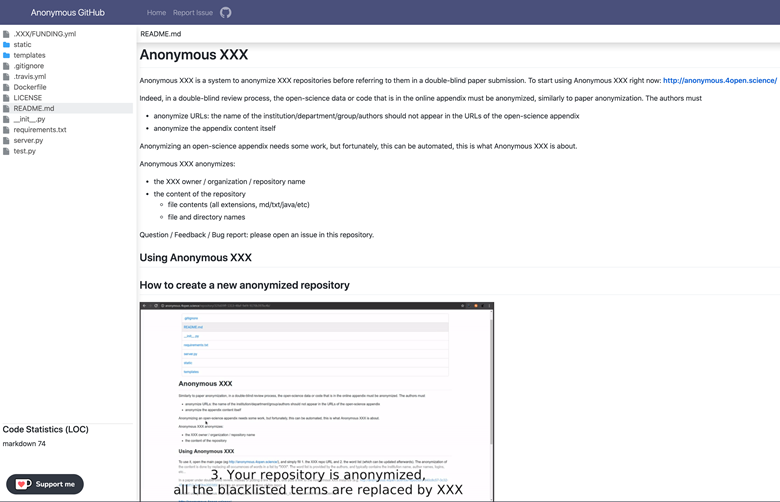
Anonymous Github anonymizes the following:
- Github repository owner, organization, and name
- File and directory names
- File contents of all extensions, including markdown, text, Java, etc.
Usage
Public instance
https://anonymous.4open.science/
CLI
This CLI tool allows you to anonymize your GitHub repositories locally, generating an anonymized zip file based on your configuration settings.
# Install the Anonymous GitHub CLI tool
npm install -g @tdurieux/anonymous_github

# Run the Anonymous GitHub CLI tool
anonymous_github
Own instance
1. Clone the repository
git clone https://github.com/tdurieux/anonymous_github/
cd anonymous_github
npm i
2. Configure the GitHub token
Create a .env file with the following contents:
GITHUB_TOKEN=<GITHUB_TOKEN>
CLIENT_ID=<CLIENT_ID>
CLIENT_SECRET=<CLIENT_SECRET>
PORT=5000
DB_USERNAME=
DB_PASSWORD=
AUTH_CALLBACK=http://localhost:5000/github/auth,
GITHUB_TOKENcan be generated here: https://github.com/settings/tokens/new withreposcope.CLIENT_IDandCLIENT_SECRETare the tokens are generated when you create a new GitHub app https://github.com/settings/applications/new.- The callback of the GitHub app needs to be defined as
https://<host>/github/auth(the same as defined in AUTH_CALLBACK).
3. Start Anonymous Github server
docker-compose up -d
4. Go to Anonymous Github
Go to http://localhost:5000. By default, Anonymous Github uses port 5000. It can be changed in docker-compose.yml. I would recommand to put Anonymous GitHub behind ngnix to handle the https certificates.
What is the scope of anonymization?
In double-anonymous peer-review, the boundary of anonymization is the paper plus its online appendix, and only this, it's not the whole world. Googling any part of the paper or the online appendix can be considered as a deliberate attempt to break anonymity (explanation)
How does it work?
Anonymous Github either downloads the complete repository and anonymizes the content of the file or proxies the request to GitHub. In both cases, the original and anonymized versions of the file are cached on the server.
Related tools
gitmask is a tool to anonymously contribute to a Github repository.
blind-reviews is a browser add-on that enables a person reviewing a GitHub pull request to hide identifying information about the person submitting it.