mirror of
https://github.com/luongnv89/claude-howto.git
synced 2026-08-17 00:10:22 +02:00
 Luong NGUYEN
1ef46cdbac
Luong NGUYEN
1ef46cdbac
Redesign LEARNING-ROADMAP.md with a self-assessment quiz that routes users
to Beginner/Intermediate/Advanced paths instead of a single linear track.
Add two project-local skills:

- self-assessment: comprehensive proficiency quiz (quick or deep mode)
  covering 10 feature areas with per-topic scoring and personalized
  learning paths
- lesson-quiz: per-lesson quiz with 100-question bank (10 per lesson)
  for pre-test, progress check, or mastery verification

Update README.md learning path table with "Recommended For" column and
quiz link. Update .gitignore to track project skills.
940 lines
26 KiB
Markdown
940 lines
26 KiB
Markdown
<picture>
|
|
<source media="(prefers-color-scheme: dark)" srcset="resources/logos/claude-howto-logo-dark.svg">
|
|
<img alt="Claude How To" src="resources/logos/claude-howto-logo.svg">
|
|
</picture>
|
|
|
|
# Claude How To
|
|
|
|
> A visual, example-driven guide to Claude Code — from basic concepts to advanced agents, with copy-paste templates that bring immediate value.
|
|
|
|
## Why This Guide?
|
|
|
|
This project complements [Anthropic's official documentation](https://docs.anthropic.com/en/docs/claude-code) with a different approach:
|
|
|
|
| | Official Docs | This Guide |
|
|
|--|---------------|------------|
|
|
| **Format** | Reference documentation | Visual tutorials with diagrams |
|
|
| **Depth** | Feature descriptions | How it works under the hood |
|
|
| **Examples** | Basic snippets | Production-ready templates you can use immediately |
|
|
| **Structure** | Feature-organized | Progressive learning path (beginner → advanced) |
|
|
| **Onboarding** | Self-directed | Guided roadmap with time estimates |
|
|
|
|
**What you'll find here:**
|
|
- Mermaid diagrams explaining how each feature works
|
|
- Ready-to-use configurations you can copy into your project
|
|
- Real-world examples with context and best practices
|
|
- Clear progression from `/help` to building custom agents
|
|
- Troubleshooting guides based on common issues
|
|
|
|
---
|
|
|
|
## Table of Contents
|
|
|
|
- [Why This Guide?](#why-this-guide)
|
|
- [Feature Catalog](#-feature-catalog)
|
|
- [Quick Navigation](#quick-navigation)
|
|
- [Learning Path](#-learning-path)
|
|
- [Quick Reference](#-quick-reference-choose-your-features)
|
|
- [Getting Started](#-getting-started)
|
|
- **Features**
|
|
- [01. Slash Commands](#01-slash-commands)
|
|
- [02. Memory](#02-memory)
|
|
- [03. Skills](#03-skills)
|
|
- [04. Subagents](#04-subagents)
|
|
- [05. MCP Protocol](#05-mcp-protocol)
|
|
- [06. Hooks](#06-hooks)
|
|
- [07. Plugins](#07-plugins)
|
|
- [08. Checkpoints](#08-checkpoints-and-rewind)
|
|
- [09. Advanced Features](#09-advanced-features)
|
|
- [10. CLI Reference](#10-cli-reference)
|
|
- [Directory Structure](#directory-structure)
|
|
- [Installation Quick Reference](#installation-quick-reference)
|
|
- [Example Workflows](#example-workflows)
|
|
- [Best Practices](#best-practices)
|
|
- [Troubleshooting](#troubleshooting)
|
|
- [Testing](#testing)
|
|
- [Additional Resources](#additional-resources)
|
|
- [Contributing](#contributing)
|
|
- [EPUB Generation](#epub-generation)
|
|
- [Contributors](#contributors)
|
|
- [Star History](#star-history)
|
|
|
|
---
|
|
|
|
## Feature Catalog
|
|
|
|
**Looking for a quick reference?** Check out our comprehensive **[Feature Catalog](CATALOG.md)** for:
|
|
|
|
- All slash commands (built-in and custom) with descriptions
|
|
- Sub-agents and their capabilities
|
|
- Skills with auto-invocation triggers
|
|
- Plugins with components and installation commands
|
|
- MCP servers for external integrations
|
|
- Hooks for event-driven automation
|
|
- One-command installation for each feature
|
|
|
|
**[View Full Catalog](CATALOG.md)**
|
|
|
|
---
|
|
|
|
## Quick Navigation
|
|
|
|
| Feature | Description | Folder |
|
|
|---------|-------------|--------|
|
|
| **Feature Catalog** | Complete reference with installation commands | [CATALOG.md](CATALOG.md) |
|
|
| **Slash Commands** | User-invoked shortcuts | [01-slash-commands/](01-slash-commands/) |
|
|
| **Memory** | Persistent context | [02-memory/](02-memory/) |
|
|
| **Skills** | Reusable capabilities | [03-skills/](03-skills/) |
|
|
| **Subagents** | Specialized AI assistants | [04-subagents/](04-subagents/) |
|
|
| **MCP Protocol** | External tool access | [05-mcp/](05-mcp/) |
|
|
| **Hooks** | Event-driven automation | [06-hooks/](06-hooks/) |
|
|
| **Plugins** | Bundled features | [07-plugins/](07-plugins/) |
|
|
| **Checkpoints** | Session snapshots & rewind | [08-checkpoints/](08-checkpoints/) |
|
|
| **Advanced Features** | Planning, thinking, background tasks | [09-advanced-features/](09-advanced-features/) |
|
|
| **CLI Reference** | Commands, flags, and options | [10-cli/](10-cli/) |
|
|
| **Blog Posts** | Real-world usage examples | [Blog Posts](https://medium.com/@luongnv89) |
|
|
|
|
---
|
|
|
|
## 📚 Learning Path
|
|
|
|
**Not sure where to start?** Take the [Self-Assessment Quiz](LEARNING-ROADMAP.md#-find-your-level) to find your recommended path.
|
|
|
|
| Order | Feature | Level | Time | Recommended For |
|
|
|-------|---------|-------|------|-----------------|
|
|
| **1** | [Slash Commands](01-slash-commands/) | ⭐ Beginner | 30 min | Level 1 start |
|
|
| **2** | [Memory](02-memory/) | ⭐⭐ Beginner+ | 45 min | Level 1 |
|
|
| **3** | [Checkpoints](08-checkpoints/) | ⭐⭐ Intermediate | 45 min | Level 1 |
|
|
| **4** | [CLI Basics](10-cli/) | ⭐⭐ Beginner+ | 30 min | Level 1 |
|
|
| **5** | [Skills](03-skills/) | ⭐⭐ Intermediate | 1 hour | Level 2 start |
|
|
| **6** | [Hooks](06-hooks/) | ⭐⭐ Intermediate | 1 hour | Level 2 |
|
|
| **7** | [MCP](05-mcp/) | ⭐⭐⭐ Intermediate+ | 1 hour | Level 2 |
|
|
| **8** | [Subagents](04-subagents/) | ⭐⭐⭐ Intermediate+ | 1.5 hours | Level 2 |
|
|
| **9** | [Advanced](09-advanced-features/) | ⭐⭐⭐⭐⭐ Advanced | 2-3 hours | Level 3 start |
|
|
| **10** | [Plugins](07-plugins/) | ⭐⭐⭐⭐ Advanced | 2 hours | Level 3 |
|
|
| **11** | [CLI Mastery](10-cli/) | ⭐⭐⭐ Advanced | 1 hour | Level 3 |
|
|
|
|
**Total**: ~11-13 hours | 📖 **[Complete Learning Roadmap →](LEARNING-ROADMAP.md)**
|
|
|
|
---
|
|
|
|
## 🎯 Quick Reference: Choose Your Features
|
|
|
|
### Feature Comparison
|
|
|
|
| Feature | Invocation | Persistence | Best For |
|
|
|---------|-----------|------------|----------|
|
|
| **Slash Commands** | Manual (`/cmd`) | Session only | Quick shortcuts |
|
|
| **Memory** | Auto-loaded | Cross-session | Long-term learning |
|
|
| **Skills** | Auto-invoked | Filesystem | Automated workflows |
|
|
| **Subagents** | Auto-delegated | Isolated context | Task distribution |
|
|
| **MCP Protocol** | Auto-queried | Real-time | Live data access |
|
|
| **Hooks** | Event-triggered | Configured | Automation & validation |
|
|
| **Plugins** | One command | All features | Complete solutions |
|
|
| **Checkpoints** | Manual/Auto | Session-based | Safe experimentation |
|
|
| **Planning Mode** | Manual/Auto | Plan phase | Complex implementations |
|
|
| **Background Tasks** | Manual | Task duration | Long-running operations |
|
|
| **CLI Reference** | Terminal commands | Session/Script | Automation & scripting |
|
|
|
|
### Use Case Matrix
|
|
|
|
| Use Case | Recommended Features |
|
|
|----------|---------------------|
|
|
| **Team Onboarding** | Memory + Slash Commands + Plugins |
|
|
| **Code Quality** | Subagents + Skills + Memory + Hooks |
|
|
| **Documentation** | Skills + Subagents + Plugins |
|
|
| **DevOps** | Plugins + MCP + Hooks + Background Tasks |
|
|
| **Security Review** | Subagents + Skills + Hooks (read-only mode) |
|
|
| **API Integration** | MCP + Memory |
|
|
| **Quick Tasks** | Slash Commands |
|
|
| **Complex Projects** | All Features + Planning Mode |
|
|
| **Refactoring** | Checkpoints + Planning Mode + Hooks |
|
|
| **Learning/Experimentation** | Checkpoints + Extended Thinking + Permission Mode |
|
|
| **CI/CD Automation** | CLI Reference + Hooks + Background Tasks |
|
|
| **Performance Optimization** | Planning Mode + Checkpoints + Background Tasks |
|
|
| **Script Automation** | CLI Reference + Hooks + MCP |
|
|
| **Batch Processing** | CLI Reference + Background Tasks |
|
|
|
|
---
|
|
|
|
## ⚡ Getting Started
|
|
|
|
### 15 Minutes - First Steps
|
|
```bash
|
|
# Copy your first slash command
|
|
cp 01-slash-commands/optimize.md .claude/commands/
|
|
|
|
# Try it!
|
|
# In Claude Code: /optimize
|
|
```
|
|
|
|
### 1 Hour - Essential Setup
|
|
```bash
|
|
# 1. Slash commands (15 min)
|
|
cp 01-slash-commands/*.md .claude/commands/
|
|
|
|
# 2. Project memory (15 min)
|
|
cp 02-memory/project-CLAUDE.md ./CLAUDE.md
|
|
|
|
# 3. Install a skill (15 min)
|
|
cp -r 03-skills/code-review ~/.claude/skills/
|
|
|
|
# 4. Try them together (15 min)
|
|
# See how they work in harmony!
|
|
```
|
|
|
|
### Weekend - Full Setup
|
|
- **Day 1**: Slash Commands, Memory, Skills, Hooks
|
|
- **Day 2**: Subagents, MCP integration, Plugins
|
|
- **Result**: Complete Claude Code power user setup
|
|
|
|
📖 **[Detailed milestones and exercises →](LEARNING-ROADMAP.md)**
|
|
|
|
---
|
|
|
|
## 01. Slash Commands
|
|
|
|
**Location**: [01-slash-commands/](01-slash-commands/)
|
|
|
|
**What**: User-invoked shortcuts stored as Markdown files
|
|
|
|
**Examples**:
|
|
- `optimize.md` - Code optimization analysis
|
|
- `pr.md` - Pull request preparation
|
|
- `generate-api-docs.md` - API documentation generator
|
|
|
|
**Installation**:
|
|
```bash
|
|
cp 01-slash-commands/*.md /path/to/project/.claude/commands/
|
|
```
|
|
|
|
**Usage**:
|
|
```
|
|
/optimize
|
|
/pr
|
|
/generate-api-docs
|
|
```
|
|
|
|
**Learn More**: [Discovering Claude Code Slash Commands](https://medium.com/@luongnv89/discovering-claude-code-slash-commands-cdc17f0dfb29)
|
|
|
|
---
|
|
|
|
## 02. Memory
|
|
|
|
**Location**: [02-memory/](02-memory/)
|
|
|
|
**What**: Persistent context across sessions
|
|
|
|
**Examples**:
|
|
- `project-CLAUDE.md` - Team-wide project standards
|
|
- `directory-api-CLAUDE.md` - Directory-specific rules
|
|
- `personal-CLAUDE.md` - Personal preferences
|
|
|
|
**Installation**:
|
|
```bash
|
|
# Project memory
|
|
cp 02-memory/project-CLAUDE.md /path/to/project/CLAUDE.md
|
|
|
|
# Directory memory
|
|
cp 02-memory/directory-api-CLAUDE.md /path/to/project/src/api/CLAUDE.md
|
|
|
|
# Personal memory
|
|
cp 02-memory/personal-CLAUDE.md ~/.claude/CLAUDE.md
|
|
```
|
|
|
|
**Usage**: Automatically loaded by Claude
|
|
|
|
---
|
|
|
|
## 03. Skills
|
|
|
|
**Location**: [03-skills/](03-skills/)
|
|
|
|
**What**: Reusable, auto-invoked capabilities with instructions and scripts
|
|
|
|
**Examples**:
|
|
- `code-review/` - Comprehensive code review with scripts
|
|
- `brand-voice/` - Brand voice consistency checker
|
|
- `doc-generator/` - API documentation generator
|
|
|
|
**Installation**:
|
|
```bash
|
|
# Personal skills
|
|
cp -r 03-skills/code-review ~/.claude/skills/
|
|
|
|
# Project skills
|
|
cp -r 03-skills/code-review /path/to/project/.claude/skills/
|
|
```
|
|
|
|
**Usage**: Automatically invoked when relevant
|
|
|
|
---
|
|
|
|
## 04. Subagents
|
|
|
|
**Location**: [04-subagents/](04-subagents/)
|
|
|
|
**What**: Specialized AI assistants with isolated contexts and custom prompts
|
|
|
|
**Examples**:
|
|
- `code-reviewer.md` - Comprehensive code quality analysis
|
|
- `test-engineer.md` - Test strategy and coverage
|
|
- `documentation-writer.md` - Technical documentation
|
|
- `secure-reviewer.md` - Security-focused review (read-only)
|
|
- `implementation-agent.md` - Full feature implementation
|
|
|
|
**Installation**:
|
|
```bash
|
|
cp 04-subagents/*.md /path/to/project/.claude/agents/
|
|
```
|
|
|
|
**Usage**: Automatically delegated by main agent
|
|
|
|
---
|
|
|
|
## 05. MCP Protocol
|
|
|
|
**Location**: [05-mcp/](05-mcp/)
|
|
|
|
**What**: Model Context Protocol for accessing external tools and APIs
|
|
|
|
**Examples**:
|
|
- `github-mcp.json` - GitHub integration
|
|
- `database-mcp.json` - Database queries
|
|
- `filesystem-mcp.json` - File operations
|
|
- `multi-mcp.json` - Multiple MCP servers
|
|
|
|
**Installation**:
|
|
```bash
|
|
# Set environment variables
|
|
export GITHUB_TOKEN="your_token"
|
|
export DATABASE_URL="postgresql://..."
|
|
|
|
# Add MCP server via CLI
|
|
claude mcp add github -- npx -y @modelcontextprotocol/server-github
|
|
|
|
# Or add to project .mcp.json manually (see 05-mcp/ for examples)
|
|
```
|
|
|
|
**Usage**: MCP tools are automatically available to Claude once configured
|
|
|
|
---
|
|
|
|
## 06. Hooks
|
|
|
|
**Location**: [06-hooks/](06-hooks/)
|
|
|
|
**What**: Event-driven shell commands that execute automatically in response to Claude Code events
|
|
|
|
**Examples**:
|
|
- `format-code.sh` - Auto-format code before writing
|
|
- `pre-commit.sh` - Run tests before commits
|
|
- `security-scan.sh` - Scan for security issues
|
|
- `log-bash.sh` - Log all bash commands
|
|
- `validate-prompt.sh` - Validate user prompts
|
|
- `notify-team.sh` - Send notifications on events
|
|
|
|
**Installation**:
|
|
```bash
|
|
mkdir -p ~/.claude/hooks
|
|
cp 06-hooks/*.sh ~/.claude/hooks/
|
|
chmod +x ~/.claude/hooks/*.sh
|
|
```
|
|
|
|
Configure hooks in `~/.claude/settings.json`:
|
|
```json
|
|
{
|
|
"hooks": {
|
|
"PreToolUse": [{
|
|
"matcher": "Write",
|
|
"hooks": ["~/.claude/hooks/format-code.sh"]
|
|
}],
|
|
"PostToolUse": [{
|
|
"matcher": "Write",
|
|
"hooks": ["~/.claude/hooks/security-scan.sh"]
|
|
}]
|
|
}
|
|
}
|
|
```
|
|
|
|
**Usage**: Hooks execute automatically on events
|
|
|
|
**Hook Types**:
|
|
- **Tool Hooks**: `PreToolUse:*`, `PostToolUse:*`
|
|
- **Session Hooks**: `Stop`, `SubagentStop`, `SubagentStart`
|
|
- **Lifecycle Hooks**: `Notification`, `ConfigChange`, `WorktreeCreate`, `WorktreeRemove`
|
|
|
|
---
|
|
|
|
## 07. Plugins
|
|
|
|
**Location**: [07-plugins/](07-plugins/)
|
|
|
|
**What**: Bundled collections of commands, agents, MCP, and hooks
|
|
|
|
**Examples**:
|
|
- `pr-review/` - Complete PR review workflow
|
|
- `devops-automation/` - Deployment and monitoring
|
|
- `documentation/` - Documentation generation
|
|
|
|
**Installation**:
|
|
```bash
|
|
/plugin install pr-review
|
|
/plugin install devops-automation
|
|
/plugin install documentation
|
|
```
|
|
|
|
**Usage**: Use bundled slash commands and features
|
|
|
|
---
|
|
|
|
## 08. Checkpoints and Rewind
|
|
|
|
**Location**: [08-checkpoints/](08-checkpoints/)
|
|
|
|
**What**: Save conversation state and rewind to previous points to explore different approaches
|
|
|
|
**Key Concepts**:
|
|
- **Checkpoint**: Snapshot of conversation state
|
|
- **Rewind**: Return to previous checkpoint
|
|
- **Branch Point**: Explore multiple approaches from same checkpoint
|
|
|
|
**Usage**:
|
|
```
|
|
# Checkpoints are created automatically with every user prompt
|
|
# To rewind, press Esc twice or use:
|
|
/rewind
|
|
|
|
# Then choose from five options:
|
|
# 1. Restore code and conversation
|
|
# 2. Restore conversation
|
|
# 3. Restore code
|
|
# 4. Summarize from here
|
|
# 5. Never mind
|
|
```
|
|
|
|
**Use Cases**:
|
|
- Try different implementation approaches
|
|
- Recover from mistakes
|
|
- Safe experimentation
|
|
- Compare alternative solutions
|
|
- A/B testing different designs
|
|
|
|
**Example Workflow**:
|
|
```
|
|
1. Work normally (checkpoints are created automatically)
|
|
2. Try experimental approach
|
|
3. If it works: Continue
|
|
4. If it fails: Press Esc+Esc or /rewind to go back
|
|
```
|
|
|
|
---
|
|
|
|
## 09. Advanced Features
|
|
|
|
**Location**: [09-advanced-features/](09-advanced-features/)
|
|
|
|
**What**: Advanced capabilities for complex workflows and automation
|
|
|
|
### Planning Mode
|
|
|
|
Create detailed implementation plans before coding:
|
|
```
|
|
User: /plan Implement user authentication system
|
|
|
|
Claude: [Creates comprehensive step-by-step plan]
|
|
|
|
User: Approve and proceed
|
|
```
|
|
|
|
**Benefits**: Clear roadmap, time estimates, risk assessment
|
|
|
|
### Extended Thinking
|
|
|
|
Deep reasoning for complex problems. Toggle with `Alt+T` / `Option+T`, or set `MAX_THINKING_TOKENS` environment variable:
|
|
```bash
|
|
# Toggle in-session: press Alt+T (Option+T on macOS)
|
|
|
|
# Or set via environment variable
|
|
MAX_THINKING_TOKENS=10000 claude
|
|
|
|
# Then ask complex questions
|
|
User: Should we use microservices or monolith?
|
|
Claude: [Analyzes trade-offs systematically with extended reasoning]
|
|
```
|
|
|
|
**Benefits**: Better architectural decisions, thorough analysis
|
|
|
|
### Background Tasks
|
|
|
|
Run long operations without blocking:
|
|
```
|
|
User: Run tests in background
|
|
|
|
Claude: Started bg-1234, you can continue working
|
|
|
|
[Later] Test results: 245 passed, 3 failed
|
|
```
|
|
|
|
**Benefits**: Parallel development, no waiting
|
|
|
|
### Permission Modes
|
|
|
|
Control what Claude can do:
|
|
- **`default`**: Standard permissions with confirmation prompts
|
|
- **`acceptEdits`**: Auto-accept file edits, confirm other actions
|
|
- **`plan`**: Analysis and planning only, no modifications
|
|
- **`dontAsk`**: Accept all actions without confirmation
|
|
- **`bypassPermissions`**: Skip all permission checks (dangerous)
|
|
|
|
```bash
|
|
claude --permission-mode plan # Code review mode
|
|
claude --permission-mode acceptEdits # Learning mode
|
|
claude --permission-mode default # Standard mode
|
|
```
|
|
|
|
### Headless Mode
|
|
|
|
Run Claude Code in CI/CD and automation:
|
|
```bash
|
|
claude -p "Run tests and generate report"
|
|
```
|
|
|
|
**Use Cases**: CI/CD, automated reviews, batch processing
|
|
|
|
### Session Management
|
|
|
|
Manage multiple work sessions:
|
|
```bash
|
|
/resume # Resume a previous session interactively
|
|
/rename # Rename the current session
|
|
/fork # Fork the current session
|
|
claude -c # Continue the most recent session
|
|
claude -r "session" # Resume a session matching the query
|
|
```
|
|
|
|
### Interactive Features
|
|
|
|
**Keyboard Shortcuts**: Ctrl+R (search), Tab (complete), ↑/↓ (history)
|
|
|
|
**Command History**: Access previous commands
|
|
|
|
**Multi-line Input**: Complex prompts across multiple lines
|
|
|
|
### Configuration
|
|
|
|
Customize Claude Code behavior in `~/.claude/settings.json`:
|
|
```json
|
|
{
|
|
"permissions": {
|
|
"allow": ["Read", "Glob", "Grep", "Bash(git *)"],
|
|
"deny": ["Bash(rm -rf *)"]
|
|
},
|
|
"hooks": {
|
|
"PreToolUse": [{
|
|
"matcher": "Write",
|
|
"hooks": ["~/.claude/hooks/format-code.sh"]
|
|
}]
|
|
},
|
|
"env": {
|
|
"MAX_THINKING_TOKENS": "10000"
|
|
}
|
|
}
|
|
```
|
|
|
|
See [config-examples.json](09-advanced-features/config-examples.json) for complete configurations.
|
|
|
|
---
|
|
|
|
## 10. CLI Reference
|
|
|
|
**Location**: [10-cli/](10-cli/)
|
|
|
|
**What**: Complete command-line interface reference for Claude Code
|
|
|
|
**Key Areas**:
|
|
- CLI commands (`claude`, `claude -p`, `claude -c`, `claude -r`)
|
|
- Core flags (print mode, continue, resume, version)
|
|
- Model & configuration (`--model`, `--agents`)
|
|
- System prompt customization
|
|
- Tool & permission management
|
|
- Output formats (text, JSON, stream-JSON)
|
|
- MCP configuration
|
|
- Session management
|
|
|
|
**Quick Examples**:
|
|
```bash
|
|
# Interactive mode
|
|
claude "explain this project"
|
|
|
|
# Print mode (non-interactive)
|
|
claude -p "review this code"
|
|
|
|
# Process file content
|
|
cat error.log | claude -p "explain this error"
|
|
|
|
# JSON output for scripts
|
|
claude -p --output-format json "list functions"
|
|
|
|
# Resume session
|
|
claude -r "feature-auth" "continue implementation"
|
|
```
|
|
|
|
**Use Cases**:
|
|
- CI/CD pipeline integration
|
|
- Script automation and piping
|
|
- Batch processing
|
|
- Multi-session workflows
|
|
- Custom agent configurations
|
|
|
|
---
|
|
|
|
## Directory Structure
|
|
|
|
```
|
|
|
|
├── 01-slash-commands/
|
|
│ ├── optimize.md
|
|
│ ├── pr.md
|
|
│ ├── generate-api-docs.md
|
|
│ └── README.md
|
|
├── 02-memory/
|
|
│ ├── project-CLAUDE.md
|
|
│ ├── directory-api-CLAUDE.md
|
|
│ ├── personal-CLAUDE.md
|
|
│ └── README.md
|
|
├── 03-skills/
|
|
│ ├── code-review/
|
|
│ │ ├── SKILL.md
|
|
│ │ ├── scripts/
|
|
│ │ └── templates/
|
|
│ ├── brand-voice/
|
|
│ │ ├── SKILL.md
|
|
│ │ └── templates/
|
|
│ ├── doc-generator/
|
|
│ │ ├── SKILL.md
|
|
│ │ └── generate-docs.py
|
|
│ └── README.md
|
|
├── 04-subagents/
|
|
│ ├── code-reviewer.md
|
|
│ ├── test-engineer.md
|
|
│ ├── documentation-writer.md
|
|
│ ├── secure-reviewer.md
|
|
│ ├── implementation-agent.md
|
|
│ └── README.md
|
|
├── 05-mcp/
|
|
│ ├── github-mcp.json
|
|
│ ├── database-mcp.json
|
|
│ ├── filesystem-mcp.json
|
|
│ ├── multi-mcp.json
|
|
│ └── README.md
|
|
├── 06-hooks/
|
|
│ ├── format-code.sh
|
|
│ ├── pre-commit.sh
|
|
│ ├── security-scan.sh
|
|
│ ├── log-bash.sh
|
|
│ ├── validate-prompt.sh
|
|
│ ├── notify-team.sh
|
|
│ └── README.md
|
|
├── 07-plugins/
|
|
│ ├── pr-review/
|
|
│ ├── devops-automation/
|
|
│ ├── documentation/
|
|
│ └── README.md
|
|
├── 08-checkpoints/
|
|
│ ├── checkpoint-examples.md
|
|
│ └── README.md
|
|
├── 09-advanced-features/
|
|
│ ├── config-examples.json
|
|
│ ├── planning-mode-examples.md
|
|
│ └── README.md
|
|
├── 10-cli/
|
|
│ └── README.md
|
|
└── README.md (this file)
|
|
```
|
|
|
|
---
|
|
|
|
## Installation Quick Reference
|
|
|
|
```bash
|
|
# Slash Commands
|
|
cp 01-slash-commands/*.md .claude/commands/
|
|
|
|
# Memory
|
|
cp 02-memory/project-CLAUDE.md ./CLAUDE.md
|
|
|
|
# Skills
|
|
cp -r 03-skills/code-review ~/.claude/skills/
|
|
|
|
# Subagents
|
|
cp 04-subagents/*.md .claude/agents/
|
|
|
|
# MCP
|
|
export GITHUB_TOKEN="token"
|
|
claude mcp add github -- npx -y @modelcontextprotocol/server-github
|
|
|
|
# Hooks
|
|
mkdir -p ~/.claude/hooks
|
|
cp 06-hooks/*.sh ~/.claude/hooks/
|
|
chmod +x ~/.claude/hooks/*.sh
|
|
|
|
# Plugins
|
|
/plugin install pr-review
|
|
|
|
# Checkpoints (auto-enabled, configure in settings)
|
|
# See 08-checkpoints/README.md
|
|
|
|
# Advanced Features (configure in settings)
|
|
# See 09-advanced-features/config-examples.json
|
|
|
|
# CLI Reference (no installation needed)
|
|
# See 10-cli/README.md for usage examples
|
|
```
|
|
|
|
---
|
|
|
|
## Example Workflows
|
|
|
|
### 1. Complete Code Review Workflow
|
|
|
|
```markdown
|
|
# Uses: Slash Commands + Subagents + Memory + MCP
|
|
|
|
User: /review-pr
|
|
|
|
Claude:
|
|
1. Loads project memory (coding standards)
|
|
2. Fetches PR via GitHub MCP
|
|
3. Delegates to code-reviewer subagent
|
|
4. Delegates to test-engineer subagent
|
|
5. Synthesizes findings
|
|
6. Provides comprehensive review
|
|
```
|
|
|
|
### 2. Automated Documentation
|
|
|
|
```markdown
|
|
# Uses: Skills + Subagents + Memory
|
|
|
|
User: "Generate API documentation for the auth module"
|
|
|
|
Claude:
|
|
1. Loads project memory (doc standards)
|
|
2. Detects doc generation request
|
|
3. Auto-invokes doc-generator skill
|
|
4. Delegates to api-documenter subagent
|
|
5. Creates comprehensive docs with examples
|
|
```
|
|
|
|
### 3. DevOps Deployment
|
|
|
|
```markdown
|
|
# Uses: Plugins + MCP + Hooks
|
|
|
|
User: /deploy production
|
|
|
|
Claude:
|
|
1. Runs pre-deploy hook (validates environment)
|
|
2. Delegates to deployment-specialist subagent
|
|
3. Executes deployment via Kubernetes MCP
|
|
4. Monitors progress
|
|
5. Runs post-deploy hook (health checks)
|
|
6. Reports status
|
|
```
|
|
|
|
---
|
|
|
|
## Best Practices
|
|
|
|
### Do's ✅
|
|
- Start simple with slash commands
|
|
- Add features incrementally
|
|
- Use memory for team standards
|
|
- Test configurations locally first
|
|
- Document custom implementations
|
|
- Version control project configurations
|
|
- Share plugins with team
|
|
|
|
### Don'ts ❌
|
|
- Don't create redundant features
|
|
- Don't hardcode credentials
|
|
- Don't skip documentation
|
|
- Don't over-complicate simple tasks
|
|
- Don't ignore security best practices
|
|
- Don't commit sensitive data
|
|
|
|
---
|
|
|
|
## Troubleshooting
|
|
|
|
### Feature Not Loading
|
|
1. Check file location and naming
|
|
2. Verify YAML frontmatter syntax
|
|
3. Check file permissions
|
|
4. Review Claude Code version compatibility
|
|
|
|
### MCP Connection Failed
|
|
1. Verify environment variables
|
|
2. Check MCP server installation
|
|
3. Test credentials
|
|
4. Review network connectivity
|
|
|
|
### Subagent Not Delegating
|
|
1. Check tool permissions
|
|
2. Verify agent description clarity
|
|
3. Review task complexity
|
|
6. Test agent independently
|
|
|
|
---
|
|
|
|
## Testing
|
|
|
|
This project includes comprehensive automated testing to ensure code quality and reliability.
|
|
|
|
### Testing Overview
|
|
|
|
- **Unit Tests**: Python tests using pytest (Python 3.10, 3.11, 3.12)
|
|
- **Code Quality**: Linting and formatting with Ruff
|
|
- **Security**: Vulnerability scanning with Bandit
|
|
- **Type Checking**: Static type analysis with mypy
|
|
- **Build Verification**: EPUB generation testing
|
|
- **Coverage Tracking**: Codecov integration
|
|
|
|
### Running Tests Locally
|
|
|
|
```bash
|
|
# Install development dependencies
|
|
uv pip install -r requirements-dev.txt
|
|
|
|
# Run all unit tests
|
|
pytest scripts/tests/ -v
|
|
|
|
# Run tests with coverage report
|
|
pytest scripts/tests/ -v --cov=scripts --cov-report=html
|
|
|
|
# Run code quality checks
|
|
ruff check scripts/
|
|
ruff format --check scripts/
|
|
|
|
# Run security scan
|
|
bandit -c pyproject.toml -r scripts/ --exclude scripts/tests/
|
|
|
|
# Run type checking
|
|
mypy scripts/ --ignore-missing-imports
|
|
```
|
|
|
|
### Automated Testing on GitHub
|
|
|
|
Tests run automatically on:
|
|
- Every push to `main` or `develop` branches
|
|
- Every pull request to `main`
|
|
|
|
View test results in the GitHub Actions tab or check the [TESTING.md](.github/TESTING.md) guide for detailed information.
|
|
|
|
### Writing Tests
|
|
|
|
When contributing, please include tests for new functionality:
|
|
|
|
1. **Write tests** in `scripts/tests/test_*.py`
|
|
2. **Run tests locally** to verify they pass
|
|
3. **Check coverage** with `pytest --cov=scripts`
|
|
4. **Submit with PR** - tests are required for all contributions
|
|
|
|
For detailed testing guidelines, see [TESTING.md](.github/TESTING.md).
|
|
|
|
---
|
|
|
|
## Additional Resources
|
|
|
|
- [Claude Code Documentation](https://docs.anthropic.com/en/docs/claude-code)
|
|
- [MCP Protocol Specification](https://modelcontextprotocol.io)
|
|
- [Skills Repository](https://github.com/luongnv89/skills) - Collection of ready-to-use skills
|
|
- [Anthropic Cookbook](https://github.com/anthropics/anthropic-cookbook)
|
|
- [Boris Cherny's Claude Code Workflow](https://x.com/bcherny/status/2007179832300581177) - The creator of Claude Code shares his systematized workflow: parallel agents, shared CLAUDE.md, Plan mode, slash commands, subagents, and verification hooks for autonomous long-running sessions. Key insights include turning recurring workflows into reusable commands and wiring Claude into team tools (GitHub, Slack, BigQuery, Sentry) for end-to-end work with feedback loops.
|
|
|
|
---
|
|
|
|
## Contributing
|
|
|
|
Found an issue or want to contribute an example? We'd love your help!
|
|
|
|
**Please read [CONTRIBUTING.md](CONTRIBUTING.md) for detailed guidelines on:**
|
|
- Types of contributions (examples, docs, features, bugs, feedback)
|
|
- How to set up your development environment
|
|
- Directory structure and how to add content
|
|
- Writing guidelines and best practices
|
|
- Commit and PR process
|
|
|
|
**Our Community Standards:**
|
|
- [CODE_OF_CONDUCT.md](CODE_OF_CONDUCT.md) - How we treat each other
|
|
- [SECURITY.md](SECURITY.md) - Security policy and vulnerability reporting
|
|
|
|
### Reporting Security Issues
|
|
|
|
If you discover a security vulnerability, please report it responsibly:
|
|
|
|
1. **Use GitHub Private Vulnerability Reporting**: https://github.com/luongnv89/claude-howto/security/advisories
|
|
2. **Or read** [.github/SECURITY_REPORTING.md](.github/SECURITY_REPORTING.md) for detailed instructions
|
|
3. **Do NOT** open a public issue for security vulnerabilities
|
|
|
|
Security issues are taken seriously and will be addressed promptly. See [SECURITY.md](SECURITY.md) for our full security policy.
|
|
|
|
Quick start:
|
|
1. Fork and clone the repository
|
|
2. Create a descriptive branch (`add/feature-name`, `fix/bug`, `docs/improvement`)
|
|
3. Make your changes following the guidelines
|
|
4. Submit a pull request with a clear description
|
|
|
|
**Need help?** Open an issue or discussion, and we'll guide you through the process.
|
|
|
|
---
|
|
|
|
## License
|
|
|
|
This project is licensed under the MIT License - see [LICENSE](LICENSE) file for details.
|
|
|
|
You are free to:
|
|
- Use this guide and examples in your projects
|
|
- Modify and adapt the content
|
|
- Share and distribute
|
|
- Use for commercial purposes
|
|
|
|
The only requirement is to include a copy of the license and copyright notice.
|
|
|
|
---
|
|
|
|
## EPUB Generation
|
|
|
|
Want to read this guide offline? Generate an EPUB ebook:
|
|
|
|
```bash
|
|
uv run scripts/build_epub.py
|
|
```
|
|
|
|
This creates `claude-howto-guide.epub` with all content, including rendered Mermaid diagrams.
|
|
|
|
See [scripts/README.md](scripts/README.md) for more options.
|
|
|
|
---
|
|
|
|
## Contributors
|
|
|
|
Thanks to everyone who has contributed to this project!
|
|
|
|
| Contributor | PRs |
|
|
|-------------|-----|
|
|
| [wjhrdy](https://github.com/wjhrdy) | [#1 - add a tool to create an epub](https://github.com/luongnv89/claude-howto/pull/1) |
|
|
|
|
---
|
|
|
|
## Star History
|
|
|
|
[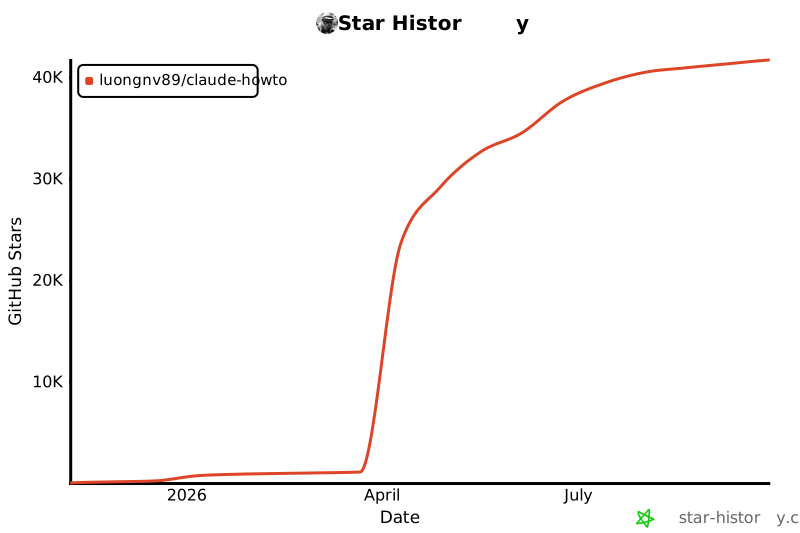](https://star-history.com/#luongnv89/claude-howto&Date)
|
|
|
|
---
|
|
|
|
**Last Updated**: February 2026
|
|
**Claude Code Version**: 2.1+
|
|
**Compatible Models**: Claude Sonnet 4.6, Claude Opus 4.6, Claude Haiku 4.5
|