mirror of
https://github.com/luongnv89/claude-howto.git
synced 2026-05-27 22:22:36 +02:00
 Luong NGUYEN
728fd1eefc
Luong NGUYEN
728fd1eefc
Create CATALOG.md containing quick reference for all Claude Code features:
- Slash commands (built-in and custom)
- Sub-agents with capabilities and tools
- Skills with auto-invocation triggers
- Plugins with component breakdowns
- MCP servers for external integrations
- Hooks for event-driven automation

Each feature includes one-command installation instructions.
Update README.md to link to the new catalog.
920 lines
25 KiB
Markdown
920 lines
25 KiB
Markdown
<picture>
|
|
<source media="(prefers-color-scheme: dark)" srcset="resources/logos/claude-howto-logo-dark.svg">
|
|
<img alt="Claude How To" src="resources/logos/claude-howto-logo.svg">
|
|
</picture>
|
|
|
|
# Claude How To
|
|
|
|
> A visual, example-driven guide to Claude Code — from basic concepts to advanced agents, with copy-paste templates that bring immediate value.
|
|
|
|
## Why This Guide?
|
|
|
|
This project complements [Anthropic's official documentation](https://docs.anthropic.com/en/docs/claude-code) with a different approach:
|
|
|
|
| | Official Docs | This Guide |
|
|
|--|---------------|------------|
|
|
| **Format** | Reference documentation | Visual tutorials with diagrams |
|
|
| **Depth** | Feature descriptions | How it works under the hood |
|
|
| **Examples** | Basic snippets | Production-ready templates you can use immediately |
|
|
| **Structure** | Feature-organized | Progressive learning path (beginner → advanced) |
|
|
| **Onboarding** | Self-directed | Guided roadmap with time estimates |
|
|
|
|
**What you'll find here:**
|
|
- Mermaid diagrams explaining how each feature works
|
|
- Ready-to-use configurations you can copy into your project
|
|
- Real-world examples with context and best practices
|
|
- Clear progression from `/help` to building custom agents
|
|
- Troubleshooting guides based on common issues
|
|
|
|
---
|
|
|
|
## Table of Contents
|
|
|
|
- [Why This Guide?](#why-this-guide)
|
|
- [Feature Catalog](#-feature-catalog)
|
|
- [Quick Navigation](#quick-navigation)
|
|
- [Learning Path](#-learning-path)
|
|
- [Quick Reference](#-quick-reference-choose-your-features)
|
|
- [Getting Started](#-getting-started)
|
|
- **Features**
|
|
- [01. Slash Commands](#01-slash-commands)
|
|
- [02. Memory](#02-memory)
|
|
- [03. Skills](#03-skills)
|
|
- [04. Subagents](#04-subagents)
|
|
- [05. MCP Protocol](#05-mcp-protocol)
|
|
- [06. Hooks](#06-hooks)
|
|
- [07. Plugins](#07-plugins)
|
|
- [08. Checkpoints](#08-checkpoints-and-rewind)
|
|
- [09. Advanced Features](#09-advanced-features)
|
|
- [10. CLI Reference](#10-cli-reference)
|
|
- [Directory Structure](#directory-structure)
|
|
- [Installation Quick Reference](#installation-quick-reference)
|
|
- [Example Workflows](#example-workflows)
|
|
- [Best Practices](#best-practices)
|
|
- [Troubleshooting](#troubleshooting)
|
|
- [Testing](#testing)
|
|
- [Additional Resources](#additional-resources)
|
|
- [Contributing](#contributing)
|
|
- [EPUB Generation](#epub-generation)
|
|
- [Contributors](#contributors)
|
|
- [Star History](#star-history)
|
|
|
|
---
|
|
|
|
## Feature Catalog
|
|
|
|
**Looking for a quick reference?** Check out our comprehensive **[Feature Catalog](CATALOG.md)** for:
|
|
|
|
- All slash commands (built-in and custom) with descriptions
|
|
- Sub-agents and their capabilities
|
|
- Skills with auto-invocation triggers
|
|
- Plugins with components and installation commands
|
|
- MCP servers for external integrations
|
|
- Hooks for event-driven automation
|
|
- One-command installation for each feature
|
|
|
|
**[View Full Catalog](CATALOG.md)**
|
|
|
|
---
|
|
|
|
## Quick Navigation
|
|
|
|
| Feature | Description | Folder |
|
|
|---------|-------------|--------|
|
|
| **Feature Catalog** | Complete reference with installation commands | [CATALOG.md](CATALOG.md) |
|
|
| **Slash Commands** | User-invoked shortcuts | [01-slash-commands/](01-slash-commands/) |
|
|
| **Memory** | Persistent context | [02-memory/](02-memory/) |
|
|
| **Skills** | Reusable capabilities | [03-skills/](03-skills/) |
|
|
| **Subagents** | Specialized AI assistants | [04-subagents/](04-subagents/) |
|
|
| **MCP Protocol** | External tool access | [05-mcp/](05-mcp/) |
|
|
| **Hooks** | Event-driven automation | [06-hooks/](06-hooks/) |
|
|
| **Plugins** | Bundled features | [07-plugins/](07-plugins/) |
|
|
| **Checkpoints** | Session snapshots & rewind | [08-checkpoints/](08-checkpoints/) |
|
|
| **Advanced Features** | Planning, thinking, background tasks | [09-advanced-features/](09-advanced-features/) |
|
|
| **CLI Reference** | Commands, flags, and options | [10-cli/](10-cli/) |
|
|
| **Blog Posts** | Real-world usage examples | [blog-post/](blog-post/) |
|
|
|
|
---
|
|
|
|
## 📚 Learning Path
|
|
|
|
**New to Claude Code?** The folders are numbered in **recommended learning order**:
|
|
|
|
| Order | Feature | Level | Time | Start Here |
|
|
|-------|---------|-------|------|------------|
|
|
| **1** | [Slash Commands](01-slash-commands/) | ⭐ Beginner | 30 min | ✅ **START** |
|
|
| **2** | [Memory](02-memory/) | ⭐⭐ Beginner+ | 45 min | Essential |
|
|
| **3** | [Skills](03-skills/) | ⭐⭐ Intermediate | 1 hour | Auto-invoke |
|
|
| **4** | [Subagents](04-subagents/) | ⭐⭐⭐ Intermediate+ | 1.5 hours | Delegation |
|
|
| **5** | [MCP](05-mcp/) | ⭐⭐⭐ Intermediate+ | 1 hour | Live data |
|
|
| **6** | [Hooks](06-hooks/) | ⭐⭐ Intermediate | 1 hour | Automation |
|
|
| **7** | [Plugins](07-plugins/) | ⭐⭐⭐⭐ Advanced | 2 hours | Bundles |
|
|
| **8** | [Checkpoints](08-checkpoints/) | ⭐⭐ Intermediate | 45 min | Safe tests |
|
|
| **9** | [Advanced](09-advanced-features/) | ⭐⭐⭐⭐⭐ Advanced | 2-3 hours | Power user |
|
|
| **10** | [CLI Reference](10-cli/) | ⭐⭐ Beginner+ | 1 hour | CLI mastery |
|
|
|
|
**Total**: ~11-13 hours | 📖 **[Complete Learning Roadmap →](LEARNING-ROADMAP.md)**
|
|
|
|
---
|
|
|
|
## 🎯 Quick Reference: Choose Your Features
|
|
|
|
### Feature Comparison
|
|
|
|
| Feature | Invocation | Persistence | Best For |
|
|
|---------|-----------|------------|----------|
|
|
| **Slash Commands** | Manual (`/cmd`) | Session only | Quick shortcuts |
|
|
| **Memory** | Auto-loaded | Cross-session | Long-term learning |
|
|
| **Skills** | Auto-invoked | Filesystem | Automated workflows |
|
|
| **Subagents** | Auto-delegated | Isolated context | Task distribution |
|
|
| **MCP Protocol** | Auto-queried | Real-time | Live data access |
|
|
| **Hooks** | Event-triggered | Configured | Automation & validation |
|
|
| **Plugins** | One command | All features | Complete solutions |
|
|
| **Checkpoints** | Manual/Auto | Session-based | Safe experimentation |
|
|
| **Planning Mode** | Manual/Auto | Plan phase | Complex implementations |
|
|
| **Background Tasks** | Manual | Task duration | Long-running operations |
|
|
| **CLI Reference** | Terminal commands | Session/Script | Automation & scripting |
|
|
|
|
### Use Case Matrix
|
|
|
|
| Use Case | Recommended Features |
|
|
|----------|---------------------|
|
|
| **Team Onboarding** | Memory + Slash Commands + Plugins |
|
|
| **Code Quality** | Subagents + Skills + Memory + Hooks |
|
|
| **Documentation** | Skills + Subagents + Plugins |
|
|
| **DevOps** | Plugins + MCP + Hooks + Background Tasks |
|
|
| **Security Review** | Subagents + Skills + Hooks (read-only mode) |
|
|
| **API Integration** | MCP + Memory |
|
|
| **Quick Tasks** | Slash Commands |
|
|
| **Complex Projects** | All Features + Planning Mode |
|
|
| **Refactoring** | Checkpoints + Planning Mode + Hooks |
|
|
| **Learning/Experimentation** | Checkpoints + Extended Thinking + Permission Mode |
|
|
| **CI/CD Automation** | CLI Reference + Hooks + Background Tasks |
|
|
| **Performance Optimization** | Planning Mode + Checkpoints + Background Tasks |
|
|
| **Script Automation** | CLI Reference + Hooks + MCP |
|
|
| **Batch Processing** | CLI Reference + Background Tasks |
|
|
|
|
---
|
|
|
|
## ⚡ Getting Started
|
|
|
|
### 15 Minutes - First Steps
|
|
```bash
|
|
# Copy your first slash command
|
|
cp 01-slash-commands/optimize.md .claude/commands/
|
|
|
|
# Try it!
|
|
# In Claude Code: /optimize
|
|
```
|
|
|
|
### 1 Hour - Essential Setup
|
|
```bash
|
|
# 1. Slash commands (15 min)
|
|
cp 01-slash-commands/*.md .claude/commands/
|
|
|
|
# 2. Project memory (15 min)
|
|
cp 02-memory/project-CLAUDE.md ./CLAUDE.md
|
|
|
|
# 3. Install a skill (15 min)
|
|
cp -r 03-skills/code-review ~/.claude/skills/
|
|
|
|
# 4. Try them together (15 min)
|
|
# See how they work in harmony!
|
|
```
|
|
|
|
### Weekend - Full Setup
|
|
- **Day 1**: Slash Commands, Memory, Skills, Hooks
|
|
- **Day 2**: Subagents, MCP integration, Plugins
|
|
- **Result**: Complete Claude Code power user setup
|
|
|
|
📖 **[Detailed milestones and exercises →](LEARNING-ROADMAP.md)**
|
|
|
|
---
|
|
|
|
## 01. Slash Commands
|
|
|
|
**Location**: [01-slash-commands/](01-slash-commands/)
|
|
|
|
**What**: User-invoked shortcuts stored as Markdown files
|
|
|
|
**Examples**:
|
|
- `optimize.md` - Code optimization analysis
|
|
- `pr.md` - Pull request preparation
|
|
- `generate-api-docs.md` - API documentation generator
|
|
|
|
**Installation**:
|
|
```bash
|
|
cp 01-slash-commands/*.md /path/to/project/.claude/commands/
|
|
```
|
|
|
|
**Usage**:
|
|
```
|
|
/optimize
|
|
/pr
|
|
/generate-api-docs
|
|
```
|
|
|
|
**Learn More**: [Discovering Claude Code Slash Commands](https://medium.com/@luongnv89/discovering-claude-code-slash-commands-cdc17f0dfb29)
|
|
|
|
---
|
|
|
|
## 02. Memory
|
|
|
|
**Location**: [02-memory/](02-memory/)
|
|
|
|
**What**: Persistent context across sessions
|
|
|
|
**Examples**:
|
|
- `project-CLAUDE.md` - Team-wide project standards
|
|
- `directory-api-CLAUDE.md` - Directory-specific rules
|
|
- `personal-CLAUDE.md` - Personal preferences
|
|
|
|
**Installation**:
|
|
```bash
|
|
# Project memory
|
|
cp 02-memory/project-CLAUDE.md /path/to/project/CLAUDE.md
|
|
|
|
# Directory memory
|
|
cp 02-memory/directory-api-CLAUDE.md /path/to/project/src/api/CLAUDE.md
|
|
|
|
# Personal memory
|
|
cp 02-memory/personal-CLAUDE.md ~/.claude/CLAUDE.md
|
|
```
|
|
|
|
**Usage**: Automatically loaded by Claude
|
|
|
|
---
|
|
|
|
## 03. Skills
|
|
|
|
**Location**: [03-skills/](03-skills/)
|
|
|
|
**What**: Reusable, auto-invoked capabilities with instructions and scripts
|
|
|
|
**Examples**:
|
|
- `code-review/` - Comprehensive code review with scripts
|
|
- `brand-voice/` - Brand voice consistency checker
|
|
- `doc-generator/` - API documentation generator
|
|
|
|
**Installation**:
|
|
```bash
|
|
# Personal skills
|
|
cp -r 03-skills/code-review ~/.claude/skills/
|
|
|
|
# Project skills
|
|
cp -r 03-skills/code-review /path/to/project/.claude/skills/
|
|
```
|
|
|
|
**Usage**: Automatically invoked when relevant
|
|
|
|
---
|
|
|
|
## 04. Subagents
|
|
|
|
**Location**: [04-subagents/](04-subagents/)
|
|
|
|
**What**: Specialized AI assistants with isolated contexts and custom prompts
|
|
|
|
**Examples**:
|
|
- `code-reviewer.md` - Comprehensive code quality analysis
|
|
- `test-engineer.md` - Test strategy and coverage
|
|
- `documentation-writer.md` - Technical documentation
|
|
- `secure-reviewer.md` - Security-focused review (read-only)
|
|
- `implementation-agent.md` - Full feature implementation
|
|
|
|
**Installation**:
|
|
```bash
|
|
cp 04-subagents/*.md /path/to/project/.claude/agents/
|
|
```
|
|
|
|
**Usage**: Automatically delegated by main agent
|
|
|
|
---
|
|
|
|
## 05. MCP Protocol
|
|
|
|
**Location**: [05-mcp/](05-mcp/)
|
|
|
|
**What**: Model Context Protocol for accessing external tools and APIs
|
|
|
|
**Examples**:
|
|
- `github-mcp.json` - GitHub integration
|
|
- `database-mcp.json` - Database queries
|
|
- `filesystem-mcp.json` - File operations
|
|
- `multi-mcp.json` - Multiple MCP servers
|
|
|
|
**Installation**:
|
|
```bash
|
|
# Set environment variables
|
|
export GITHUB_TOKEN="your_token"
|
|
export DATABASE_URL="postgresql://..."
|
|
|
|
# Copy configuration
|
|
cp 05-mcp/github-mcp.json ~/.claude/mcp.json
|
|
```
|
|
|
|
**Usage**:
|
|
```
|
|
/mcp__github__list_prs
|
|
/mcp__github__get_pr 456
|
|
```
|
|
|
|
---
|
|
|
|
## 06. Hooks
|
|
|
|
**Location**: [06-hooks/](06-hooks/)
|
|
|
|
**What**: Event-driven shell commands that execute automatically in response to Claude Code events
|
|
|
|
**Examples**:
|
|
- `format-code.sh` - Auto-format code before writing
|
|
- `pre-commit.sh` - Run tests before commits
|
|
- `security-scan.sh` - Scan for security issues
|
|
- `log-bash.sh` - Log all bash commands
|
|
- `validate-prompt.sh` - Validate user prompts
|
|
- `notify-team.sh` - Send notifications on events
|
|
|
|
**Installation**:
|
|
```bash
|
|
mkdir -p ~/.claude/hooks
|
|
cp 06-hooks/*.sh ~/.claude/hooks/
|
|
chmod +x ~/.claude/hooks/*.sh
|
|
|
|
# Configure in settings
|
|
echo '{
|
|
"hooks": {
|
|
"PreToolUse:Write": "~/.claude/hooks/format-code.sh ${file_path}",
|
|
"PostToolUse:Write": "~/.claude/hooks/security-scan.sh ${file_path}",
|
|
"PreCommit": "~/.claude/hooks/pre-commit.sh"
|
|
}
|
|
}' > ~/.claude/hooks-config.json
|
|
```
|
|
|
|
**Usage**: Hooks execute automatically on events
|
|
|
|
**Hook Types**:
|
|
- **Tool Hooks**: `PreToolUse:*`, `PostToolUse:*`
|
|
- **Session Hooks**: `UserPromptSubmit`, `SessionStart`, `SessionEnd`
|
|
- **Git Hooks**: `PreCommit`, `PostCommit`, `PrePush`
|
|
|
|
---
|
|
|
|
## 07. Plugins
|
|
|
|
**Location**: [07-plugins/](07-plugins/)
|
|
|
|
**What**: Bundled collections of commands, agents, MCP, and hooks
|
|
|
|
**Examples**:
|
|
- `pr-review/` - Complete PR review workflow
|
|
- `devops-automation/` - Deployment and monitoring
|
|
- `documentation/` - Documentation generation
|
|
|
|
**Installation**:
|
|
```bash
|
|
/plugin install pr-review
|
|
/plugin install devops-automation
|
|
/plugin install documentation
|
|
```
|
|
|
|
**Usage**: Use bundled slash commands and features
|
|
|
|
---
|
|
|
|
## 08. Checkpoints and Rewind
|
|
|
|
**Location**: [08-checkpoints/](08-checkpoints/)
|
|
|
|
**What**: Save conversation state and rewind to previous points to explore different approaches
|
|
|
|
**Key Concepts**:
|
|
- **Checkpoint**: Snapshot of conversation state
|
|
- **Rewind**: Return to previous checkpoint
|
|
- **Branch Point**: Explore multiple approaches from same checkpoint
|
|
|
|
**Usage**:
|
|
```
|
|
# Create checkpoint
|
|
/checkpoint save "Before refactoring"
|
|
|
|
# List checkpoints
|
|
/checkpoint list
|
|
|
|
# Rewind to checkpoint
|
|
/checkpoint rewind "Before refactoring"
|
|
|
|
# Compare checkpoints
|
|
/checkpoint diff checkpoint-1 checkpoint-2
|
|
```
|
|
|
|
**Use Cases**:
|
|
- Try different implementation approaches
|
|
- Recover from mistakes
|
|
- Safe experimentation
|
|
- Compare alternative solutions
|
|
- A/B testing different designs
|
|
|
|
**Example Workflow**:
|
|
```
|
|
1. /checkpoint save "Working state"
|
|
2. Try experimental approach
|
|
3. If it works: Continue
|
|
4. If it fails: /checkpoint rewind "Working state"
|
|
```
|
|
|
|
---
|
|
|
|
## 09. Advanced Features
|
|
|
|
**Location**: [09-advanced-features/](09-advanced-features/)
|
|
|
|
**What**: Advanced capabilities for complex workflows and automation
|
|
|
|
### Planning Mode
|
|
|
|
Create detailed implementation plans before coding:
|
|
```
|
|
User: /plan Implement user authentication system
|
|
|
|
Claude: [Creates comprehensive step-by-step plan]
|
|
|
|
User: Approve and proceed
|
|
```
|
|
|
|
**Benefits**: Clear roadmap, time estimates, risk assessment
|
|
|
|
### Extended Thinking
|
|
|
|
Deep reasoning for complex problems:
|
|
```
|
|
User: /think Should we use microservices or monolith?
|
|
|
|
Claude: [Analyzes trade-offs systematically]
|
|
```
|
|
|
|
**Benefits**: Better architectural decisions, thorough analysis
|
|
|
|
### Background Tasks
|
|
|
|
Run long operations without blocking:
|
|
```
|
|
User: Run tests in background
|
|
|
|
Claude: Started bg-1234, you can continue working
|
|
|
|
[Later] Test results: 245 passed, 3 failed
|
|
```
|
|
|
|
**Benefits**: Parallel development, no waiting
|
|
|
|
### Permission Modes
|
|
|
|
Control what Claude can do:
|
|
- **Unrestricted**: Full access (default)
|
|
- **Confirm**: Ask before actions
|
|
- **Read-only**: Analysis only, no modifications
|
|
- **Custom**: Granular permissions
|
|
|
|
```
|
|
/permission readonly # Code review mode
|
|
/permission confirm # Learning mode
|
|
/permission unrestricted # Full automation
|
|
```
|
|
|
|
### Headless Mode
|
|
|
|
Run Claude Code in CI/CD and automation:
|
|
```bash
|
|
claude-code --headless --task "Run tests and generate report"
|
|
```
|
|
|
|
**Use Cases**: CI/CD, automated reviews, batch processing
|
|
|
|
### Session Management
|
|
|
|
Manage multiple work sessions:
|
|
```
|
|
/session list # Show all sessions
|
|
/session new "Feature" # Create new session
|
|
/session switch "Bug" # Switch sessions
|
|
/session save # Save current state
|
|
```
|
|
|
|
### Interactive Features
|
|
|
|
**Keyboard Shortcuts**: Ctrl+R (search), Tab (complete), ↑/↓ (history)
|
|
|
|
**Command History**: Access previous commands
|
|
|
|
**Multi-line Input**: Complex prompts across multiple lines
|
|
|
|
### Configuration
|
|
|
|
Customize Claude Code behavior:
|
|
```json
|
|
{
|
|
"planning": { "autoEnter": true },
|
|
"extendedThinking": { "enabled": true },
|
|
"backgroundTasks": { "maxConcurrentTasks": 5 },
|
|
"permissions": { "mode": "unrestricted" },
|
|
"checkpoints": { "autoCheckpoint": true }
|
|
}
|
|
```
|
|
|
|
See [config-examples.json](09-advanced-features/config-examples.json) for complete configurations.
|
|
|
|
---
|
|
|
|
## 10. CLI Reference
|
|
|
|
**Location**: [10-cli/](10-cli/)
|
|
|
|
**What**: Complete command-line interface reference for Claude Code
|
|
|
|
**Key Areas**:
|
|
- CLI commands (`claude`, `claude -p`, `claude -c`, `claude -r`)
|
|
- Core flags (print mode, continue, resume, version)
|
|
- Model & configuration (`--model`, `--agents`)
|
|
- System prompt customization
|
|
- Tool & permission management
|
|
- Output formats (text, JSON, stream-JSON)
|
|
- MCP configuration
|
|
- Session management
|
|
|
|
**Quick Examples**:
|
|
```bash
|
|
# Interactive mode
|
|
claude "explain this project"
|
|
|
|
# Print mode (non-interactive)
|
|
claude -p "review this code"
|
|
|
|
# Process file content
|
|
cat error.log | claude -p "explain this error"
|
|
|
|
# JSON output for scripts
|
|
claude -p --output-format json "list functions"
|
|
|
|
# Resume session
|
|
claude -r "feature-auth" "continue implementation"
|
|
```
|
|
|
|
**Use Cases**:
|
|
- CI/CD pipeline integration
|
|
- Script automation and piping
|
|
- Batch processing
|
|
- Multi-session workflows
|
|
- Custom agent configurations
|
|
|
|
---
|
|
|
|
## Directory Structure
|
|
|
|
```
|
|
|
|
├── 01-slash-commands/
|
|
│ ├── optimize.md
|
|
│ ├── pr.md
|
|
│ ├── generate-api-docs.md
|
|
│ └── README.md
|
|
├── 02-memory/
|
|
│ ├── project-CLAUDE.md
|
|
│ ├── directory-api-CLAUDE.md
|
|
│ ├── personal-CLAUDE.md
|
|
│ └── README.md
|
|
├── 03-skills/
|
|
│ ├── code-review/
|
|
│ │ ├── SKILL.md
|
|
│ │ ├── scripts/
|
|
│ │ └── templates/
|
|
│ ├── brand-voice/
|
|
│ │ ├── SKILL.md
|
|
│ │ └── templates/
|
|
│ ├── doc-generator/
|
|
│ │ ├── SKILL.md
|
|
│ │ └── generate-docs.py
|
|
│ └── README.md
|
|
├── 04-subagents/
|
|
│ ├── code-reviewer.md
|
|
│ ├── test-engineer.md
|
|
│ ├── documentation-writer.md
|
|
│ ├── secure-reviewer.md
|
|
│ ├── implementation-agent.md
|
|
│ └── README.md
|
|
├── 05-mcp/
|
|
│ ├── github-mcp.json
|
|
│ ├── database-mcp.json
|
|
│ ├── filesystem-mcp.json
|
|
│ ├── multi-mcp.json
|
|
│ └── README.md
|
|
├── 06-hooks/
|
|
│ ├── format-code.sh
|
|
│ ├── pre-commit.sh
|
|
│ ├── security-scan.sh
|
|
│ ├── log-bash.sh
|
|
│ ├── validate-prompt.sh
|
|
│ ├── notify-team.sh
|
|
│ └── README.md
|
|
├── 07-plugins/
|
|
│ ├── pr-review/
|
|
│ ├── devops-automation/
|
|
│ ├── documentation/
|
|
│ └── README.md
|
|
├── 08-checkpoints/
|
|
│ ├── checkpoint-examples.md
|
|
│ └── README.md
|
|
├── 09-advanced-features/
|
|
│ ├── config-examples.json
|
|
│ ├── planning-mode-examples.md
|
|
│ └── README.md
|
|
├── 10-cli/
|
|
│ └── README.md
|
|
└── README.md (this file)
|
|
```
|
|
|
|
---
|
|
|
|
## Installation Quick Reference
|
|
|
|
```bash
|
|
# Slash Commands
|
|
cp 01-slash-commands/*.md .claude/commands/
|
|
|
|
# Memory
|
|
cp 02-memory/project-CLAUDE.md ./CLAUDE.md
|
|
|
|
# Skills
|
|
cp -r 03-skills/code-review ~/.claude/skills/
|
|
|
|
# Subagents
|
|
cp 04-subagents/*.md .claude/agents/
|
|
|
|
# MCP
|
|
export GITHUB_TOKEN="token"
|
|
cp 05-mcp/github-mcp.json .claude/mcp.json
|
|
|
|
# Hooks
|
|
mkdir -p ~/.claude/hooks
|
|
cp 06-hooks/*.sh ~/.claude/hooks/
|
|
chmod +x ~/.claude/hooks/*.sh
|
|
|
|
# Plugins
|
|
/plugin install pr-review
|
|
|
|
# Checkpoints (auto-enabled, configure in settings)
|
|
# See 08-checkpoints/README.md
|
|
|
|
# Advanced Features (configure in settings)
|
|
# See 09-advanced-features/config-examples.json
|
|
|
|
# CLI Reference (no installation needed)
|
|
# See 10-cli/README.md for usage examples
|
|
```
|
|
|
|
---
|
|
|
|
## Example Workflows
|
|
|
|
### 1. Complete Code Review Workflow
|
|
|
|
```markdown
|
|
# Uses: Slash Commands + Subagents + Memory + MCP
|
|
|
|
User: /review-pr
|
|
|
|
Claude:
|
|
1. Loads project memory (coding standards)
|
|
2. Fetches PR via GitHub MCP
|
|
3. Delegates to code-reviewer subagent
|
|
4. Delegates to test-engineer subagent
|
|
5. Synthesizes findings
|
|
6. Provides comprehensive review
|
|
```
|
|
|
|
### 2. Automated Documentation
|
|
|
|
```markdown
|
|
# Uses: Skills + Subagents + Memory
|
|
|
|
User: "Generate API documentation for the auth module"
|
|
|
|
Claude:
|
|
1. Loads project memory (doc standards)
|
|
2. Detects doc generation request
|
|
3. Auto-invokes doc-generator skill
|
|
4. Delegates to api-documenter subagent
|
|
5. Creates comprehensive docs with examples
|
|
```
|
|
|
|
### 3. DevOps Deployment
|
|
|
|
```markdown
|
|
# Uses: Plugins + MCP + Hooks
|
|
|
|
User: /deploy production
|
|
|
|
Claude:
|
|
1. Runs pre-deploy hook (validates environment)
|
|
2. Delegates to deployment-specialist subagent
|
|
3. Executes deployment via Kubernetes MCP
|
|
4. Monitors progress
|
|
5. Runs post-deploy hook (health checks)
|
|
6. Reports status
|
|
```
|
|
|
|
---
|
|
|
|
## Best Practices
|
|
|
|
### Do's ✅
|
|
- Start simple with slash commands
|
|
- Add features incrementally
|
|
- Use memory for team standards
|
|
- Test configurations locally first
|
|
- Document custom implementations
|
|
- Version control project configurations
|
|
- Share plugins with team
|
|
|
|
### Don'ts ❌
|
|
- Don't create redundant features
|
|
- Don't hardcode credentials
|
|
- Don't skip documentation
|
|
- Don't over-complicate simple tasks
|
|
- Don't ignore security best practices
|
|
- Don't commit sensitive data
|
|
|
|
---
|
|
|
|
## Troubleshooting
|
|
|
|
### Feature Not Loading
|
|
1. Check file location and naming
|
|
2. Verify YAML frontmatter syntax
|
|
3. Check file permissions
|
|
4. Review Claude Code version compatibility
|
|
|
|
### MCP Connection Failed
|
|
1. Verify environment variables
|
|
2. Check MCP server installation
|
|
3. Test credentials
|
|
4. Review network connectivity
|
|
|
|
### Subagent Not Delegating
|
|
1. Check tool permissions
|
|
2. Verify agent description clarity
|
|
3. Review task complexity
|
|
6. Test agent independently
|
|
|
|
---
|
|
|
|
## Testing
|
|
|
|
This project includes comprehensive automated testing to ensure code quality and reliability.
|
|
|
|
### Testing Overview
|
|
|
|
- **Unit Tests**: Python tests using pytest (Python 3.10, 3.11, 3.12)
|
|
- **Code Quality**: Linting and formatting with Ruff
|
|
- **Security**: Vulnerability scanning with Bandit
|
|
- **Type Checking**: Static type analysis with mypy
|
|
- **Build Verification**: EPUB generation testing
|
|
- **Coverage Tracking**: Codecov integration
|
|
|
|
### Running Tests Locally
|
|
|
|
```bash
|
|
# Install development dependencies
|
|
uv pip install -r requirements-dev.txt
|
|
|
|
# Run all unit tests
|
|
pytest scripts/tests/ -v
|
|
|
|
# Run tests with coverage report
|
|
pytest scripts/tests/ -v --cov=scripts --cov-report=html
|
|
|
|
# Run code quality checks
|
|
ruff check scripts/
|
|
ruff format --check scripts/
|
|
|
|
# Run security scan
|
|
bandit -c pyproject.toml -r scripts/ --exclude scripts/tests/
|
|
|
|
# Run type checking
|
|
mypy scripts/ --ignore-missing-imports
|
|
```
|
|
|
|
### Automated Testing on GitHub
|
|
|
|
Tests run automatically on:
|
|
- Every push to `main` or `develop` branches
|
|
- Every pull request to `main`
|
|
|
|
View test results in the GitHub Actions tab or check the [TESTING.md](.github/TESTING.md) guide for detailed information.
|
|
|
|
### Writing Tests
|
|
|
|
When contributing, please include tests for new functionality:
|
|
|
|
1. **Write tests** in `scripts/tests/test_*.py`
|
|
2. **Run tests locally** to verify they pass
|
|
3. **Check coverage** with `pytest --cov=scripts`
|
|
4. **Submit with PR** - tests are required for all contributions
|
|
|
|
For detailed testing guidelines, see [TESTING.md](.github/TESTING.md).
|
|
|
|
---
|
|
|
|
## Additional Resources
|
|
|
|
- [Claude Code Documentation](https://docs.claude.com/en/docs/claude-code)
|
|
- [MCP Protocol Specification](https://modelcontextprotocol.io)
|
|
- [Plugin Marketplace](https://plugins.claude.com)
|
|
- [Community Examples](https://github.com/anthropic/claude-examples)
|
|
- [Boris Cherny's Claude Code Workflow](https://x.com/bcherny/status/2007179832300581177) - The creator of Claude Code shares his systematized workflow: parallel agents, shared CLAUDE.md, Plan mode, slash commands, subagents, and verification hooks for autonomous long-running sessions. Key insights include turning recurring workflows into reusable commands and wiring Claude into team tools (GitHub, Slack, BigQuery, Sentry) for end-to-end work with feedback loops.
|
|
|
|
---
|
|
|
|
## Contributing
|
|
|
|
Found an issue or want to contribute an example? We'd love your help!
|
|
|
|
**Please read [CONTRIBUTING.md](CONTRIBUTING.md) for detailed guidelines on:**
|
|
- Types of contributions (examples, docs, features, bugs, feedback)
|
|
- How to set up your development environment
|
|
- Directory structure and how to add content
|
|
- Writing guidelines and best practices
|
|
- Commit and PR process
|
|
|
|
**Our Community Standards:**
|
|
- [CODE_OF_CONDUCT.md](CODE_OF_CONDUCT.md) - How we treat each other
|
|
- [SECURITY.md](SECURITY.md) - Security policy and vulnerability reporting
|
|
|
|
### Reporting Security Issues
|
|
|
|
If you discover a security vulnerability, please report it responsibly:
|
|
|
|
1. **Use GitHub Private Vulnerability Reporting**: https://github.com/luongnv89/claude-howto/security/advisories
|
|
2. **Or read** [.github/SECURITY_REPORTING.md](.github/SECURITY_REPORTING.md) for detailed instructions
|
|
3. **Do NOT** open a public issue for security vulnerabilities
|
|
|
|
Security issues are taken seriously and will be addressed promptly. See [SECURITY.md](SECURITY.md) for our full security policy.
|
|
|
|
Quick start:
|
|
1. Fork and clone the repository
|
|
2. Create a descriptive branch (`add/feature-name`, `fix/bug`, `docs/improvement`)
|
|
3. Make your changes following the guidelines
|
|
4. Submit a pull request with a clear description
|
|
|
|
**Need help?** Open an issue or discussion, and we'll guide you through the process.
|
|
|
|
---
|
|
|
|
## License
|
|
|
|
This project is licensed under the MIT License - see [LICENSE](LICENSE) file for details.
|
|
|
|
You are free to:
|
|
- Use this guide and examples in your projects
|
|
- Modify and adapt the content
|
|
- Share and distribute
|
|
- Use for commercial purposes
|
|
|
|
The only requirement is to include a copy of the license and copyright notice.
|
|
|
|
---
|
|
|
|
## EPUB Generation
|
|
|
|
Want to read this guide offline? Generate an EPUB ebook:
|
|
|
|
```bash
|
|
uv run scripts/build_epub.py
|
|
```
|
|
|
|
This creates `claude-howto-guide.epub` with all content, including rendered Mermaid diagrams.
|
|
|
|
See [scripts/README.md](scripts/README.md) for more options.
|
|
|
|
---
|
|
|
|
## Contributors
|
|
|
|
Thanks to everyone who has contributed to this project!
|
|
|
|
| Contributor | PRs |
|
|
|-------------|-----|
|
|
| [wjhrdy](https://github.com/wjhrdy) | [#1 - add a tool to create an epub](https://github.com/luongnv89/claude-howto/pull/1) |
|
|
|
|
---
|
|
|
|
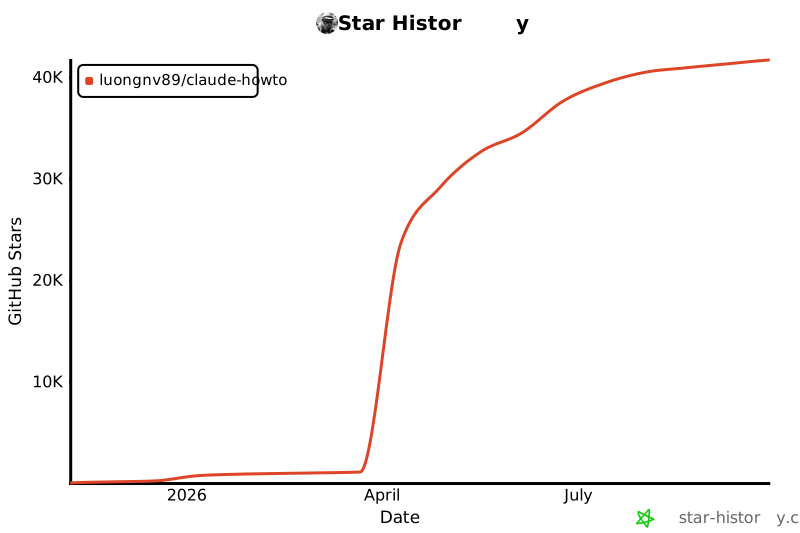
## Star History
|
|
|
|
[](https://star-history.com/#luongnv89/claude-howto&Date)
|
|
|
|
---
|
|
|
|
**Last Updated**: January 2026
|
|
**Claude Code Version**: 1.0+
|
|
**Compatible Models**: Claude Sonnet 4.5, Claude Opus 4.5, Claude Haiku 4.5
|