mirror of
https://github.com/FoggedLens/iD.git
synced 2026-02-14 01:33:03 +00:00

351 lines
17 KiB
Markdown
351 lines
17 KiB
Markdown
## d3
|
|
|
|
[d3](http://d3js.org/) is the primary library used by iD. It is used for
|
|
rendering the map data as well as many sorts of general DOM manipulation tasks
|
|
for which jQuery would often be used.
|
|
|
|
Notable features of d3 that are used by iD include
|
|
[d3.xhr](https://github.com/mbostock/d3/wiki/Requests#wiki-d3_xhr), which is
|
|
used to make the API requests to download data from openstreetmap.org and save
|
|
changes;
|
|
[d3.dispatch](https://github.com/mbostock/d3/wiki/Internals#wiki-d3_dispatch),
|
|
which provides a callback-based [Observer
|
|
pattern](http://en.wikipedia.org/wiki/Observer_pattern) between different
|
|
parts of iD;
|
|
[d3.geo.path](https://github.com/mbostock/d3/wiki/Geo-Paths#wiki-path), which
|
|
generates SVG paths for lines and areas; and
|
|
[d3.behavior.zoom](https://github.com/mbostock/d3/wiki/Zoom-Behavior#wiki-zoom),
|
|
which implements map panning and zooming.
|
|
|
|
## Core
|
|
|
|
The iD *core* implements OSM data types, a graph of OSM objects'
|
|
relationships to one another, an undo/redo history for changes made during
|
|
editing, and a couple of important auxiliary classes. It eventually aims
|
|
to be a reusable, modular library to kickstart other JavaScript-based
|
|
tools for OpenStreetMap.
|
|
|
|
The OSM data model includes three basic data types: nodes, ways, and
|
|
relations.
|
|
|
|
* A _node_ is a point type, having a single geographic coordinate.
|
|
* A _way_ is an ordered list of nodes.
|
|
* A _relation_ groups together nodes, ways, and other relations to provide
|
|
free-form higher-level structures.
|
|
|
|
Each of these three types has _tags_: an associative array of key-value pairs which
|
|
describe the object.
|
|
|
|
In iD, these three types are implemented by `iD.Node`, `iD.Way` and
|
|
`iD.Relation`. These three classes inherit from a common base, `iD.Entity`.
|
|
This is the only use of classical inheritance in iD, but it's justified
|
|
by the common functionality of the types. Generically, we refer to a
|
|
node, way or relation as an _entity_.
|
|
|
|
Every entity has an _ID_ either assigned by the OSM database or
|
|
a negative, local identifier assigned by iD for newly-created objects.
|
|
IDs from the OSM database as treated as opaque strings; no
|
|
[assumptions](http://lists.openstreetmap.org/pipermail/dev/2013-February/026495.html)
|
|
are made of them other than that they can be compared for identity and do not
|
|
begin with a minus sign (and thus will not conflict with proxy IDs). The three
|
|
types of entities have separate ID spaces: a
|
|
node can have the same numeric ID as a way or a relation. Instead of segregating
|
|
ways, nodes, and other entities into different datastructures,
|
|
iD internally uses fully-unique IDs generated by prefixing
|
|
each OSM ID with the first letter of the entity type. For example, a way
|
|
with OSM ID 123456 is represented as 'w123456' within iD.
|
|
|
|
iD entities are *immutable*: once constructed, an `Entity` object cannot
|
|
change. Tags cannot be updated; nodes cannot be added or removed from ways,
|
|
and so on. Immutability makes it easier to reason about the behavior of an
|
|
entity: if your code has a reference to one, it is safe to store it and use it
|
|
later, knowing that it cannot have been changed outside of your control. It
|
|
also makes it possible to implement the entity graph (described below) as an
|
|
efficient [persistent data
|
|
structure](http://en.wikipedia.org/wiki/Persistent_data_structure).
|
|
|
|
Since iD is an editor, it must allow for new versions of entities. The
|
|
solution is that all edits produce new copies of anything that changes. At the
|
|
entity level, this takes the form of methods such as `iD.Node#move`, which
|
|
returns a new node object that has the same ID and tags as the original, but a
|
|
different coordinate. More generically, `iD.Entity#update` returns a new
|
|
entity of the same type and ID as the original but with specified properties
|
|
such as `nodes`, `tags`, or `members` replaced.
|
|
|
|
|
|
|
|
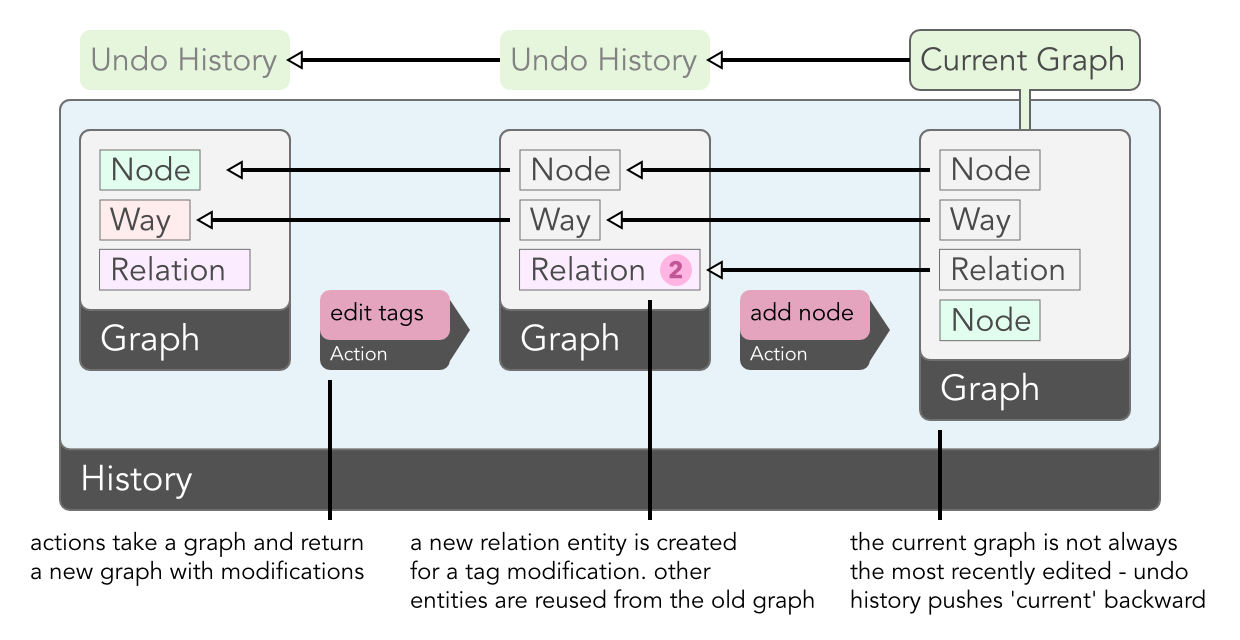
Entities are related to one another: ways have many nodes and relations have
|
|
many members. To render a map of a certain area, iD needs a
|
|
datastructure to hold all the entities in that area and traverse these
|
|
relationships. `iD.Graph` provides this functionality. The core of a graph is
|
|
a map between IDs and the associated entities; given an ID, the graph can give
|
|
you the entity. Like entities, a graph is immutable: adding, replacing, or
|
|
removing an entity produces a new graph, and the original is unchanged.
|
|
Because entities are immutable, the original and new graphs can minimize
|
|
memory use by sharing references to entities that have not changed instead of
|
|
copying the entire graph.
|
|
This persistent data structure approach is similar to the internals of
|
|
the [git](http://git-scm.com/) revision control system.
|
|
|
|
The final major component of the core is `iD.History`, which tracks the changes
|
|
made in an editing session and provides undo/redo capabilities. Here, the
|
|
immutable nature of the core types really pays off: the history is a simple
|
|
stack of graphs, each representing the state of the data at a particular point
|
|
in editing. The graph at the top of the stack is the current state, off which
|
|
all rendering is based. To undo the last change, this graph is popped off the
|
|
stack, and the map is re-rendered based on the new top of the stack.
|
|
|
|
This approach constitutes one of the main differences between iD's approach
|
|
to data and that of [JOSM](http://josm.openstreetmap.de/) and
|
|
[Potlatch 2](http://wiki.openstreetmap.org/wiki/Potlatch_2).
|
|
Instead of changing a single copy of local data and having to implement
|
|
an 'undo' for each specific action, actions in iD do not need to be aware
|
|
of history and the undo system.
|
|
|
|
Finally, we have the auxiliary classes `iD.Difference` and `iD.Tree`.
|
|
|
|
`iD.Difference` encapsulates the difference between two graphs, and knows how to calculate the
|
|
set of entities that were created, modified, or deleted, and need to be redrawn.
|
|
|
|
```js
|
|
var a = iD.Graph(), b = iD.Graph();
|
|
// (fill a & b with data)
|
|
var difference = iD.Difference(a, b);
|
|
|
|
// returns entities created between and b
|
|
difference.created();
|
|
```
|
|
|
|
`iD.Tree` calculates the set of downloaded entities that are visible in the
|
|
current map view. To calculate this quickly during map
|
|
interaction, it uses an [R-tree](http://en.wikipedia.org/wiki/R-tree).
|
|
|
|
```js
|
|
var graph = iD.Graph();
|
|
// (load OSM data into graph)
|
|
|
|
// this tree indexes the contents of the graph
|
|
var tree = iD.Tree(graph);
|
|
|
|
// quickly pull all features that intersect with an extent
|
|
var features = tree.intersects(
|
|
iD.geo.Extent([0, 0], [2, 2]), tree.graph());
|
|
```
|
|
|
|
## Actions
|
|
|
|
In iD, an _action_ is a function that accepts a graph as input and returns a
|
|
new, modified graph as output. Actions typically need other inputs as well; for
|
|
example, `iD.actions.DeleteNode` also requires the ID of a node to delete. The
|
|
additional input is passed to the action's constructor:
|
|
|
|
```js
|
|
// construct the action: this returns a function that remembers the
|
|
// value `n123456` in a closure so that when it's called, it runs
|
|
// the specified action on the graph
|
|
var action = iD.actions.DeleteNode('n123456');
|
|
|
|
// apply the action, yielding a new graph. oldGraph is untouched.
|
|
newGraph = action(oldGraph);
|
|
```
|
|
|
|
iD provides actions for all the typical things an editor needs to do: add a
|
|
new entity, split a way in two, connect the vertices of two ways together, and
|
|
so on. In addition to performing the basic work needed to accomplish these
|
|
things, an action typically contains a significant amount of logic for keeping
|
|
the relationships between entities logical and consistent. For example, an
|
|
action as apparently simple as `DeleteNode`, in addition to removing the node
|
|
from the graph, needs to do two other things: remove the node from any ways in
|
|
which it is a member (which in turn requires deleting parent ways that are
|
|
left with just a single node), and removing it from any relations of which it
|
|
is a member.
|
|
|
|
As you can imagine, implementing all these details requires an expert
|
|
knowledge of the OpenStreetMap data model. It is our hope that JavaScript
|
|
based tools for OpenStreetMap can reuse the iD's core implementation,
|
|
significantly reducing the work necessary to create a robust tool.
|
|
|
|
## Modes
|
|
|
|
With _modes_, we shift gears from abstract data types and algorithms to the
|
|
parts of the architecture that implement the user interface for iD. Modes are
|
|
manifested in the interface by the three buttons at the top left:
|
|
|
|

|
|
|
|
The modality of existing OSM editors runs the gamut from Potlatch 2, which is
|
|
almost entirely modeless, to JOSM, which sports half a dozen modes out of the
|
|
box and has many more provided by plugins. iD seeks a middle ground: too few
|
|
modes can leave new users unsure where to start, while too many can be
|
|
overwhelming.
|
|
|
|
iD's user-facing modes consist of a base "Browse" mode, in which you can move
|
|
around the map and select and edit entities, and three geometrically-oriented
|
|
drawing modes, which are accessible through the mode buttons in the upper
|
|
toolbar: Point, Line, and Area. In the code, these are broken down a
|
|
little bit more. There are separate modes for when an entity is selected
|
|
(`iD.modes.Select`) versus when nothing is selected (`iD.modes.Browse`), and
|
|
each of the geometric modes is split into one mode for starting to draw an
|
|
object and one mode for continuing an existing object (with the exception of
|
|
`iD.modes.AddPoint`, which is a single-step operation for obvious reasons).
|
|
|
|
The code interface for each mode consists of a pair of methods: `enter` and
|
|
`exit`. In the `enter` method, a mode sets up all the behavior that should be
|
|
present when that mode is active. This typically means binding callbacks to
|
|
DOM events that will be triggered on map elements, installing keybindings, and
|
|
showing certain parts of the interface like the inspector in `Select` mode.
|
|
The `exit` mode does the opposite, removing the behavior installed by the
|
|
`enter` method. Together the two methods ensure that modes are self-contained
|
|
and exclusive: each mode knows exactly the behavior that is specific to that
|
|
mode, and exactly one mode's behavior is active at any time.
|
|
|
|
## Behavior
|
|
|
|
Certain behaviors are common to more than one mode. For example, iD indicates
|
|
interactive map elements by drawing a halo around them when you hover over
|
|
them, and this behavior is common to both the browse and draw modes. Instead
|
|
of duplicating the code to implement this behavior in all these modes, we
|
|
extract it to `iD.behavior.Hover`.
|
|
|
|
_Behaviors_ take their inspiration from [d3's
|
|
behaviors](https://github.com/mbostock/d3/wiki/Behaviors). Like d3's `zoom`
|
|
and `drag`, each iD behavior is a function that takes as input a d3 selection
|
|
(assumed to consist of a single element) and installs the DOM event bindings
|
|
necessary to implement the behavior. The `Hover` behavior, for example,
|
|
installs bindings for the `mouseover` and `mouseout` events that add and
|
|
remove a `hover` class from map elements.
|
|
|
|
Because certain behaviors are appropriate to some but not all modes, we need
|
|
the ability to remove a behavior when entering a mode where it is not
|
|
appropriate. (This is functionality [not yet
|
|
provided](https://github.com/mbostock/d3/issues/894) by d3's own behaviors.)
|
|
Each behavior implements an `off` function that "uninstalls" the behavior.
|
|
This is very similar to the `exit` method of a mode, and in fact many modes do
|
|
little else but uninstall behaviors in their `exit` methods.
|
|
|
|
## Operations
|
|
|
|
_Operations_ wrap actions, providing their user-interface: tooltips, key
|
|
bindings, and the logic that determines whether an action can be validly
|
|
performed given the current map state and selection. Each operation is
|
|
constructed with the list of IDs which are currently selected and a `context`
|
|
object which provides access to the history and other important parts of iD's
|
|
internal state. After being constructed, an operation can be queried as to
|
|
whether or not it should be made available (i.e., show up in the context menu)
|
|
and if so, if it should be enabled.
|
|
|
|

|
|
|
|
We make a distinction between availability and enabled state for the sake of
|
|
learnability: most operations are available so long as an entity of the
|
|
appropriate type is selected. Even if it remains disabled for other reasons
|
|
(e.g. because you can't split a way on its start or end vertex), a new user
|
|
can still learn that "this is something I can do to this type of thing", and a
|
|
tooltip can provide an explanation of what that operation does and the
|
|
conditions under which it is enabled.
|
|
|
|
To execute an operation, call it as a function, with no arguments. The typical
|
|
operation will perform the appropriate action, creating a new undo state in
|
|
the history, and then enter the appropriate mode. For example,
|
|
`iD.operations.Split` performs `iD.actions.Split`, then enters
|
|
`iD.modes.Select` with the resulting ways selected.
|
|
|
|
## Map Rendering
|
|
|
|
Finally, we get to the parts of iD that actually draw and manipulate the map
|
|
entities on screen. The rendering is coordinated by `iD.Map`, which takes care
|
|
of setting up a [Spherical Mercator](http://bl.ocks.org/mbostock/3757132)
|
|
projection and the [zoom
|
|
behavior](https://github.com/mbostock/d3/wiki/Zoom-Behavior), and provides
|
|
accessors for such things as the current zoom level and map center.
|
|
|
|
For rendering entities on screen, we found it convenient to adopt a geometric
|
|
vocabulary that provides a slightly higher-level representation than the basic
|
|
entity types of the OSM data model:
|
|
|
|
* A _point_ is a node that is not a member of any way.
|
|
* A _vertex_ is a node that is a member of one or more ways.
|
|
* A _line_ is a way that is not an area.
|
|
* An _area_ is a way that is circular and has certain tags, or a series of one
|
|
or more ways grouped in a multipolygon relation.
|
|
|
|
For each of these geometric types, `iD.svg` has a corresponding module:
|
|
`iD.svg.Points`, `iD.svg.Vertices`, `iD.svg.Lines`, and `iD.svg.Areas`. To
|
|
render entities on screen, `iD.Map` delegates to these modules. Internally,
|
|
they make heavy use of [d3 joins](http://bost.ocks.org/mike/join/) to
|
|
manipulate the SVG elements that visually represent the map entities. When an
|
|
entity is rendered for the first time, it is part of the _enter_ selection,
|
|
and the SVG elements needed to represent it are created. When an entity is
|
|
modified, it is part of the _update_ selection, and the appropriate attributes
|
|
of the SVG element (for example, those that specify the location on screen)
|
|
are updated. And when an entity is deleted (or simply moves offscreen), the
|
|
corresponding SVG element is in the _exit_ selection, and will be removed.
|
|
|
|
The `iD.svg` modules apply classes to the SVG elements based on the entity
|
|
tags, via `iD.svg.TagClasses`. For example, an entity tagged with
|
|
`highway=residential` gets two classes: `tag-highway` and
|
|
`tag-highway-residential`. This allows distinct visual styles to be applied
|
|
via CSS at either the key or key-value levels. SVG elements also receive a
|
|
class corresponding to their entity type (`node`, `way`, or `relation`) and
|
|
one corresponding to their geometry type (`point`, `line`, or `area`).
|
|
|
|
The `iD.svg` namespace has a few other modules that don't have a one-to-one
|
|
correspondence with entities:
|
|
|
|
* `iD.svg.Midpoints` renders the small "virtual node" at the midpoint between
|
|
two vertices.
|
|
* `iD.svg.Labels` renders the textual
|
|
[labels](http://mapbox.com/osmdev/2013/02/12/labeling-id/).
|
|
* `iD.svg.Layers` sets up a number of layers that ensure that map elements
|
|
appear in an appropriate z-order.
|
|
|
|
## Other UI
|
|
|
|
iD provides a lot of user interface elements other than the core map component:
|
|
the page footer, the interface for saving changes, the splash screen you see
|
|
the first time you use iD, the geocoding and background layer controls, and the
|
|
tag/preset editor, for example.
|
|
|
|

|
|
|
|
The implementations for all non-map UI components live in the `iD.ui` namespace.
|
|
Many of the modules in this namespace follow a pattern for reusable d3
|
|
components [originally suggested](http://bost.ocks.org/mike/chart/) by Mike
|
|
Bostock in the context of charts. The entry point to a UI element is a
|
|
constructor function, e.g. `iD.ui.Geocoder()`. The constructor function may
|
|
require a set of mandatory arguments; for most UI components exactly one
|
|
argument is required, a `context` object produced by the top-level `iD()`
|
|
function.
|
|
|
|
A component needs some way to be rendered on screen by creating new DOM
|
|
elements or manipulating existing elements. This is done by calling the
|
|
component as a function, and passing a d3 selection where the component should
|
|
render itself:
|
|
|
|
```
|
|
var container = d3.select('body').append('div')
|
|
.attr('class', 'map-control geocode-control');
|
|
|
|
var geocoder = iD.ui.Geocoder(context)(container);
|
|
```
|
|
|
|
Alternatively, and more commonly, the same result is accomplished with
|
|
[d3.selection#call](https://github.com/mbostock/d3/wiki/Selections#wiki-call):
|
|
|
|
```
|
|
d3.select('body').append('div')
|
|
.attr('class', 'map-control geocode-control')
|
|
.call(iD.ui.Geocoder(context));
|
|
```
|
|
|
|
Some components are reconfigurable, and some provide functionality beyond
|
|
basic rendering. Both reconfiguration and extended functionality are exposed
|
|
via module functions:
|
|
|
|
```
|
|
var inspector = iD.ui.Inspector();
|
|
inspector(container); // render the inspector
|
|
inspector.tags(); // retrieve the current tags
|
|
inspector.on('change', callback); // get notified when a tag change is made
|
|
```
|