mirror of
https://github.com/momenbasel/keyFinder.git
synced 2026-04-23 21:16:00 +02:00
 moamen
b73c2185b0
moamen
b73c2185b0
- Migrated to Chrome Manifest V3 with service worker architecture
- 80+ secret detection patterns covering AWS, GCP, Azure, GitHub, GitLab,
  Stripe, Slack, Discord, OpenAI, and 30+ other providers
- 10 scanning surfaces: inline scripts, external scripts, meta tags,
  hidden inputs, data attributes, HTML comments, URL params, web storage,
  cookies, and network response interception
- Shannon entropy analysis for detecting undocumented secret formats
- MAIN world interceptor for XHR/fetch response scanning and window globals
- Professional dark-theme UI with filtering, search, and CSV/JSON export
- Zero dependencies - removed jQuery, Bootstrap, font-awesome, popper
- Proper XSS-safe DOM rendering throughout
- Badge counter on extension icon showing finding count
- All frames scanning including iframes
142 lines
5.9 KiB
Markdown
142 lines
5.9 KiB
Markdown
<p align="center">
|
|
<img width="128" height="128" alt="KeyFinder logo" src="https://raw.githubusercontent.com/momenbasel/keyFinder/master/icons/icon128.png">
|
|
</p>
|
|
|
|
<h1 align="center">KeyFinder</h1>
|
|
|
|
<p align="center">
|
|
<strong>Passive API key and secret discovery for Chrome</strong>
|
|
</p>
|
|
|
|
<p align="center">
|
|
<img src="https://img.shields.io/badge/manifest-v3-blue"/>
|
|
<img src="https://img.shields.io/badge/Chrome-Extension-green"/>
|
|
<img src="https://img.shields.io/github/license/momenbasel/keyFinder"/>
|
|
<img src="https://img.shields.io/github/v/release/momenbasel/keyFinder"/>
|
|
<img src="https://img.shields.io/github/downloads/momenbasel/keyFinder/total.svg"/>
|
|
</p>
|
|
|
|
<hr>
|
|
|
|
KeyFinder is a Chrome extension that passively scans every page you visit for leaked API keys, tokens, secrets, and credentials. It runs silently in the background with zero configuration required.
|
|
|
|
## What It Detects
|
|
|
|
KeyFinder ships with **80+ detection patterns** covering secrets from:
|
|
|
|
| Category | Providers |
|
|
|----------|-----------|
|
|
| **Cloud** | AWS (Access Keys, Secret Keys, Session Tokens, Cognito), Google Cloud (API Keys, OAuth, Service Accounts), Azure (Storage Keys, SAS Tokens, Connection Strings) |
|
|
| **Source Control** | GitHub (PATs, OAuth, Fine-grained tokens), GitLab (PATs, Pipeline, Runner tokens), Bitbucket |
|
|
| **Payments** | Stripe (Secret, Publishable, Restricted, Webhook), PayPal Braintree, Square |
|
|
| **Communication** | Slack (Bot, User, App tokens, Webhooks), Discord (Bot tokens, Webhooks), Telegram, Twilio, SendGrid |
|
|
| **AI / ML** | OpenAI, Anthropic, HuggingFace, Replicate |
|
|
| **Databases** | MongoDB, PostgreSQL, MySQL, Redis connection strings |
|
|
| **SaaS** | Shopify, Sentry, New Relic, PlanetScale, Linear, Notion, Datadog, Algolia, Mapbox |
|
|
| **Infrastructure** | HashiCorp Vault, Terraform, Docker Hub, NPM, Cloudflare, DigitalOcean, Doppler, Pulumi, Grafana |
|
|
| **Crypto** | RSA, EC, OpenSSH, PGP, DSA private keys |
|
|
| **Generic** | JWTs, Bearer tokens, Basic Auth, API key assignments, credential URLs, high-entropy strings |
|
|
|
|
## How It Works
|
|
|
|
KeyFinder scans **10 different attack surfaces** on every page:
|
|
|
|
1. **Script `src` URLs** - Checks all script source URLs for keywords and tokens in query parameters
|
|
2. **Inline scripts** - Scans `<script>` tag contents for secret patterns
|
|
3. **External scripts** - Fetches and scans same-origin JavaScript files
|
|
4. **Meta tags** - Checks `<meta>` tags for leaked API keys and tokens
|
|
5. **Hidden form fields** - Inspects `<input type="hidden">` values
|
|
6. **Data attributes** - Scans `data-*` attributes for sensitive values
|
|
7. **HTML comments** - Parses comment nodes for accidentally committed secrets
|
|
8. **URL parameters** - Analyzes links and hrefs for tokens in query strings
|
|
9. **Web storage** - Scans localStorage and sessionStorage
|
|
10. **Network responses** - Intercepts XHR and Fetch responses for leaked secrets
|
|
|
|
Additionally, **Shannon entropy analysis** is applied to detect random high-entropy strings that may be undocumented secret formats.
|
|
|
|
## Features
|
|
|
|
- **Zero dependencies** - Pure vanilla JavaScript, no jQuery, no external libraries
|
|
- **Manifest V3** - Built for modern Chrome with service worker architecture
|
|
- **Passive scanning** - Runs automatically on every page load
|
|
- **Custom keywords** - Add your own search terms to scan for
|
|
- **Dashboard** - Professional results page with filtering, sorting, and search
|
|
- **Export** - Download findings as JSON or CSV
|
|
- **Badge counter** - Shows finding count on the extension icon
|
|
- **Low footprint** - Minimal CPU and memory usage
|
|
- **All frames** - Scans iframes and embedded content
|
|
|
|
## Installation
|
|
|
|
### From Release (Recommended)
|
|
|
|
1. Go to [Releases](https://github.com/momenbasel/keyFinder/releases) and download the latest `.crx` file
|
|
2. Open Chrome and navigate to `chrome://extensions`
|
|
3. Enable **Developer mode** (top right toggle)
|
|
4. Drag and drop the `.crx` file onto the page
|
|
|
|
### From Source
|
|
|
|
```bash
|
|
git clone https://github.com/momenbasel/keyFinder.git
|
|
```
|
|
|
|
1. Open Chrome and go to `chrome://extensions`
|
|
2. Enable **Developer mode**
|
|
3. Click **Load unpacked** and select the `keyFinder` folder
|
|
|
|
<img src="https://github.com/momenbasel/keyFinder/blob/master/installGif.gif?raw=true" alt="Installation demo"/>
|
|
|
|
## Demo
|
|
|
|
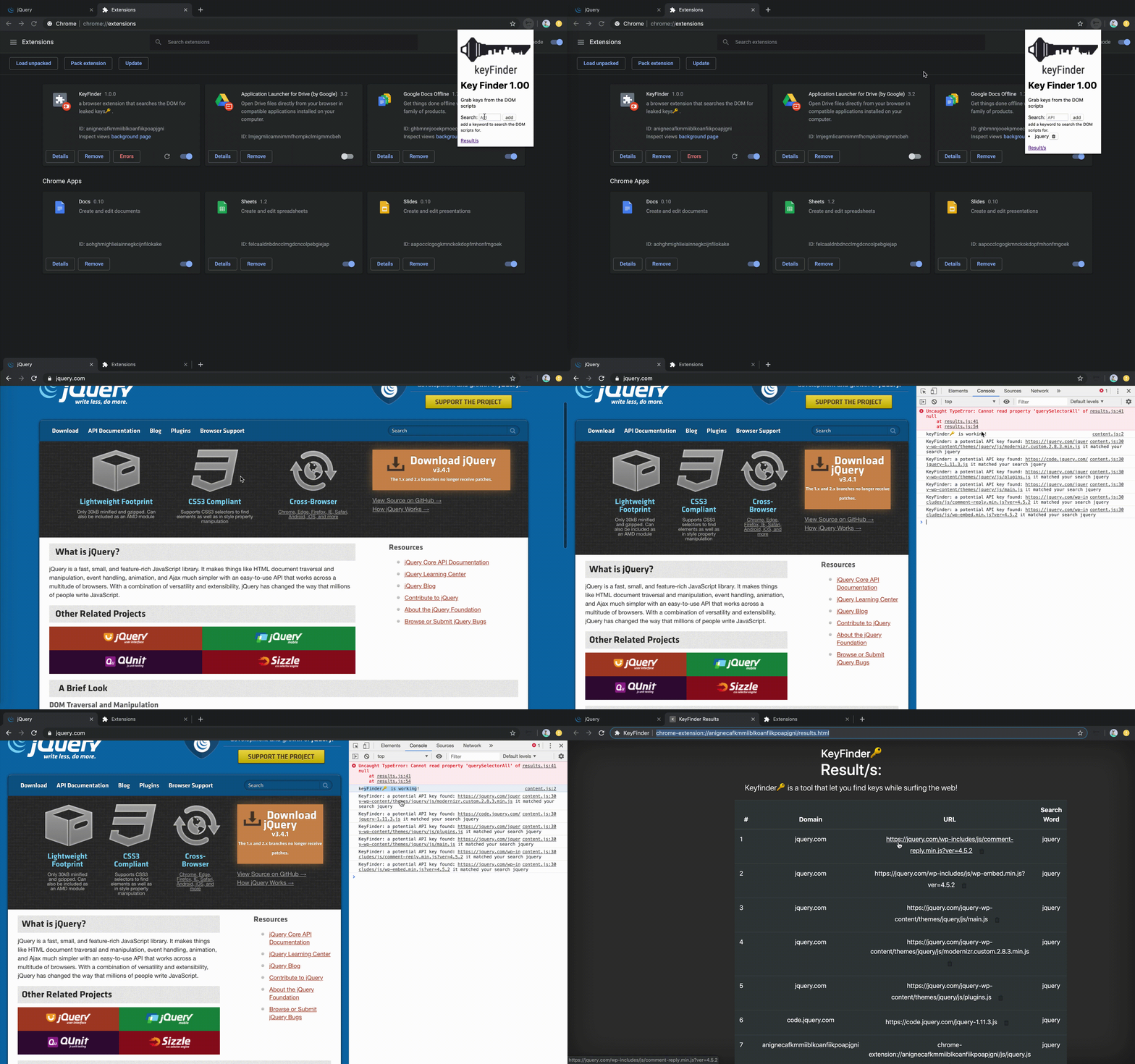
|
|
|
|
## Usage
|
|
|
|
1. **Install** the extension
|
|
2. **Browse** the web normally - KeyFinder scans every page in the background
|
|
3. Click the **extension icon** to see stats and manage keywords
|
|
4. Click **View Findings** to open the full results dashboard
|
|
5. **Filter** by severity, provider, or type
|
|
6. **Export** findings as JSON or CSV for reporting
|
|
|
|
## Adding Custom Keywords
|
|
|
|
Click the extension icon, type a keyword in the input field, and click **Add**. The keyword will be used to scan script URLs, inline code, and key-value assignments on every page you visit.
|
|
|
|
Default keywords: `key`, `api_key`, `apikey`, `api-key`, `secret`, `token`, `access_token`, `auth`, `credential`, `password`, `client_id`, `client_secret`
|
|
|
|
## Architecture
|
|
|
|
```
|
|
keyFinder/
|
|
manifest.json # MV3 manifest
|
|
popup.html # Extension popup UI
|
|
results.html # Findings dashboard
|
|
js/
|
|
background.js # Service worker - storage and message handling
|
|
patterns.js # 80+ secret detection regex patterns
|
|
content.js # Page scanner - DOM, scripts, network interception
|
|
popup.js # Popup logic
|
|
results.js # Dashboard logic with filtering and export
|
|
css/
|
|
popup.css # Popup styles
|
|
results.css # Dashboard styles
|
|
icons/
|
|
icon16.png
|
|
icon48.png
|
|
icon128.png
|
|
```
|
|
|
|
## Disclaimer
|
|
|
|
This tool is intended for **security research and authorized testing only**. Use it to identify leaked secrets on your own applications or during authorized penetration tests. You are responsible for your own actions.
|
|
|
|
## License
|
|
|
|
MIT
|
|
|
|
## Author
|
|
|
|
[@momenbassel](https://x.com/momenbassel) - [LinkedIn](https://www.linkedin.com/in/momenbasel/)
|