
Phishing Club



Phishing Club is a phishing simulation and man-in-the-middle framework designed for companies that perform phishing simulation internally or as part of their business, and for aidding red teams obtaining initial access.
It can be used both as a replacement for Gophish for phishers that are looking for more features and as an aid or alternative for offensive phishing tools like MITM frameworks.
Quick start
⚡ For systemd-enabled distributions, installation is quick and easy
Run the following on the server
curl -fsSL https://raw.githubusercontent.com/phishingclub/phishingclub/main/install.sh | bash
Remember to copy the admin URL and password
For a manual step by step guide or more in depth installation information - click here
Prebuild images of the latest version are also available.
See production docker compose example and the latest images
Features
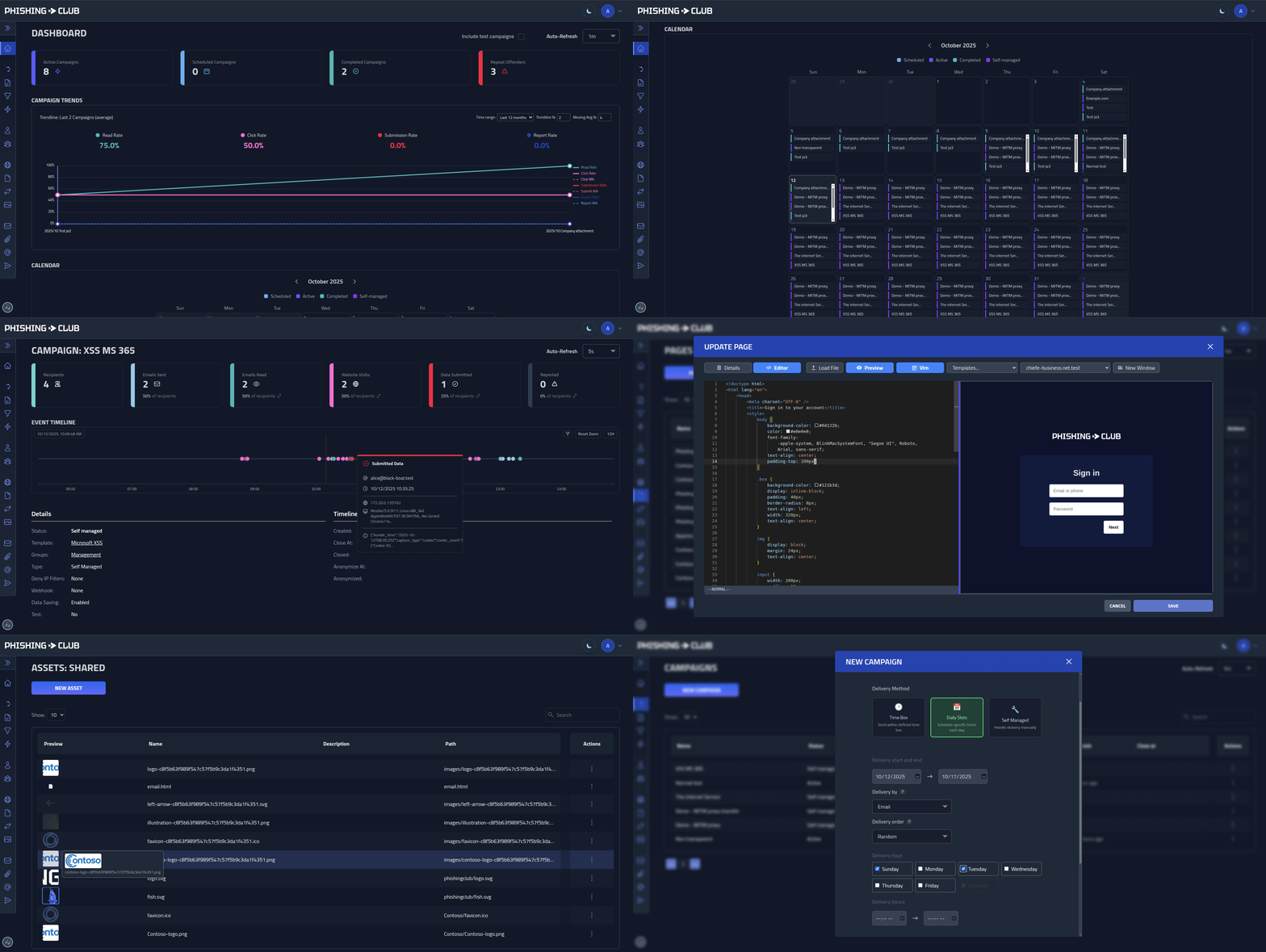
- Multi-stage phishing flows - Put together multiple phishing pages
- Reverse proxy phishing - Capture sessions to bypass weak MFA
- Domain proxying - Configure domains to proxy and mirror content from target sites
- Flexible scheduling - Time windows, business hours, or manual delivery
- Multiple domains - Auto TLS, custom sites, asset management
- Advanced delivery - SMTP configs or custom API endpoints
- Recipient tracking - Groups, CSV import, repeat offender metrics
- Analytics - Timelines, dashboards, per-user event history
- Automation - HMAC-signed webhooks, REST API, import/export
- Multi-tenancy - Segregated client handling and statistics for service providers
- Security features - MFA, SSO, session management, IP filtering
- Operational tools - In-app updates, CLI installer, config management
MITM and Red Team Features
- Full control - Modify and capture requests and responses independently
- DOM rewriting - Modify content using CSS/jQuery-like selectors or regex
- Path and param rewriting - Rewrite URL paths and query parameters on the fly
- Dynamic obfuscation - Avoid static detection with dynamically obfuscated landing pages
- Evasion page - Customize the pre-lure evasion page
- Custom deny page - Decide what bots or evaded visitors see
- Access control - Default deny-list until visiting phishing lure URL
- Advanced filtering - Use JA4, CIDR and geo-IP to control lure URL access
- Browser impersonation - Impersonate JA4 fingerprints in proxied requests
- Response overwriting - Shortcut proxying with custom responses
- Forward proxying - Use HTTP and SOCKS5 proxies to ensure requests originate from the right location
Students & Learning
Phishing Club can be used by cybersecurity students or others who want try hands-on phishing. The development enviroment is an ideal place to get started. Spin up campaigns, test templates, and learn how phishing attacks work in a safe, contained environment. The enviroment comes with containers local SMTP/Mailbox and everything you need.
To aid with the development of MITM proxys configurations there is also a MITMProxy container where you can view the traffic that flows towards the proxied site.
To get started, clone the repo, ensure you have make and docker installed and run make up and wait for the backend to be up and running. Copy the credentials and you are ready to go.
Need help? Join the discord channel.
Template Development
Phishing Template Workbench
Speed up your template development with our template workbench tool:
Phishing Template Workbench - A developer-focused environment for creating and testing phishing simulation templates.
- Preview - Preview templates
- Variable support - See
{{.FirstName}},{{.Email}}substitution with realistic sample data - Naive Responsive Testing - Preview templates across mobile, tablet, and desktop
- Export Ready - Compatible with Phishing Club formats
- Included Templates - Comes with example templates covering common phishing scenarios that you can import and customize
Development Setup
Prerequisites
- Docker and Docker Compose
- Git
- Make (optional, for convenience commands)
Quick Start
- Clone the repository:
git clone https://github.com/phishingclub/phishingclub.git
cd phishingclub
- Start the services:
make up
# or manually:
docker compose up -d
- Access the platform:
- Administration:
http://localhost:8003 - HTTP Phishing Server:
http://localhost:80 - HTTPS Phishing Server:
https://localhost:443
- Get admin credentials:
The username and password are output in the terminal when you start the services. If you restart the backend service before completing setup by logging in, the username and password will change.
make backend-password
- Setup and start phishing:
Open https://localhost:8003 and setup the admin account using the credentials from step 4.
Visit the Phishing Club Guide for more information.
Services and Ports
| Port | Service | Description |
|---|---|---|
| 80 | HTTP Phishing Server | HTTP phishing server for campaigns |
| 443 | HTTPS Phishing Server | HTTPS phishing server with SSL |
| 8002 | Backend API | Backend API server |
| 8003 | Frontend | Development frontend with Vite |
| 8101 | Database Viewer | DBGate database administration |
| 8102 | Mail Server | Mailpit SMTP server with SpamAssassin integration |
| 8103 | Container Logs | Dozzle log viewer |
| 8104 | Container Stats | Docker container statistics |
| 8105 | MITMProxy | MITMProxy web interface |
| 8106 | MITMProxy | MITMProxy external access |
| 8201 | ACME Server | Pebble ACME server for certificates |
| 8202 | ACME Management | Pebble management interface |
Development Commands
The makefile has a lot of convenience commands for development.
# Start all services
make up

# Stop all services
make down

# View logs
make logs

# Restart specific service
make backend-restart
make frontend-restart

# Access service containers
make backend-attach
make frontend-attach

# Reset backend database
make backend-db-reset

# Get backend admin password
make backend-password
Development Domains
For development we use .test for all domains. But this must also be handled on the host level. You must either modify the hosts file and add the domains you use or run a local DNS server and ensure all *.test domains resolves to 127.0.0.1.
Option 1: DNSMasq (Recommended)
# Add to your DNSMasq configuration
address=/.test/127.0.0.1
Option 2: Hosts File
Add to /etc/hosts:
127.0.0.1 microsoft.test
127.0.0.1 google.test
... add your development domains here
Development SSL Certificates
The development environment uses Pebble ACME server for automatic SSL certificate generation. In production, configure your preferred ACME provider or upload custom certificates.
If you experience any issues with certificate generation, bring the backend down, clear the local certs and start the backend again:
make backend-downmake backend-clear-certsmake backend-up
Certificate warning
When developing it can be nice to ignore certificate warnings, especially when handling complex proxy setups. Use a dedicated browser and skip certificate warning.
On Ubuntu you can add custom shortcut for chromium without cert warnings.
~/.local/share/applications/chromium-dev.desktop
[Desktop Entry]
Version=1.0
Type=Application
Name=Chromium Phishing Dev
Comment=Chromium for development with SSL certificate errors ignored
Exec=chromium-browser --ignore-certificate-errors --incognito
Icon=chromium-browser
Terminal=false
License
Phishing Club is available under a dual licensing model:
Open Source License (AGPL-3.0)
This project is licensed under the GNU Affero General Public License v3.0 (AGPL-3.0). This means:
- ✅ You can use, modify, and distribute the software freely
- ✅ Perfect for educational, research, and commercial use
- ✅ You can run your own instance for security testing or professional services
- ⚠️ Important: If you provide the software modified as a network service, you must make your source code available under AGPL-3.0
Commercial License
For organizations that want to:
- Use Phishing Club in commercial products without AGPL restrictions
- Offer Phishing Club as a service without source code disclosure
- Modify or modify the codebase without source code disclosure
Contact us for commercial licensing: license@phishing.club
Roadmap
There is no offical roadmap at this moment.
But you can vote with emojis on the [feature] requests on Github or add you own feature request.
Feature request with a high number of votes will be prioritized, however it is no guaranteed they will be implemented. Ultimately what gets implemented, how and when highly depends on me and what I think is right for the project.
Contributing
We welcome contributions from the community! Please read our Contributing Guidelines for detailed information on:
- Development setup and workflow
- Code standards and conventions
- Submission requirements
- License agreements
Quick Start for Contributors:
- Check existing issues and create a feature request if needed
- Wait for approval before starting work
- Fork the repository and create a feature branch
- Follow our development workflow and coding standards
- Submit a pull request with signed commits
For complete details, see CONTRIBUTING.md.
Suggestions for Contributors
- Improve or add templates to the template project
- Check existing feature requests - Want to work on something, make a comment.
Support
Need help? Join the Phishing Club Discord
Community support is provided on a best-effort, volunteer basis. For dedicated assistance, paid support is available.
- General Support: Join our Discord community or open a GitHub issue
- Commercial Licensing: Contact license@phishing.club
- Security Issues: See our Security Policy
Security and Ethical Use
This platform is designed for authorized security testing only.
For important information about:
- Reporting security vulnerabilities
- Ethical use requirements
- Legal responsibilities
- Security best practices
Please read our Security Policy.
Important: Users are solely responsible for ensuring their use complies with all applicable laws and regulations.