
Your ultrafast open source AI sandbox.



English |
简体中文
VibeBox is a lightweight, ultra-fast sandbox for AI agents to run commands, edit files, and execute code inside an
isolated Apple Virtualization Framework micro-VM, no repeated permission prompts, minimal memory/disk overhead.
[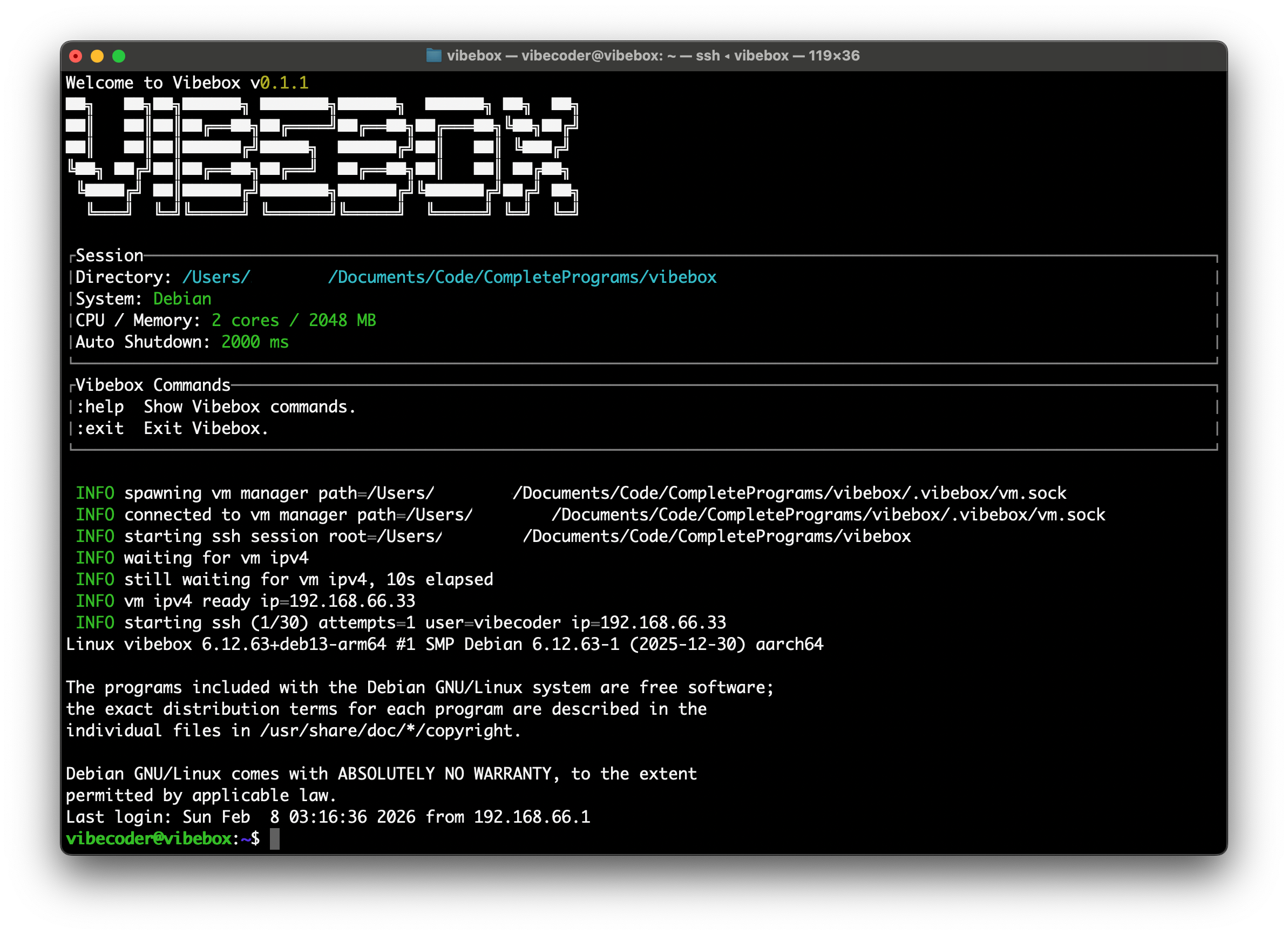](https://vibebox.robcholz.com)
---
### Why I built VibeBox
I use agents like Codex and CC a lot, but I always felt uneasy running them directly on my host machine. If I lock
things
down, I get interrupted by constant “are you sure?” prompts. If I loosen it up, I worry the agent might touch the
wrong files or run something I didn’t intend.
I wanted something that feels as frictionless as giving an agent a real shell, but with a hard isolation boundary. So I
built VibeBox: a per-project micro-VM sandbox that starts fast, keeps changes contained to the repo, and lets me iterate
without babysitting permissions.
### Comparison
Here’s why I didn’t just use existing options:
- **vibe**: super convenient, but it’s too minimal for what I need. It lacks basic configuration, and it doesn’t give me
the multi-instance + session management my workflow wants.
- **QEMU**: powerful, but the configuration surface area is huge. For day-to-day sandboxing it’s not “open a repo and
go” — it’s a project on its own.
- **Docker / devcontainers**: great ecosystem, but for daily use it feels heavy. Cold starts can be slow, and it’s not
something I can jump into instantly, repeatedly, all day.
That’s what pushed me to build **VibeBox**: I wanted a per-project sandbox that’s fast to enter (just `vibebox`),
supports real configuration + sessions, and keeps a hard isolation boundary.
### Installation
```bash
# YOLO
curl -fsSL https://raw.githubusercontent.com/robcholz/vibebox/main/install | bash
# Package managers
cargo install vibebox
# Or manually (bad)
curl -LO https://github.com/robcholz/vibebox/releases/download/latest/vibebox-macos-arm64.zip
unzip vibebox-macos-arm64.zip
mkdir -p ~/.local/bin
mv vibe ~/.local/bin
export PATH="$HOME/.local/bin:$PATH"
```
> [!TIP]
> We truly recommend you to use `YOLO` to install.
**Requirements**
- macOS on Apple Silicon (Vibebox uses Apple's virtualization APIs).
**First Run**
The first `vibebox` run downloads a Debian base image and provisions it. After that, per-project instances reuse the
cached base image for much faster startups.
### Documentation
**Quick Start**
```bash
cd /path/to/your/project
vibebox
```
On first run, Vibebox creates `vibebox.toml` in your project (if missing) and a `.vibebox/` directory for instance data.
**Configuration (`vibebox.toml`)**
`vibebox.toml` lives in your project root by default. You can override it with `vibebox -c path/to/vibebox.toml` or the
`VIBEBOX_CONFIG_PATH` env var, but the path must stay inside the project directory.
Default config (auto-created when missing):
```toml
[box]
cpu_count = 2
ram_mb = 2048
disk_gb = 5
mounts = [
"~/.codex:~/.codex:read-write",
"~/.claude:~/.claude:read-write",
]
[supervisor]
auto_shutdown_ms = 20000
```
`disk_gb` is only applied when the instance disk is first created. If you change it later, run `vibebox reset` to
recreate the disk.
**Mounts**
- Your project is mounted read-write at `~/`, and the shell starts there.
- If a `.git` directory exists, it is masked with a tmpfs mount inside the VM to discourage accidental edits from the
guest.
- Extra mounts come from `box.mounts` with the format `host:guest[:read-only|read-write]`.
- Host paths support `~` expansion. Relative guest paths are treated as `/root/`.
- Guest paths that use `~` are linked into `/home/` for convenience. Run `vibebox explain` to see the resolved
host/guest mappings.
**CLI Commands**
```bash
vibebox # start or attach to the current project VM
vibebox list # list known project sessions
vibebox reset # delete .vibebox for this project and recreate on next run
vibebox purge-cache # delete the global cache (~/.cache/vibebox)
vibebox explain # show mounts and network info
```
**Inside the VM**
- Default SSH user: `vibecoder`
- Hostname: `vibebox`
- Base image provisioning installs: build tools, `git`, `curl`, `ripgrep`, `openssh-server`, and `sudo`.
- On first login, Vibebox installs `mise` and configures tools like `uv`, `node`, `@openai/codex`, and
`@anthropic-ai/claude-code` (best-effort).
- Shell aliases: `:help` and `:exit`.
**State & Cache**
- Project state lives in `.vibebox/` (instance disk, SSH keys, logs, manager socket/pid). `vibebox reset` removes it.
- Global cache lives in `~/.cache/vibebox` (base image + shared guest cache). `vibebox purge-cache` clears it.
- Session index lives in `~/.vibebox/sessions` and is shown by `vibebox list`.
### Contributing
If you're interested in contributing to VibeBox, please read our [contributing docs](CONTRIBUTING.md) before
submitting a pull request.
### Using VibeBox
Feel free to use, but remember to promote VibeBox as well!
### FAQ
#### How is this different from other Sandboxes?
Vibebox is built for fast, repeatable local sandboxes with minimal ceremony. What’s different here:
- Warm startup is typically under **6 seconds** on my M3, so you can jump back in quickly.
- One simple command — `vibebox` — drops you into the sandbox from your project.
- Configuration lives in `vibebox.toml`, where you can set CPU, RAM, disk size, and mounts.
### Special Thank
[vibe](https://github.com/lynaghk/vibe) by lynaghk.
And amazing Rust community, without your rich crates and fantastic toolchain like [crates.io](https://crates.io), this
wouldn't be possible!
---
**Follow me on X** [X.com](https://x.com/robcholz)