mirror of
https://github.com/Ed1s0nZ/CyberStrikeAI.git
synced 2026-05-17 05:33:32 +02:00
Compare commits
22 Commits
| Author | SHA1 | Date | |
|---|---|---|---|
 公明 公明
|
e54815e018 | ||
|
公明
|
9baa99ea40 | ||
|
公明
|
83a8c46db1 | ||
|
公明
|
4b2619e1fe | ||
|
公明
|
3fffee80f4 | ||
|
公明
|
41d7afcf99 | ||
|
公明
|
6431dcb240 | ||
|
公明
|
665b1d553a | ||
|
公明
|
fd3a52af01 | ||
|
公明
|
8368ee7712 | ||
|
公明
|
dd883677b8 | ||
|
公明
|
2edd5ffe95 | ||
|
公明
|
ae588dbfe4 | ||
|
公明
|
93be113a79 | ||
|
公明
|
d3fb14f72d | ||
|
公明
|
af715e23cb | ||
|
公明
|
3aecdc275f | ||
|
公明
|
660d95a787 | ||
|
公明
|
01271fd8eb | ||
|
公明
|
8c6e044f84 | ||
|
公明
|
cb2defd0cc | ||
|
公明
|
88ab73e422 |
@@ -14,6 +14,12 @@ CyberStrikeAI is an **AI-native security testing platform** built in Go. It inte
|
||||
|
||||
<div align="center">
|
||||
|
||||
### System Dashboard Overview
|
||||
|
||||
<img src="./images/dashboard.png" alt="System Dashboard" width="100%">
|
||||
|
||||
*The dashboard provides a comprehensive overview of system runtime status, security vulnerabilities, tool usage, and knowledge base, helping users quickly understand the platform's core features and current state.*
|
||||
|
||||
### Core Features Overview
|
||||
|
||||
<table>
|
||||
@@ -516,6 +522,8 @@ CyberStrikeAI has joined [404Starlink](https://github.com/knownsec/404StarLink)
|
||||
</a>
|
||||
</div>
|
||||
|
||||
## Stargazers over time
|
||||
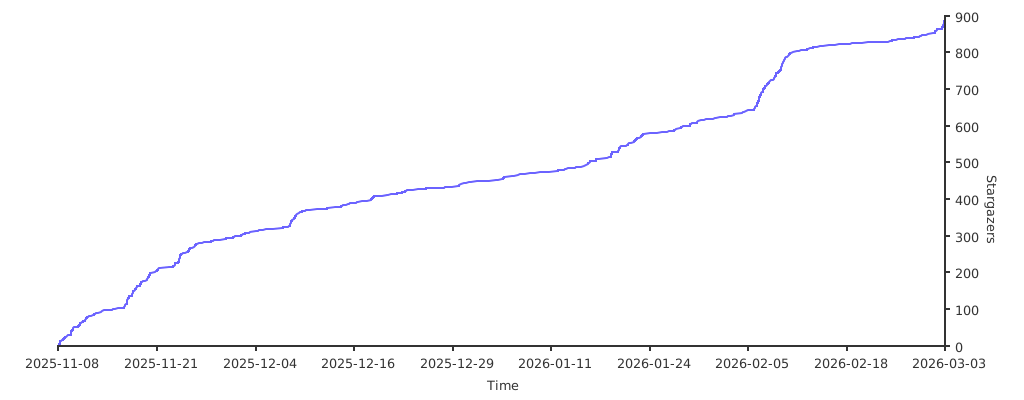
|
||||
|
||||
|
||||
---
|
||||
|
||||
@@ -13,6 +13,12 @@ CyberStrikeAI 是一款 **AI 原生安全测试平台**,基于 Go 构建,集
|
||||
|
||||
<div align="center">
|
||||
|
||||
### 系统仪表盘概览
|
||||
|
||||
<img src="./images/dashboard.png" alt="系统仪表盘" width="100%">
|
||||
|
||||
*仪表盘提供系统运行状态、安全漏洞、工具使用情况和知识库的全面概览,帮助用户快速了解平台核心功能和当前状态。*
|
||||
|
||||
### 核心功能概览
|
||||
|
||||
<table>
|
||||
@@ -513,6 +519,9 @@ CyberStrikeAI 现已加入 [404星链计划](https://github.com/knownsec/404Star
|
||||
</a>
|
||||
</div>
|
||||
|
||||
## Stargazers over time
|
||||

|
||||
|
||||
---
|
||||
|
||||
欢迎提交 Issue/PR 贡献新的工具模版或优化建议!
|
||||
|
||||
+11
-1
@@ -10,7 +10,7 @@
|
||||
# ============================================
|
||||
|
||||
# 前端显示的版本号(可选,不填则显示默认版本)
|
||||
version: "v1.3.6"
|
||||
version: "v1.3.9"
|
||||
|
||||
# 服务器配置
|
||||
server:
|
||||
@@ -44,6 +44,16 @@ openai:
|
||||
model: deepseek-chat # 模型名称(必填)
|
||||
max_total_tokens: 120000 # LLM 相关上下文的最大 Token 数限制(内存压缩和攻击链构建会共用此配置)
|
||||
|
||||
# ============================================
|
||||
# 信息收集(FOFA)配置(可选)
|
||||
# ============================================
|
||||
# 用于「信息收集」页面调用 FOFA API(后端代理,避免前端暴露 key)
|
||||
# 也可通过环境变量配置:FOFA_EMAIL / FOFA_API_KEY(优先级更高)
|
||||
fofa:
|
||||
base_url: "https://fofa.info/api/v1/search/all" # 可选,留空则使用默认
|
||||
email: "" # FOFA 账号邮箱(可选,建议在系统设置中填写)
|
||||
api_key: "" # FOFA API Key(可选,建议在系统设置中填写)
|
||||
|
||||
# Agent 配置
|
||||
# 达到最大迭代次数时,AI 会自动总结测试结果
|
||||
agent:
|
||||
|
||||

Binary file not shown.
|
After Width: | Height: | Size: 832 KiB |
@@ -318,6 +318,7 @@ func New(cfg *config.Config, log *logger.Logger) (*App, error) {
|
||||
roleHandler := handler.NewRoleHandler(cfg, configPath, log.Logger)
|
||||
roleHandler.SetSkillsManager(skillsManager) // 设置Skills管理器到RoleHandler
|
||||
skillsHandler := handler.NewSkillsHandler(skillsManager, cfg, configPath, log.Logger)
|
||||
fofaHandler := handler.NewFofaHandler(cfg, log.Logger)
|
||||
if db != nil {
|
||||
skillsHandler.SetDB(db) // 设置数据库连接以便获取调用统计
|
||||
}
|
||||
@@ -415,6 +416,7 @@ func New(cfg *config.Config, log *logger.Logger) (*App, error) {
|
||||
vulnerabilityHandler,
|
||||
roleHandler,
|
||||
skillsHandler,
|
||||
fofaHandler,
|
||||
mcpServer,
|
||||
authManager,
|
||||
openAPIHandler,
|
||||
@@ -478,6 +480,7 @@ func setupRoutes(
|
||||
vulnerabilityHandler *handler.VulnerabilityHandler,
|
||||
roleHandler *handler.RoleHandler,
|
||||
skillsHandler *handler.SkillsHandler,
|
||||
fofaHandler *handler.FofaHandler,
|
||||
mcpServer *mcp.Server,
|
||||
authManager *security.AuthManager,
|
||||
openAPIHandler *handler.OpenAPIHandler,
|
||||
@@ -506,6 +509,11 @@ func setupRoutes(
|
||||
protected.GET("/agent-loop/tasks", agentHandler.ListAgentTasks)
|
||||
protected.GET("/agent-loop/tasks/completed", agentHandler.ListCompletedTasks)
|
||||
|
||||
// 信息收集 - FOFA 查询(后端代理)
|
||||
protected.POST("/fofa/search", fofaHandler.Search)
|
||||
// 信息收集 - 自然语言解析为 FOFA 语法(需人工确认后再查询)
|
||||
protected.POST("/fofa/parse", fofaHandler.ParseNaturalLanguage)
|
||||
|
||||
// 批量任务管理
|
||||
protected.POST("/batch-tasks", agentHandler.CreateBatchQueue)
|
||||
protected.GET("/batch-tasks", agentHandler.ListBatchQueues)
|
||||
|
||||
@@ -18,6 +18,7 @@ type Config struct {
|
||||
Log LogConfig `yaml:"log"`
|
||||
MCP MCPConfig `yaml:"mcp"`
|
||||
OpenAI OpenAIConfig `yaml:"openai"`
|
||||
FOFA FofaConfig `yaml:"fofa,omitempty" json:"fofa,omitempty"`
|
||||
Agent AgentConfig `yaml:"agent"`
|
||||
Security SecurityConfig `yaml:"security"`
|
||||
Database DatabaseConfig `yaml:"database"`
|
||||
@@ -52,6 +53,13 @@ type OpenAIConfig struct {
|
||||
MaxTotalTokens int `yaml:"max_total_tokens,omitempty" json:"max_total_tokens,omitempty"`
|
||||
}
|
||||
|
||||
type FofaConfig struct {
|
||||
// Email 为 FOFA 账号邮箱;APIKey 为 FOFA API Key(建议使用只读权限的 Key)
|
||||
Email string `yaml:"email,omitempty" json:"email,omitempty"`
|
||||
APIKey string `yaml:"api_key,omitempty" json:"api_key,omitempty"`
|
||||
BaseURL string `yaml:"base_url,omitempty" json:"base_url,omitempty"` // 默认 https://fofa.info/api/v1/search/all
|
||||
}
|
||||
|
||||
type SecurityConfig struct {
|
||||
Tools []ToolConfig `yaml:"tools,omitempty"` // 向后兼容:支持在主配置文件中定义工具
|
||||
ToolsDir string `yaml:"tools_dir,omitempty"` // 工具配置文件目录(新方式)
|
||||
|
||||
@@ -145,6 +145,7 @@ func (h *ConfigHandler) SetAppUpdater(updater AppUpdater) {
|
||||
// GetConfigResponse 获取配置响应
|
||||
type GetConfigResponse struct {
|
||||
OpenAI config.OpenAIConfig `json:"openai"`
|
||||
FOFA config.FofaConfig `json:"fofa"`
|
||||
MCP config.MCPConfig `json:"mcp"`
|
||||
Tools []ToolConfigInfo `json:"tools"`
|
||||
Agent config.AgentConfig `json:"agent"`
|
||||
@@ -216,6 +217,7 @@ func (h *ConfigHandler) GetConfig(c *gin.Context) {
|
||||
|
||||
c.JSON(http.StatusOK, GetConfigResponse{
|
||||
OpenAI: h.config.OpenAI,
|
||||
FOFA: h.config.FOFA,
|
||||
MCP: h.config.MCP,
|
||||
Tools: tools,
|
||||
Agent: h.config.Agent,
|
||||
@@ -472,6 +474,7 @@ func (h *ConfigHandler) GetTools(c *gin.Context) {
|
||||
// UpdateConfigRequest 更新配置请求
|
||||
type UpdateConfigRequest struct {
|
||||
OpenAI *config.OpenAIConfig `json:"openai,omitempty"`
|
||||
FOFA *config.FofaConfig `json:"fofa,omitempty"`
|
||||
MCP *config.MCPConfig `json:"mcp,omitempty"`
|
||||
Tools []ToolEnableStatus `json:"tools,omitempty"`
|
||||
Agent *config.AgentConfig `json:"agent,omitempty"`
|
||||
@@ -506,6 +509,12 @@ func (h *ConfigHandler) UpdateConfig(c *gin.Context) {
|
||||
)
|
||||
}
|
||||
|
||||
// 更新FOFA配置
|
||||
if req.FOFA != nil {
|
||||
h.config.FOFA = *req.FOFA
|
||||
h.logger.Info("更新FOFA配置", zap.String("email", h.config.FOFA.Email))
|
||||
}
|
||||
|
||||
// 更新MCP配置
|
||||
if req.MCP != nil {
|
||||
h.config.MCP = *req.MCP
|
||||
@@ -845,6 +854,7 @@ func (h *ConfigHandler) saveConfig() error {
|
||||
updateAgentConfig(root, h.config.Agent.MaxIterations)
|
||||
updateMCPConfig(root, h.config.MCP)
|
||||
updateOpenAIConfig(root, h.config.OpenAI)
|
||||
updateFOFAConfig(root, h.config.FOFA)
|
||||
updateKnowledgeConfig(root, h.config.Knowledge)
|
||||
// 更新外部MCP配置(使用external_mcp.go中的函数,同一包中可直接调用)
|
||||
// 读取原始配置以保持向后兼容
|
||||
@@ -989,6 +999,14 @@ func updateOpenAIConfig(doc *yaml.Node, cfg config.OpenAIConfig) {
|
||||
setStringInMap(openaiNode, "model", cfg.Model)
|
||||
}
|
||||
|
||||
func updateFOFAConfig(doc *yaml.Node, cfg config.FofaConfig) {
|
||||
root := doc.Content[0]
|
||||
fofaNode := ensureMap(root, "fofa")
|
||||
setStringInMap(fofaNode, "base_url", cfg.BaseURL)
|
||||
setStringInMap(fofaNode, "email", cfg.Email)
|
||||
setStringInMap(fofaNode, "api_key", cfg.APIKey)
|
||||
}
|
||||
|
||||
func updateKnowledgeConfig(doc *yaml.Node, cfg config.KnowledgeConfig) {
|
||||
root := doc.Content[0]
|
||||
knowledgeNode := ensureMap(root, "knowledge")
|
||||
|
||||
@@ -0,0 +1,467 @@
|
||||
package handler
|
||||
|
||||
import (
|
||||
"context"
|
||||
"encoding/base64"
|
||||
"encoding/json"
|
||||
"errors"
|
||||
"fmt"
|
||||
"net/http"
|
||||
"net/url"
|
||||
"os"
|
||||
"strings"
|
||||
"time"
|
||||
|
||||
"cyberstrike-ai/internal/config"
|
||||
openaiClient "cyberstrike-ai/internal/openai"
|
||||
|
||||
"github.com/gin-gonic/gin"
|
||||
"go.uber.org/zap"
|
||||
)
|
||||
|
||||
type FofaHandler struct {
|
||||
cfg *config.Config
|
||||
logger *zap.Logger
|
||||
client *http.Client
|
||||
openAIClient *openaiClient.Client
|
||||
}
|
||||
|
||||
func NewFofaHandler(cfg *config.Config, logger *zap.Logger) *FofaHandler {
|
||||
// LLM 请求通常比 FOFA 查询更慢一点,单独给一个更宽松的超时。
|
||||
llmHTTPClient := &http.Client{Timeout: 2 * time.Minute}
|
||||
var llmCfg *config.OpenAIConfig
|
||||
if cfg != nil {
|
||||
llmCfg = &cfg.OpenAI
|
||||
}
|
||||
return &FofaHandler{
|
||||
cfg: cfg,
|
||||
logger: logger,
|
||||
client: &http.Client{Timeout: 30 * time.Second},
|
||||
openAIClient: openaiClient.NewClient(llmCfg, llmHTTPClient, logger),
|
||||
}
|
||||
}
|
||||
|
||||
type fofaSearchRequest struct {
|
||||
Query string `json:"query" binding:"required"`
|
||||
Size int `json:"size,omitempty"`
|
||||
Page int `json:"page,omitempty"`
|
||||
Fields string `json:"fields,omitempty"`
|
||||
Full bool `json:"full,omitempty"`
|
||||
}
|
||||
|
||||
type fofaParseRequest struct {
|
||||
Text string `json:"text" binding:"required"`
|
||||
}
|
||||
|
||||
type fofaParseResponse struct {
|
||||
Query string `json:"query"`
|
||||
Explanation string `json:"explanation,omitempty"`
|
||||
Warnings []string `json:"warnings,omitempty"`
|
||||
}
|
||||
|
||||
type fofaAPIResponse struct {
|
||||
Error bool `json:"error"`
|
||||
ErrMsg string `json:"errmsg"`
|
||||
Size int `json:"size"`
|
||||
Page int `json:"page"`
|
||||
Total int `json:"total"`
|
||||
Mode string `json:"mode"`
|
||||
Query string `json:"query"`
|
||||
Results [][]interface{} `json:"results"`
|
||||
}
|
||||
|
||||
type fofaSearchResponse struct {
|
||||
Query string `json:"query"`
|
||||
Size int `json:"size"`
|
||||
Page int `json:"page"`
|
||||
Total int `json:"total"`
|
||||
Fields []string `json:"fields"`
|
||||
ResultsCount int `json:"results_count"`
|
||||
Results []map[string]interface{} `json:"results"`
|
||||
}
|
||||
|
||||
func (h *FofaHandler) resolveCredentials() (email, apiKey string) {
|
||||
// 优先环境变量(便于容器部署),其次配置文件
|
||||
email = strings.TrimSpace(os.Getenv("FOFA_EMAIL"))
|
||||
apiKey = strings.TrimSpace(os.Getenv("FOFA_API_KEY"))
|
||||
if email != "" && apiKey != "" {
|
||||
return email, apiKey
|
||||
}
|
||||
if h.cfg != nil {
|
||||
if email == "" {
|
||||
email = strings.TrimSpace(h.cfg.FOFA.Email)
|
||||
}
|
||||
if apiKey == "" {
|
||||
apiKey = strings.TrimSpace(h.cfg.FOFA.APIKey)
|
||||
}
|
||||
}
|
||||
return email, apiKey
|
||||
}
|
||||
|
||||
func (h *FofaHandler) resolveBaseURL() string {
|
||||
if h.cfg != nil {
|
||||
if v := strings.TrimSpace(h.cfg.FOFA.BaseURL); v != "" {
|
||||
return v
|
||||
}
|
||||
}
|
||||
return "https://fofa.info/api/v1/search/all"
|
||||
}
|
||||
|
||||
// ParseNaturalLanguage 将自然语言解析为 FOFA 查询语法(仅生成,不执行查询)
|
||||
func (h *FofaHandler) ParseNaturalLanguage(c *gin.Context) {
|
||||
var req fofaParseRequest
|
||||
if err := c.ShouldBindJSON(&req); err != nil {
|
||||
c.JSON(http.StatusBadRequest, gin.H{"error": "无效的请求参数: " + err.Error()})
|
||||
return
|
||||
}
|
||||
req.Text = strings.TrimSpace(req.Text)
|
||||
if req.Text == "" {
|
||||
c.JSON(http.StatusBadRequest, gin.H{"error": "text 不能为空"})
|
||||
return
|
||||
}
|
||||
|
||||
if h.cfg == nil {
|
||||
c.JSON(http.StatusInternalServerError, gin.H{"error": "系统配置未初始化"})
|
||||
return
|
||||
}
|
||||
if strings.TrimSpace(h.cfg.OpenAI.APIKey) == "" || strings.TrimSpace(h.cfg.OpenAI.Model) == "" {
|
||||
c.JSON(http.StatusBadRequest, gin.H{
|
||||
"error": "未配置 AI 模型:请在系统设置中填写 openai.api_key 与 openai.model(支持 OpenAI 兼容 API,如 DeepSeek)",
|
||||
"need": []string{"openai.api_key", "openai.model"},
|
||||
})
|
||||
return
|
||||
}
|
||||
if h.openAIClient == nil {
|
||||
c.JSON(http.StatusInternalServerError, gin.H{"error": "AI 客户端未初始化"})
|
||||
return
|
||||
}
|
||||
|
||||
systemPrompt := strings.TrimSpace(`
|
||||
你是“FOFA 查询语法生成器”。任务:把用户输入的自然语言搜索意图,转换成 FOFA 查询语法。
|
||||
|
||||
输出要求(非常重要):
|
||||
1) 只输出 JSON(不要 markdown、不要代码块、不要额外解释文本)
|
||||
2) JSON 结构必须是:
|
||||
{
|
||||
"query": "string,FOFA查询语法(可直接粘贴到 FOFA 或本系统查询框)",
|
||||
"explanation": "string,可选,解释你如何映射字段/逻辑",
|
||||
"warnings": ["string"...] 可选,列出歧义/风险/需要人工确认的点
|
||||
}
|
||||
3) 如果用户输入本身已经是 FOFA 查询语法(或非常接近 FOFA 语法的表达式),应当“原样返回”为 query:
|
||||
- 不要擅自改写字段名、操作符、括号结构
|
||||
- 不要改写任何字符串值(尤其是地理位置类值),不要做缩写/同义词替换/翻译/音译
|
||||
|
||||
查询语法要点(来自 FOFA 语法参考):
|
||||
- 逻辑连接符:&&(与)、||(或),必要时用 () 包住子表达式以确认优先级(括号优先级最高)
|
||||
- 当同一层级同时出现 && 与 ||(混用)时,用 () 明确优先级(避免歧义)
|
||||
- 比较/匹配:
|
||||
- = 匹配;当字段="" 时,可查询“不存在该字段”或“值为空”的情况
|
||||
- == 完全匹配;当字段=="" 时,可查询“字段存在且值为空”的情况
|
||||
- != 不匹配;当字段!="" 时,可查询“值不为空”的情况
|
||||
- *= 模糊匹配;可使用 * 或 ? 进行搜索
|
||||
- 直接输入关键词(不带字段)会在标题、HTML内容、HTTP头、URL字段中搜索;但当意图明确时优先用字段表达(更可控、更准确)
|
||||
|
||||
字段示例速查(来自用户提供的案例,可直接套用/拼接):
|
||||
- 高级搜索操作符示例:
|
||||
- title="beijing" (= 匹配)
|
||||
- title=="" (== 完全匹配,字段存在且值为空)
|
||||
- title="" (= 匹配,可能表示字段不存在或值为空)
|
||||
- title!="" (!= 不匹配,可用于值不为空)
|
||||
- title*="*Home*" (*= 模糊匹配,用 * 或 ?)
|
||||
- (app="Apache" || app="Nginx") && country="CN" (混用 && / || 时用括号)
|
||||
- 基础类(General):
|
||||
- ip="1.1.1.1"
|
||||
- ip="220.181.111.1/24"
|
||||
- ip="2600:9000:202a:2600:18:4ab7:f600:93a1"
|
||||
- port="6379"
|
||||
- domain="qq.com"
|
||||
- host=".fofa.info"
|
||||
- os="centos"
|
||||
- server="Microsoft-IIS/10"
|
||||
- asn="19551"
|
||||
- org="LLC Baxet"
|
||||
- is_domain=true / is_domain=false
|
||||
- is_ipv6=true / is_ipv6=false
|
||||
- 标记类(Special Label):
|
||||
- app="Microsoft-Exchange"
|
||||
- fid="sSXXGNUO2FefBTcCLIT/2Q=="
|
||||
- product="NGINX"
|
||||
- product="Roundcube-Webmail" && product.version="1.6.10"
|
||||
- category="服务"
|
||||
- type="service" / type="subdomain"
|
||||
- cloud_name="Aliyundun"
|
||||
- is_cloud=true / is_cloud=false
|
||||
- is_fraud=true / is_fraud=false
|
||||
- is_honeypot=true / is_honeypot=false
|
||||
- 协议类(type=service):
|
||||
- protocol="quic"
|
||||
- banner="users"
|
||||
- banner_hash="7330105010150477363"
|
||||
- banner_fid="zRpqmn0FXQRjZpH8MjMX55zpMy9SgsW8"
|
||||
- base_protocol="udp" / base_protocol="tcp"
|
||||
- 网站类(type=subdomain):
|
||||
- title="beijing"
|
||||
- header="elastic"
|
||||
- header_hash="1258854265"
|
||||
- body="网络空间测绘"
|
||||
- body_hash="-2090962452"
|
||||
- js_name="js/jquery.js"
|
||||
- js_md5="82ac3f14327a8b7ba49baa208d4eaa15"
|
||||
- cname="customers.spektrix.com"
|
||||
- cname_domain="siteforce.com"
|
||||
- icon_hash="-247388890"
|
||||
- status_code="402"
|
||||
- icp="京ICP证030173号"
|
||||
- sdk_hash="Are3qNnP2Eqn7q5kAoUO3l+w3mgVIytO"
|
||||
- 地理位置(Location):
|
||||
- country="CN" 或 country="中国"
|
||||
- region="Zhejiang" 或 region="浙江"(仅支持中国地区中文)
|
||||
- city="Hangzhou"
|
||||
- 证书类(Certificate):
|
||||
- cert="baidu"
|
||||
- cert.subject="Oracle Corporation"
|
||||
- cert.issuer="DigiCert"
|
||||
- cert.subject.org="Oracle Corporation"
|
||||
- cert.subject.cn="baidu.com"
|
||||
- cert.issuer.org="cPanel, Inc."
|
||||
- cert.issuer.cn="Synology Inc. CA"
|
||||
- cert.domain="huawei.com"
|
||||
- cert.is_equal=true / cert.is_equal=false
|
||||
- cert.is_valid=true / cert.is_valid=false
|
||||
- cert.is_match=true / cert.is_match=false
|
||||
- cert.is_expired=true / cert.is_expired=false
|
||||
- jarm="2ad2ad0002ad2ad22c2ad2ad2ad2ad2eac92ec34bcc0cf7520e97547f83e81"
|
||||
- tls.version="TLS 1.3"
|
||||
- tls.ja3s="15af977ce25de452b96affa2addb1036"
|
||||
- cert.sn="356078156165546797850343536942784588840297"
|
||||
- cert.not_after.after="2025-03-01" / cert.not_after.before="2025-03-01"
|
||||
- cert.not_before.after="2025-03-01" / cert.not_before.before="2025-03-01"
|
||||
- 时间类(Last update time):
|
||||
- after="2023-01-01"
|
||||
- before="2023-12-01"
|
||||
- after="2023-01-01" && before="2023-12-01"
|
||||
- 独立IP语法(需配合 ip_filter / ip_exclude):
|
||||
- ip_filter(banner="SSH-2.0-OpenSSH_6.7p2") && ip_filter(icon_hash="-1057022626")
|
||||
- ip_filter(banner="SSH-2.0-OpenSSH_6.7p2" && asn="3462") && ip_exclude(title="EdgeOS")
|
||||
- port_size="6" / port_size_gt="6" / port_size_lt="12"
|
||||
- ip_ports="80,161"
|
||||
- ip_country="CN"
|
||||
- ip_region="Zhejiang"
|
||||
- ip_city="Hangzhou"
|
||||
- ip_after="2021-03-18"
|
||||
- ip_before="2019-09-09"
|
||||
|
||||
生成约束与注意事项:
|
||||
- 字符串值一律用英文双引号包裹,例如 title="登录"、country="CN"
|
||||
- 字符串值保持字面一致:不要缩写(例如 city="beijing" 不要变成 city="BJ"),不要用别名(例如 Beijing/Peking),不要擅自翻译/音译/改写大小写
|
||||
- 地理位置字段(country/region/city)更倾向于“按用户给定值输出”;不确定合法取值时,不要猜测,把备选写进 warnings
|
||||
- 不要捏造不存在的 FOFA 字段;不确定时把不确定点写进 warnings,并输出一个保守的 query
|
||||
- 当用户描述里有“多个与/或条件”,优先加 () 明确优先级,例如:(app="Apache" || app="Nginx") && country="CN"
|
||||
- 当用户缺少关键条件导致范围过大或歧义(如地点/协议/端口/服务类型未说明),允许 query 为空字符串,并在 warnings 里明确需要补充的信息
|
||||
`)
|
||||
|
||||
userPrompt := fmt.Sprintf("自然语言意图:%s", req.Text)
|
||||
|
||||
requestBody := map[string]interface{}{
|
||||
"model": h.cfg.OpenAI.Model,
|
||||
"messages": []map[string]interface{}{
|
||||
{"role": "system", "content": systemPrompt},
|
||||
{"role": "user", "content": userPrompt},
|
||||
},
|
||||
"temperature": 0.1,
|
||||
"max_tokens": 1200,
|
||||
}
|
||||
|
||||
// OpenAI 返回结构:只需要 choices[0].message.content
|
||||
var apiResponse struct {
|
||||
Choices []struct {
|
||||
Message struct {
|
||||
Content string `json:"content"`
|
||||
} `json:"message"`
|
||||
} `json:"choices"`
|
||||
}
|
||||
|
||||
ctx, cancel := context.WithTimeout(c.Request.Context(), 90*time.Second)
|
||||
defer cancel()
|
||||
|
||||
if err := h.openAIClient.ChatCompletion(ctx, requestBody, &apiResponse); err != nil {
|
||||
var apiErr *openaiClient.APIError
|
||||
if errors.As(err, &apiErr) {
|
||||
h.logger.Warn("FOFA自然语言解析:LLM返回错误", zap.Int("status", apiErr.StatusCode))
|
||||
c.JSON(http.StatusBadGateway, gin.H{"error": "AI 解析失败(上游返回非 200),请检查模型配置或稍后重试"})
|
||||
return
|
||||
}
|
||||
c.JSON(http.StatusBadGateway, gin.H{"error": "AI 解析失败: " + err.Error()})
|
||||
return
|
||||
}
|
||||
if len(apiResponse.Choices) == 0 {
|
||||
c.JSON(http.StatusBadGateway, gin.H{"error": "AI 未返回有效结果"})
|
||||
return
|
||||
}
|
||||
|
||||
content := strings.TrimSpace(apiResponse.Choices[0].Message.Content)
|
||||
// 兼容模型偶尔返回 ```json ... ``` 的情况
|
||||
content = strings.TrimPrefix(content, "```json")
|
||||
content = strings.TrimPrefix(content, "```")
|
||||
content = strings.TrimSuffix(content, "```")
|
||||
content = strings.TrimSpace(content)
|
||||
|
||||
var parsed fofaParseResponse
|
||||
if err := json.Unmarshal([]byte(content), &parsed); err != nil {
|
||||
// 直接回传一部分原文,方便排查,但避免太大
|
||||
snippet := content
|
||||
if len(snippet) > 1200 {
|
||||
snippet = snippet[:1200]
|
||||
}
|
||||
c.JSON(http.StatusBadGateway, gin.H{
|
||||
"error": "AI 返回内容无法解析为 JSON,请稍后重试或换个描述方式",
|
||||
"snippet": snippet,
|
||||
})
|
||||
return
|
||||
}
|
||||
parsed.Query = strings.TrimSpace(parsed.Query)
|
||||
if parsed.Query == "" {
|
||||
// query 允许为空(表示需求不明确),但前端需要明确提示
|
||||
if len(parsed.Warnings) == 0 {
|
||||
parsed.Warnings = []string{"需求信息不足,未能生成可用的 FOFA 查询语法,请补充关键条件(如国家/端口/产品/域名等)。"}
|
||||
}
|
||||
}
|
||||
|
||||
c.JSON(http.StatusOK, parsed)
|
||||
}
|
||||
|
||||
// Search FOFA 查询(后端代理,避免前端暴露 key)
|
||||
func (h *FofaHandler) Search(c *gin.Context) {
|
||||
var req fofaSearchRequest
|
||||
if err := c.ShouldBindJSON(&req); err != nil {
|
||||
c.JSON(http.StatusBadRequest, gin.H{"error": "无效的请求参数: " + err.Error()})
|
||||
return
|
||||
}
|
||||
|
||||
req.Query = strings.TrimSpace(req.Query)
|
||||
if req.Query == "" {
|
||||
c.JSON(http.StatusBadRequest, gin.H{"error": "query 不能为空"})
|
||||
return
|
||||
}
|
||||
if req.Size <= 0 {
|
||||
req.Size = 100
|
||||
}
|
||||
if req.Page <= 0 {
|
||||
req.Page = 1
|
||||
}
|
||||
// FOFA 接口 size 上限和账户权限相关,这里只做一个合理的保护
|
||||
if req.Size > 10000 {
|
||||
req.Size = 10000
|
||||
}
|
||||
if req.Fields == "" {
|
||||
req.Fields = "host,ip,port,domain,title,protocol,country,province,city,server"
|
||||
}
|
||||
|
||||
email, apiKey := h.resolveCredentials()
|
||||
if email == "" || apiKey == "" {
|
||||
c.JSON(http.StatusBadRequest, gin.H{
|
||||
"error": "FOFA 未配置:请在系统设置中填写 FOFA Email/API Key,或设置环境变量 FOFA_EMAIL/FOFA_API_KEY",
|
||||
"need": []string{"fofa.email", "fofa.api_key"},
|
||||
"env_key": []string{"FOFA_EMAIL", "FOFA_API_KEY"},
|
||||
})
|
||||
return
|
||||
}
|
||||
|
||||
baseURL := h.resolveBaseURL()
|
||||
qb64 := base64.StdEncoding.EncodeToString([]byte(req.Query))
|
||||
|
||||
u, err := url.Parse(baseURL)
|
||||
if err != nil {
|
||||
c.JSON(http.StatusInternalServerError, gin.H{"error": "FOFA base_url 无效: " + err.Error()})
|
||||
return
|
||||
}
|
||||
|
||||
params := u.Query()
|
||||
params.Set("email", email)
|
||||
params.Set("key", apiKey)
|
||||
params.Set("qbase64", qb64)
|
||||
params.Set("size", fmt.Sprintf("%d", req.Size))
|
||||
params.Set("page", fmt.Sprintf("%d", req.Page))
|
||||
params.Set("fields", strings.TrimSpace(req.Fields))
|
||||
if req.Full {
|
||||
params.Set("full", "true")
|
||||
} else {
|
||||
// 明确传 false,便于排查
|
||||
params.Set("full", "false")
|
||||
}
|
||||
u.RawQuery = params.Encode()
|
||||
|
||||
httpReq, err := http.NewRequestWithContext(c.Request.Context(), http.MethodGet, u.String(), nil)
|
||||
if err != nil {
|
||||
c.JSON(http.StatusInternalServerError, gin.H{"error": "创建请求失败: " + err.Error()})
|
||||
return
|
||||
}
|
||||
|
||||
resp, err := h.client.Do(httpReq)
|
||||
if err != nil {
|
||||
c.JSON(http.StatusBadGateway, gin.H{"error": "请求 FOFA 失败: " + err.Error()})
|
||||
return
|
||||
}
|
||||
defer resp.Body.Close()
|
||||
|
||||
if resp.StatusCode < 200 || resp.StatusCode >= 300 {
|
||||
c.JSON(http.StatusBadGateway, gin.H{"error": fmt.Sprintf("FOFA 返回非 2xx: %d", resp.StatusCode)})
|
||||
return
|
||||
}
|
||||
|
||||
var apiResp fofaAPIResponse
|
||||
if err := json.NewDecoder(resp.Body).Decode(&apiResp); err != nil {
|
||||
c.JSON(http.StatusBadGateway, gin.H{"error": "解析 FOFA 响应失败: " + err.Error()})
|
||||
return
|
||||
}
|
||||
if apiResp.Error {
|
||||
msg := strings.TrimSpace(apiResp.ErrMsg)
|
||||
if msg == "" {
|
||||
msg = "FOFA 返回错误"
|
||||
}
|
||||
c.JSON(http.StatusBadGateway, gin.H{"error": msg})
|
||||
return
|
||||
}
|
||||
|
||||
fields := splitAndCleanCSV(req.Fields)
|
||||
results := make([]map[string]interface{}, 0, len(apiResp.Results))
|
||||
for _, row := range apiResp.Results {
|
||||
item := make(map[string]interface{}, len(fields))
|
||||
for i, f := range fields {
|
||||
if i < len(row) {
|
||||
item[f] = row[i]
|
||||
} else {
|
||||
item[f] = nil
|
||||
}
|
||||
}
|
||||
results = append(results, item)
|
||||
}
|
||||
|
||||
c.JSON(http.StatusOK, fofaSearchResponse{
|
||||
Query: req.Query,
|
||||
Size: apiResp.Size,
|
||||
Page: apiResp.Page,
|
||||
Total: apiResp.Total,
|
||||
Fields: fields,
|
||||
ResultsCount: len(results),
|
||||
Results: results,
|
||||
})
|
||||
}
|
||||
|
||||
func splitAndCleanCSV(s string) []string {
|
||||
parts := strings.Split(s, ",")
|
||||
out := make([]string, 0, len(parts))
|
||||
seen := make(map[string]struct{}, len(parts))
|
||||
for _, p := range parts {
|
||||
v := strings.TrimSpace(p)
|
||||
if v == "" {
|
||||
continue
|
||||
}
|
||||
if _, ok := seen[v]; ok {
|
||||
continue
|
||||
}
|
||||
seen[v] = struct{}{}
|
||||
out = append(out, v)
|
||||
}
|
||||
return out
|
||||
}
|
||||
+3
-3
@@ -4,9 +4,6 @@ httpx>=0.27.0
|
||||
charset-normalizer>=3.3.2
|
||||
chardet>=5.2.0
|
||||
|
||||
# dirsearch:用 python3 -m dirsearch 时由本依赖提供(含 defusedxml 等)
|
||||
dirsearch>=0.4.3
|
||||
|
||||
# Python exploitation / analysis frameworks referenced by tool recipes
|
||||
# angr>=9.2.96
|
||||
# pwntools>=4.12.0
|
||||
@@ -15,3 +12,6 @@ uro>=1.0.2
|
||||
|
||||
bloodhound>=1.6.1
|
||||
impacket>=0.11.0
|
||||
|
||||
# MCP (Model Context Protocol) SDK
|
||||
mcp>=1.0.0
|
||||
|
||||
+586
-16
@@ -1931,37 +1931,66 @@ header {
|
||||
.login-overlay {
|
||||
position: fixed;
|
||||
inset: 0;
|
||||
background: rgba(0, 0, 0, 0.6);
|
||||
backdrop-filter: blur(6px);
|
||||
background: rgba(0, 0, 0, 0.5);
|
||||
backdrop-filter: blur(12px);
|
||||
-webkit-backdrop-filter: blur(12px);
|
||||
display: none;
|
||||
align-items: center;
|
||||
justify-content: center;
|
||||
z-index: 1200;
|
||||
padding: 24px;
|
||||
animation: loginOverlayIn 0.3s ease-out;
|
||||
}
|
||||
|
||||
@keyframes loginOverlayIn {
|
||||
from { opacity: 0; }
|
||||
to { opacity: 1; }
|
||||
}
|
||||
|
||||
@keyframes loginCardIn {
|
||||
from {
|
||||
opacity: 0;
|
||||
transform: scale(0.96) translateY(-12px);
|
||||
}
|
||||
to {
|
||||
opacity: 1;
|
||||
transform: scale(1) translateY(0);
|
||||
}
|
||||
}
|
||||
|
||||
.login-card {
|
||||
width: 100%;
|
||||
max-width: 360px;
|
||||
max-width: 400px;
|
||||
background: var(--bg-primary);
|
||||
border-radius: 12px;
|
||||
padding: 32px 28px;
|
||||
box-shadow: var(--shadow-lg);
|
||||
border-radius: 16px;
|
||||
padding: 0;
|
||||
box-shadow: 0 24px 48px rgba(0, 0, 0, 0.12), 0 0 0 1px rgba(0, 0, 0, 0.04);
|
||||
border: 1px solid var(--border-color);
|
||||
display: flex;
|
||||
flex-direction: column;
|
||||
gap: 20px;
|
||||
gap: 0;
|
||||
overflow: hidden;
|
||||
animation: loginCardIn 0.35s cubic-bezier(0.34, 1.56, 0.64, 1);
|
||||
}
|
||||
|
||||
.login-header h2 {
|
||||
.login-brand {
|
||||
padding: 32px 28px 24px;
|
||||
text-align: center;
|
||||
background: linear-gradient(180deg, rgba(0, 102, 255, 0.06) 0%, transparent 100%);
|
||||
border-bottom: 1px solid var(--border-color);
|
||||
}
|
||||
|
||||
.login-brand h2 {
|
||||
margin: 0;
|
||||
font-size: 1.5rem;
|
||||
font-size: 1.375rem;
|
||||
font-weight: 600;
|
||||
color: var(--text-primary);
|
||||
letter-spacing: -0.02em;
|
||||
}
|
||||
|
||||
.login-subtitle {
|
||||
margin: 8px 0 0 0;
|
||||
font-size: 0.9375rem;
|
||||
font-size: 0.875rem;
|
||||
color: var(--text-secondary);
|
||||
}
|
||||
|
||||
@@ -1969,23 +1998,85 @@ header {
|
||||
display: flex;
|
||||
flex-direction: column;
|
||||
gap: 16px;
|
||||
padding: 24px 28px 28px;
|
||||
}
|
||||
|
||||
.login-form .form-group {
|
||||
margin-bottom: 0;
|
||||
}
|
||||
|
||||
.login-form .form-group label {
|
||||
display: block;
|
||||
margin-bottom: 8px;
|
||||
font-size: 0.8125rem;
|
||||
font-weight: 500;
|
||||
color: var(--text-secondary);
|
||||
}
|
||||
|
||||
.login-form input[type="password"] {
|
||||
width: 100%;
|
||||
padding: 12px 14px;
|
||||
font-size: 0.9375rem;
|
||||
border: 1px solid var(--border-color);
|
||||
border-radius: 10px;
|
||||
background: var(--bg-primary);
|
||||
color: var(--text-primary);
|
||||
transition: border-color 0.2s, box-shadow 0.2s;
|
||||
}
|
||||
|
||||
.login-form input[type="password"]::placeholder {
|
||||
color: var(--text-muted);
|
||||
}
|
||||
|
||||
.login-form input[type="password"]:focus {
|
||||
outline: none;
|
||||
border-color: var(--accent-color);
|
||||
box-shadow: 0 0 0 3px rgba(0, 102, 255, 0.15);
|
||||
}
|
||||
|
||||
.login-error {
|
||||
color: var(--error-color);
|
||||
background: rgba(220, 53, 69, 0.08);
|
||||
border: 1px solid rgba(220, 53, 69, 0.4);
|
||||
border-radius: 6px;
|
||||
border: 1px solid rgba(220, 53, 69, 0.3);
|
||||
border-radius: 8px;
|
||||
padding: 10px 12px;
|
||||
font-size: 0.875rem;
|
||||
font-size: 0.8125rem;
|
||||
}
|
||||
|
||||
.login-submit {
|
||||
.login-card .login-submit {
|
||||
width: 100%;
|
||||
justify-content: center;
|
||||
display: inline-flex;
|
||||
align-items: center;
|
||||
gap: 8px;
|
||||
padding: 12px 20px;
|
||||
font-size: 0.9375rem;
|
||||
font-weight: 600;
|
||||
border-radius: 10px;
|
||||
background: linear-gradient(135deg, var(--accent-color) 0%, #0047ab 100%) !important;
|
||||
border: none !important;
|
||||
color: #fff !important;
|
||||
box-shadow: 0 4px 14px rgba(0, 102, 255, 0.4);
|
||||
transition: transform 0.2s, box-shadow 0.2s, opacity 0.2s;
|
||||
}
|
||||
|
||||
.login-card .login-submit:hover {
|
||||
box-shadow: 0 6px 20px rgba(0, 102, 255, 0.45);
|
||||
transform: translateY(-1px);
|
||||
background: linear-gradient(135deg, var(--accent-hover) 0%, #003d8a 100%) !important;
|
||||
}
|
||||
|
||||
.login-card .login-submit:active {
|
||||
transform: translateY(0);
|
||||
box-shadow: 0 2px 10px rgba(0, 102, 255, 0.35);
|
||||
}
|
||||
|
||||
.login-submit-arrow {
|
||||
transition: transform 0.2s ease;
|
||||
}
|
||||
|
||||
.login-card .login-submit:hover .login-submit-arrow {
|
||||
transform: translateX(3px);
|
||||
}
|
||||
|
||||
/* 模态框样式 */
|
||||
@@ -2051,6 +2142,10 @@ header {
|
||||
-webkit-background-clip: text;
|
||||
-webkit-text-fill-color: transparent;
|
||||
background-clip: text;
|
||||
/* 允许标题在 flex 中收缩/换行,避免把右侧按钮挤压变形 */
|
||||
flex: 1 1 auto;
|
||||
min-width: 0;
|
||||
overflow-wrap: anywhere;
|
||||
}
|
||||
|
||||
.modal-close {
|
||||
@@ -3763,6 +3858,36 @@ header {
|
||||
border-color: var(--accent-color);
|
||||
}
|
||||
|
||||
/* 通用按钮加载态(用于耗时请求:AI 解析等) */
|
||||
.btn-loading {
|
||||
opacity: 0.9;
|
||||
cursor: progress;
|
||||
display: inline-flex;
|
||||
align-items: center;
|
||||
justify-content: center;
|
||||
gap: 6px;
|
||||
}
|
||||
|
||||
.btn-loading::before {
|
||||
content: '';
|
||||
width: 12px;
|
||||
height: 12px;
|
||||
border: 2px solid rgba(0, 0, 0, 0.18);
|
||||
border-top-color: currentColor;
|
||||
border-radius: 50%;
|
||||
display: inline-block;
|
||||
animation: btnSpin 0.8s linear infinite;
|
||||
}
|
||||
|
||||
@keyframes btnSpin {
|
||||
to { transform: rotate(360deg); }
|
||||
}
|
||||
|
||||
.fofa-nl-status {
|
||||
margin-top: 6px;
|
||||
font-size: 0.8125rem;
|
||||
}
|
||||
|
||||
.btn-danger {
|
||||
padding: 10px 20px;
|
||||
background: rgba(220, 53, 69, 0.08);
|
||||
@@ -7717,6 +7842,27 @@ header {
|
||||
color: var(--accent-color);
|
||||
}
|
||||
|
||||
/* 批量队列详情弹窗:标题很长时避免挤压右侧按钮 */
|
||||
#batch-queue-detail-modal .modal-header {
|
||||
align-items: flex-start;
|
||||
gap: 12px;
|
||||
}
|
||||
|
||||
#batch-queue-detail-modal .modal-header > div {
|
||||
flex-shrink: 0;
|
||||
}
|
||||
|
||||
#batch-queue-detail-modal .modal-header-actions {
|
||||
flex-direction: row;
|
||||
width: auto;
|
||||
flex-wrap: wrap;
|
||||
justify-content: flex-end;
|
||||
}
|
||||
|
||||
#batch-queue-detail-modal .modal-header-actions button {
|
||||
white-space: nowrap;
|
||||
}
|
||||
|
||||
.batch-queue-tasks-list {
|
||||
max-height: 500px;
|
||||
overflow-y: auto;
|
||||
@@ -7756,12 +7902,13 @@ header {
|
||||
}
|
||||
|
||||
.batch-task-header .btn-small {
|
||||
margin-left: auto;
|
||||
margin-left: 0;
|
||||
flex-shrink: 0;
|
||||
}
|
||||
|
||||
.batch-task-header .batch-task-edit-btn {
|
||||
margin-left: 8px;
|
||||
/* 仅把“编辑”(首个操作按钮)推到最右,避免多个按钮都 margin-left:auto 导致挤压/错位 */
|
||||
margin-left: auto;
|
||||
}
|
||||
|
||||
.batch-task-header .batch-task-delete-btn {
|
||||
@@ -8598,6 +8745,8 @@ header {
|
||||
}
|
||||
|
||||
.dashboard-tools-chart-wrap {
|
||||
display: flex;
|
||||
flex-direction: column;
|
||||
min-width: 0;
|
||||
flex: 1;
|
||||
}
|
||||
@@ -8607,6 +8756,7 @@ header {
|
||||
align-items: center;
|
||||
justify-content: center;
|
||||
min-height: 120px;
|
||||
flex: 1;
|
||||
font-size: 0.8125rem;
|
||||
color: var(--text-muted);
|
||||
background: linear-gradient(135deg, #f8fafc 0%, #f1f5f9 100%);
|
||||
@@ -9209,6 +9359,13 @@ header {
|
||||
width: 100%;
|
||||
gap: 6px;
|
||||
}
|
||||
|
||||
/* 批量队列详情弹窗:即使在窄屏也保持按钮不“变形” */
|
||||
#batch-queue-detail-modal .modal-header-actions {
|
||||
flex-direction: row;
|
||||
width: auto;
|
||||
gap: 8px;
|
||||
}
|
||||
|
||||
.attack-chain-action-btn {
|
||||
width: 100%;
|
||||
@@ -10847,3 +11004,416 @@ header {
|
||||
font-size: 0.8125rem;
|
||||
color: var(--text-secondary);
|
||||
}
|
||||
|
||||
/* ==================== 信息收集(FOFA)页面 ==================== */
|
||||
.info-collect-panel {
|
||||
background: var(--bg-primary);
|
||||
border: 1px solid var(--border-color);
|
||||
border-radius: 12px;
|
||||
padding: 16px;
|
||||
margin-bottom: 16px;
|
||||
box-shadow: 0 2px 10px rgba(0, 0, 0, 0.04);
|
||||
}
|
||||
|
||||
/* 表单整体增加纵向留白,避免“挤在一起” */
|
||||
.info-collect-form {
|
||||
display: flex;
|
||||
flex-direction: column;
|
||||
gap: 14px;
|
||||
}
|
||||
|
||||
/* 将每个表单块做成轻量卡片分组(只作用于 info-collect 顶层 form-group) */
|
||||
.info-collect-form > .form-group,
|
||||
.info-collect-form > .info-collect-form-row {
|
||||
padding: 14px 14px;
|
||||
border: 1px solid rgba(0, 0, 0, 0.06);
|
||||
border-radius: 12px;
|
||||
background: linear-gradient(135deg, #ffffff 0%, #fafbfc 100%);
|
||||
}
|
||||
|
||||
/* 覆盖全局 .form-group textarea(min-height:200px) 的默认大留白 */
|
||||
.form-group textarea.info-collect-query-input {
|
||||
min-height: 36px;
|
||||
max-height: 96px;
|
||||
overflow: hidden; /* 配合 JS 自动增高 */
|
||||
resize: none;
|
||||
padding: 10px 12px;
|
||||
}
|
||||
|
||||
.info-collect-nl-row {
|
||||
display: flex;
|
||||
align-items: flex-start;
|
||||
gap: 10px;
|
||||
}
|
||||
|
||||
.info-collect-nl-row .info-collect-query-input {
|
||||
flex: 1 1 auto;
|
||||
min-width: 0; /* 允许在 flex 中收缩,避免撑破布局 */
|
||||
}
|
||||
|
||||
.info-collect-nl-row button {
|
||||
flex: 0 0 auto;
|
||||
white-space: nowrap;
|
||||
}
|
||||
|
||||
@media (max-width: 980px) {
|
||||
.info-collect-form-row {
|
||||
grid-template-columns: 1fr;
|
||||
}
|
||||
.info-collect-nl-row {
|
||||
flex-direction: column;
|
||||
align-items: stretch;
|
||||
}
|
||||
.info-collect-col-actions {
|
||||
width: 140px;
|
||||
}
|
||||
}
|
||||
|
||||
.info-collect-form-row {
|
||||
display: grid;
|
||||
grid-template-columns: repeat(3, minmax(180px, 1fr));
|
||||
gap: 14px;
|
||||
align-items: end;
|
||||
}
|
||||
|
||||
.info-collect-form-row .form-group {
|
||||
min-width: 0;
|
||||
}
|
||||
|
||||
.info-collect-results {
|
||||
background: var(--bg-primary);
|
||||
border: 1px solid var(--border-color);
|
||||
border-radius: 12px;
|
||||
overflow: hidden;
|
||||
box-shadow: 0 2px 10px rgba(0, 0, 0, 0.04);
|
||||
}
|
||||
|
||||
.info-collect-results-header {
|
||||
display: flex;
|
||||
justify-content: space-between;
|
||||
align-items: center;
|
||||
padding: 12px 16px;
|
||||
border-bottom: 1px solid var(--border-color);
|
||||
gap: 12px;
|
||||
}
|
||||
|
||||
.info-collect-results-header-left {
|
||||
display: flex;
|
||||
flex-direction: column;
|
||||
gap: 2px;
|
||||
min-width: 240px;
|
||||
}
|
||||
|
||||
.info-collect-results-toolbar {
|
||||
display: flex;
|
||||
align-items: center;
|
||||
gap: 8px;
|
||||
flex-wrap: wrap;
|
||||
justify-content: flex-end;
|
||||
}
|
||||
|
||||
.info-collect-selected {
|
||||
font-size: 0.8125rem;
|
||||
color: var(--text-secondary);
|
||||
padding: 4px 10px;
|
||||
border: 1px solid var(--border-color);
|
||||
border-radius: 999px;
|
||||
background: var(--bg-secondary);
|
||||
margin-right: 4px;
|
||||
}
|
||||
|
||||
.info-collect-results-title {
|
||||
font-weight: 600;
|
||||
color: var(--text-primary);
|
||||
}
|
||||
|
||||
.info-collect-results-meta {
|
||||
font-size: 0.8125rem;
|
||||
color: var(--text-secondary);
|
||||
}
|
||||
|
||||
.info-collect-results-table-wrap {
|
||||
overflow: auto;
|
||||
max-height: 60vh;
|
||||
position: relative;
|
||||
}
|
||||
|
||||
.info-collect-table {
|
||||
width: 100%;
|
||||
border-collapse: collapse;
|
||||
font-size: 0.875rem;
|
||||
table-layout: fixed;
|
||||
}
|
||||
|
||||
.info-collect-table th,
|
||||
.info-collect-table td {
|
||||
padding: 9px 12px;
|
||||
border-bottom: 1px solid var(--border-color);
|
||||
vertical-align: top;
|
||||
white-space: nowrap;
|
||||
overflow: hidden;
|
||||
text-overflow: ellipsis;
|
||||
}
|
||||
|
||||
.info-collect-table th + th,
|
||||
.info-collect-table td + td {
|
||||
border-left: 1px solid rgba(0, 0, 0, 0.04);
|
||||
}
|
||||
|
||||
.info-collect-table thead th {
|
||||
position: sticky;
|
||||
top: 0;
|
||||
background: var(--bg-secondary);
|
||||
color: var(--text-secondary);
|
||||
font-weight: 600;
|
||||
z-index: 1;
|
||||
}
|
||||
|
||||
.info-collect-table tbody tr:nth-child(even) td {
|
||||
background: rgba(0, 0, 0, 0.012);
|
||||
}
|
||||
|
||||
.info-collect-table tbody tr:hover td {
|
||||
background: rgba(0, 102, 255, 0.04);
|
||||
}
|
||||
|
||||
.info-collect-table .muted {
|
||||
color: var(--text-secondary);
|
||||
}
|
||||
|
||||
/* 操作列:放到最右侧并固定,避免横向滚动找不到 */
|
||||
.info-collect-col-actions {
|
||||
width: 150px;
|
||||
text-align: left;
|
||||
}
|
||||
|
||||
.info-collect-table thead th.info-collect-col-actions,
|
||||
.info-collect-table tbody td.info-collect-col-actions {
|
||||
position: sticky;
|
||||
right: 0;
|
||||
z-index: 2;
|
||||
background: var(--bg-primary);
|
||||
border-left: 1px solid var(--border-color);
|
||||
}
|
||||
|
||||
.info-collect-table thead th.info-collect-col-actions {
|
||||
background: var(--bg-secondary);
|
||||
z-index: 3;
|
||||
text-align: center; /* 表头“操作”居中 */
|
||||
}
|
||||
|
||||
.info-collect-actions {
|
||||
display: flex;
|
||||
gap: 8px;
|
||||
justify-content: flex-start; /* 按钮向左 */
|
||||
}
|
||||
|
||||
.info-collect-actions .btn-icon {
|
||||
padding: 6px;
|
||||
border-radius: 8px;
|
||||
}
|
||||
|
||||
.info-collect-presets {
|
||||
display: flex;
|
||||
gap: 10px;
|
||||
flex-wrap: wrap;
|
||||
margin-top: 8px;
|
||||
}
|
||||
|
||||
.info-collect-query-input {
|
||||
min-height: 40px;
|
||||
max-height: 110px;
|
||||
line-height: 1.45;
|
||||
overflow: hidden; /* 配合 JS 自动增高 */
|
||||
resize: none;
|
||||
}
|
||||
|
||||
.preset-chip {
|
||||
border: 1px solid var(--border-color);
|
||||
background: var(--bg-secondary);
|
||||
color: var(--text-secondary);
|
||||
padding: 7px 12px;
|
||||
border-radius: 999px;
|
||||
cursor: pointer;
|
||||
font-size: 0.8125rem;
|
||||
line-height: 1;
|
||||
transition: all 0.15s ease;
|
||||
}
|
||||
|
||||
.preset-chip:hover {
|
||||
border-color: var(--accent-color);
|
||||
color: var(--accent-color);
|
||||
background: rgba(0, 102, 255, 0.06);
|
||||
}
|
||||
|
||||
.info-collect-link {
|
||||
color: var(--accent-color);
|
||||
text-decoration: none;
|
||||
border-bottom: 1px dashed rgba(0, 102, 255, 0.35);
|
||||
}
|
||||
|
||||
.info-collect-link:hover {
|
||||
border-bottom-color: rgba(0, 102, 255, 0.75);
|
||||
}
|
||||
|
||||
/* 勾选列(左侧固定) */
|
||||
.info-collect-col-select {
|
||||
width: 44px;
|
||||
text-align: center;
|
||||
}
|
||||
|
||||
.info-collect-table thead th.info-collect-col-select,
|
||||
.info-collect-table tbody td.info-collect-col-select {
|
||||
position: sticky;
|
||||
left: 0;
|
||||
z-index: 2;
|
||||
background: var(--bg-primary);
|
||||
border-right: 1px solid var(--border-color);
|
||||
}
|
||||
|
||||
.info-collect-table thead th.info-collect-col-select {
|
||||
background: var(--bg-secondary);
|
||||
z-index: 4;
|
||||
}
|
||||
|
||||
/* 单元格点击展开提示(非强制) */
|
||||
.info-collect-cell {
|
||||
cursor: pointer;
|
||||
}
|
||||
|
||||
.info-collect-cell-text {
|
||||
display: inline-block;
|
||||
max-width: 100%;
|
||||
overflow: hidden;
|
||||
text-overflow: ellipsis;
|
||||
vertical-align: top;
|
||||
}
|
||||
|
||||
/* 字段显示/隐藏面板 */
|
||||
.info-collect-columns-panel {
|
||||
position: sticky;
|
||||
top: 0;
|
||||
z-index: 6;
|
||||
background: var(--bg-primary);
|
||||
border-bottom: 1px solid var(--border-color);
|
||||
padding: 12px 16px;
|
||||
}
|
||||
|
||||
.info-collect-columns-panel-header {
|
||||
display: flex;
|
||||
align-items: center;
|
||||
justify-content: space-between;
|
||||
gap: 12px;
|
||||
margin-bottom: 10px;
|
||||
}
|
||||
|
||||
.info-collect-columns-title {
|
||||
font-weight: 600;
|
||||
color: var(--text-primary);
|
||||
}
|
||||
|
||||
.info-collect-columns-actions {
|
||||
display: flex;
|
||||
align-items: center;
|
||||
gap: 8px;
|
||||
flex-wrap: wrap;
|
||||
justify-content: flex-end;
|
||||
}
|
||||
|
||||
.info-collect-columns-list {
|
||||
display: grid;
|
||||
grid-template-columns: repeat(4, minmax(140px, 1fr));
|
||||
gap: 8px;
|
||||
}
|
||||
|
||||
.info-collect-col-item {
|
||||
display: flex;
|
||||
align-items: center;
|
||||
gap: 8px;
|
||||
padding: 8px 10px;
|
||||
border: 1px solid var(--border-color);
|
||||
border-radius: 10px;
|
||||
background: var(--bg-secondary);
|
||||
cursor: pointer;
|
||||
user-select: none;
|
||||
color: var(--text-secondary);
|
||||
font-size: 0.875rem;
|
||||
overflow: hidden;
|
||||
}
|
||||
|
||||
.info-collect-col-item span {
|
||||
overflow: hidden;
|
||||
text-overflow: ellipsis;
|
||||
white-space: nowrap;
|
||||
}
|
||||
|
||||
/* 单元格详情弹窗 */
|
||||
.info-collect-cell-modal {
|
||||
position: fixed;
|
||||
inset: 0;
|
||||
background: rgba(0,0,0,0.45);
|
||||
display: flex;
|
||||
align-items: center;
|
||||
justify-content: center;
|
||||
z-index: 10000;
|
||||
padding: 24px;
|
||||
}
|
||||
|
||||
.info-collect-cell-modal-content {
|
||||
width: min(920px, 100%);
|
||||
max-height: 86vh;
|
||||
background: var(--bg-primary);
|
||||
border: 1px solid var(--border-color);
|
||||
border-radius: 12px;
|
||||
box-shadow: 0 10px 30px rgba(0,0,0,0.20);
|
||||
display: flex;
|
||||
flex-direction: column;
|
||||
overflow: hidden;
|
||||
}
|
||||
|
||||
.info-collect-cell-modal-header {
|
||||
display: flex;
|
||||
align-items: center;
|
||||
justify-content: space-between;
|
||||
padding: 12px 14px;
|
||||
border-bottom: 1px solid var(--border-color);
|
||||
}
|
||||
|
||||
.info-collect-cell-modal-title {
|
||||
font-weight: 600;
|
||||
color: var(--text-primary);
|
||||
overflow: hidden;
|
||||
text-overflow: ellipsis;
|
||||
white-space: nowrap;
|
||||
padding-right: 12px;
|
||||
}
|
||||
|
||||
.info-collect-cell-modal-body {
|
||||
padding: 12px 14px;
|
||||
overflow: auto;
|
||||
}
|
||||
|
||||
.info-collect-cell-modal-pre {
|
||||
margin: 0;
|
||||
white-space: pre-wrap;
|
||||
word-break: break-word;
|
||||
font-family: ui-monospace, SFMono-Regular, Menlo, Monaco, Consolas, "Liberation Mono", "Courier New", monospace;
|
||||
font-size: 0.875rem;
|
||||
line-height: 1.55;
|
||||
color: var(--text-primary);
|
||||
}
|
||||
|
||||
.info-collect-cell-modal-footer {
|
||||
padding: 12px 14px;
|
||||
border-top: 1px solid var(--border-color);
|
||||
display: flex;
|
||||
justify-content: flex-end;
|
||||
gap: 8px;
|
||||
}
|
||||
|
||||
@media (max-width: 980px) {
|
||||
.info-collect-columns-list {
|
||||
grid-template-columns: repeat(2, minmax(140px, 1fr));
|
||||
}
|
||||
}
|
||||
|
||||
|
||||
@@ -17,7 +17,7 @@ async function refreshDashboard() {
|
||||
setEl('dashboard-kpi-tools-calls', '…');
|
||||
setEl('dashboard-kpi-success-rate', '…');
|
||||
var chartPlaceholder = document.getElementById('dashboard-tools-pie-placeholder');
|
||||
if (chartPlaceholder) { chartPlaceholder.style.display = 'block'; chartPlaceholder.textContent = '加载中…'; }
|
||||
if (chartPlaceholder) { chartPlaceholder.style.removeProperty('display'); chartPlaceholder.textContent = '加载中…'; }
|
||||
var barChartEl = document.getElementById('dashboard-tools-bar-chart');
|
||||
if (barChartEl) { barChartEl.style.display = 'none'; barChartEl.innerHTML = ''; }
|
||||
|
||||
@@ -134,19 +134,31 @@ async function refreshDashboard() {
|
||||
// 知识:{ enabled, total_categories, total_items, ... }(优化版)
|
||||
const knowledgeItemsEl = document.getElementById('dashboard-knowledge-items');
|
||||
const knowledgeCategoriesEl = document.getElementById('dashboard-knowledge-categories');
|
||||
const knowledgeStatusEl = document.getElementById('dashboard-knowledge-status');
|
||||
if (knowledgeRes && typeof knowledgeRes === 'object') {
|
||||
if (knowledgeRes.enabled === false) {
|
||||
if (knowledgeItemsEl) knowledgeItemsEl.textContent = '未启用';
|
||||
// 功能未启用:用状态标签展示,数值保持为 "-"
|
||||
if (knowledgeStatusEl) knowledgeStatusEl.textContent = '未启用';
|
||||
if (knowledgeItemsEl) knowledgeItemsEl.textContent = '-';
|
||||
if (knowledgeCategoriesEl) knowledgeCategoriesEl.textContent = '-';
|
||||
} else {
|
||||
const categories = knowledgeRes.total_categories ?? 0;
|
||||
const items = knowledgeRes.total_items ?? 0;
|
||||
if (knowledgeItemsEl) knowledgeItemsEl.textContent = formatNumber(items);
|
||||
if (knowledgeCategoriesEl) knowledgeCategoriesEl.textContent = formatNumber(categories);
|
||||
// 根据数据量给个轻量状态文案
|
||||
if (knowledgeStatusEl) {
|
||||
if (items > 0 || categories > 0) {
|
||||
knowledgeStatusEl.textContent = '已启用';
|
||||
} else {
|
||||
knowledgeStatusEl.textContent = '待配置';
|
||||
}
|
||||
}
|
||||
}
|
||||
} else {
|
||||
if (knowledgeItemsEl) knowledgeItemsEl.textContent = '-';
|
||||
if (knowledgeCategoriesEl) knowledgeCategoriesEl.textContent = '-';
|
||||
if (knowledgeStatusEl) knowledgeStatusEl.textContent = '-';
|
||||
}
|
||||
|
||||
// Skills:{ total_skills, total_calls, ... }(优化版)
|
||||
@@ -188,7 +200,7 @@ async function refreshDashboard() {
|
||||
setEl('dashboard-kpi-tools-calls', '-');
|
||||
renderDashboardToolsBar(null);
|
||||
var ph = document.getElementById('dashboard-tools-pie-placeholder');
|
||||
if (ph) { ph.style.display = 'block'; ph.textContent = '暂无调用数据'; }
|
||||
if (ph) { ph.style.removeProperty('display'); ph.textContent = '暂无调用数据'; }
|
||||
}
|
||||
}
|
||||
|
||||
@@ -201,7 +213,7 @@ function setDashboardOverviewPlaceholder(t) {
|
||||
['dashboard-batch-pending', 'dashboard-batch-running', 'dashboard-batch-done', 'dashboard-batch-total',
|
||||
'dashboard-tools-count', 'dashboard-tools-calls', 'dashboard-tools-success-rate',
|
||||
'dashboard-skills-count', 'dashboard-skills-calls', 'dashboard-skills-status',
|
||||
'dashboard-knowledge-items', 'dashboard-knowledge-categories'].forEach(id => setEl(id, t));
|
||||
'dashboard-knowledge-items', 'dashboard-knowledge-categories', 'dashboard-knowledge-status'].forEach(id => setEl(id, t));
|
||||
updateProgressBar('dashboard-batch-progress-pending', '0');
|
||||
updateProgressBar('dashboard-batch-progress-running', '0');
|
||||
updateProgressBar('dashboard-batch-progress-done', '0');
|
||||
@@ -244,7 +256,8 @@ function renderDashboardToolsBar(monitorRes) {
|
||||
if (!placeholder || !barChartEl) return;
|
||||
|
||||
if (!monitorRes || typeof monitorRes !== 'object') {
|
||||
placeholder.style.display = 'block';
|
||||
placeholder.style.removeProperty('display');
|
||||
placeholder.textContent = '暂无调用数据';
|
||||
barChartEl.style.display = 'none';
|
||||
barChartEl.innerHTML = '';
|
||||
return;
|
||||
@@ -259,7 +272,8 @@ function renderDashboardToolsBar(monitorRes) {
|
||||
.slice(0, 30);
|
||||
|
||||
if (entries.length === 0) {
|
||||
placeholder.style.display = 'block';
|
||||
placeholder.style.removeProperty('display');
|
||||
placeholder.textContent = '暂无调用数据';
|
||||
barChartEl.style.display = 'none';
|
||||
barChartEl.innerHTML = '';
|
||||
return;
|
||||
|
||||
File diff suppressed because it is too large
Load Diff
@@ -8,7 +8,7 @@ function initRouter() {
|
||||
if (hash) {
|
||||
const hashParts = hash.split('?');
|
||||
const pageId = hashParts[0];
|
||||
if (pageId && ['dashboard', 'chat', 'vulnerabilities', 'mcp-monitor', 'mcp-management', 'knowledge-management', 'knowledge-retrieval-logs', 'roles-management', 'skills-monitor', 'skills-management', 'settings', 'tasks'].includes(pageId)) {
|
||||
if (pageId && ['dashboard', 'chat', 'info-collect', 'vulnerabilities', 'mcp-monitor', 'mcp-management', 'knowledge-management', 'knowledge-retrieval-logs', 'roles-management', 'skills-monitor', 'skills-management', 'settings', 'tasks'].includes(pageId)) {
|
||||
switchPage(pageId);
|
||||
|
||||
// 如果是chat页面且带有conversation参数,加载对应对话
|
||||
@@ -245,6 +245,12 @@ function initPage(pageId) {
|
||||
case 'chat':
|
||||
// 对话页面已由chat.js初始化
|
||||
break;
|
||||
case 'info-collect':
|
||||
// 信息收集页面
|
||||
if (typeof initInfoCollectPage === 'function') {
|
||||
initInfoCollectPage();
|
||||
}
|
||||
break;
|
||||
case 'tasks':
|
||||
// 初始化任务管理页面
|
||||
if (typeof initTasksPage === 'function') {
|
||||
@@ -355,7 +361,7 @@ document.addEventListener('DOMContentLoaded', function() {
|
||||
const hashParts = hash.split('?');
|
||||
const pageId = hashParts[0];
|
||||
|
||||
if (pageId && ['chat', 'tasks', 'vulnerabilities', 'mcp-monitor', 'mcp-management', 'knowledge-management', 'knowledge-retrieval-logs', 'roles-management', 'skills-monitor', 'skills-management', 'settings'].includes(pageId)) {
|
||||
if (pageId && ['chat', 'info-collect', 'tasks', 'vulnerabilities', 'mcp-monitor', 'mcp-management', 'knowledge-management', 'knowledge-retrieval-logs', 'roles-management', 'skills-monitor', 'skills-management', 'settings'].includes(pageId)) {
|
||||
switchPage(pageId);
|
||||
|
||||
// 如果是chat页面且带有conversation参数,加载对应对话
|
||||
|
||||
@@ -102,6 +102,15 @@ async function loadConfig(loadTools = true) {
|
||||
document.getElementById('openai-api-key').value = currentConfig.openai.api_key || '';
|
||||
document.getElementById('openai-base-url').value = currentConfig.openai.base_url || '';
|
||||
document.getElementById('openai-model').value = currentConfig.openai.model || '';
|
||||
|
||||
// 填充FOFA配置
|
||||
const fofa = currentConfig.fofa || {};
|
||||
const fofaEmailEl = document.getElementById('fofa-email');
|
||||
const fofaKeyEl = document.getElementById('fofa-api-key');
|
||||
const fofaBaseUrlEl = document.getElementById('fofa-base-url');
|
||||
if (fofaEmailEl) fofaEmailEl.value = fofa.email || '';
|
||||
if (fofaKeyEl) fofaKeyEl.value = fofa.api_key || '';
|
||||
if (fofaBaseUrlEl) fofaBaseUrlEl.value = fofa.base_url || '';
|
||||
|
||||
// 填充Agent配置
|
||||
document.getElementById('agent-max-iterations').value = currentConfig.agent.max_iterations || 30;
|
||||
@@ -693,6 +702,11 @@ async function applySettings() {
|
||||
base_url: baseUrl,
|
||||
model: model
|
||||
},
|
||||
fofa: {
|
||||
email: document.getElementById('fofa-email')?.value.trim() || '',
|
||||
api_key: document.getElementById('fofa-api-key')?.value.trim() || '',
|
||||
base_url: document.getElementById('fofa-base-url')?.value.trim() || ''
|
||||
},
|
||||
agent: {
|
||||
max_iterations: parseInt(document.getElementById('agent-max-iterations').value) || 30
|
||||
},
|
||||
|
||||
@@ -1197,7 +1197,8 @@ async function showBatchQueueDetail(queueId) {
|
||||
batchQueuesState.currentQueueId = queueId;
|
||||
|
||||
if (title) {
|
||||
title.textContent = queue.title ? `批量任务队列 - ${escapeHtml(queue.title)}` : '批量任务队列';
|
||||
// textContent 本身会做转义;这里不要再 escapeHtml,否则会把 && 显示成 &...(看起来像“变形/乱码”)
|
||||
title.textContent = queue.title ? `批量任务队列 - ${String(queue.title)}` : '批量任务队列';
|
||||
}
|
||||
|
||||
// 更新按钮显示
|
||||
|
||||
+139
-6
@@ -11,7 +11,7 @@
|
||||
<body>
|
||||
<div id="login-overlay" class="login-overlay" style="display: none;">
|
||||
<div class="login-card">
|
||||
<div class="login-header">
|
||||
<div class="login-brand">
|
||||
<h2>登录 CyberStrikeAI</h2>
|
||||
<p class="login-subtitle">请输入配置中的访问密码</p>
|
||||
</div>
|
||||
@@ -21,7 +21,9 @@
|
||||
<input type="password" id="login-password" placeholder="输入登录密码" required autocomplete="current-password" />
|
||||
</div>
|
||||
<div id="login-error" class="login-error" role="alert" style="display: none;"></div>
|
||||
<button type="submit" class="btn-primary login-submit">登录</button>
|
||||
<button type="submit" class="btn-primary login-submit">
|
||||
<span>登录</span>
|
||||
</button>
|
||||
</form>
|
||||
</div>
|
||||
</div>
|
||||
@@ -90,6 +92,15 @@
|
||||
<span>对话</span>
|
||||
</div>
|
||||
</div>
|
||||
<div class="nav-item" data-page="info-collect">
|
||||
<div class="nav-item-content" data-title="信息收集" onclick="switchPage('info-collect')">
|
||||
<svg width="20" height="20" viewBox="0 0 24 24" fill="none" stroke="currentColor" stroke-width="2" stroke-linecap="round" stroke-linejoin="round">
|
||||
<circle cx="11" cy="11" r="8"></circle>
|
||||
<line x1="21" y1="21" x2="16.65" y2="16.65"></line>
|
||||
</svg>
|
||||
<span>信息收集</span>
|
||||
</div>
|
||||
</div>
|
||||
<div class="nav-item" data-page="tasks">
|
||||
<div class="nav-item-content" data-title="任务管理" onclick="switchPage('tasks')">
|
||||
<svg width="20" height="20" viewBox="0 0 24 24" fill="none" stroke="currentColor" stroke-width="2" stroke-linecap="round" stroke-linejoin="round">
|
||||
@@ -299,6 +310,7 @@
|
||||
<div class="dashboard-overview-content">
|
||||
<div class="dashboard-overview-header">
|
||||
<span class="dashboard-overview-label">知识</span>
|
||||
<span class="dashboard-overview-status" id="dashboard-knowledge-status">-</span>
|
||||
</div>
|
||||
<div class="dashboard-overview-value-group">
|
||||
<span class="dashboard-overview-value-large" id="dashboard-knowledge-items">-</span>
|
||||
@@ -721,6 +733,105 @@
|
||||
</div>
|
||||
</div>
|
||||
|
||||
<!-- 信息收集页面 -->
|
||||
<div id="page-info-collect" class="page">
|
||||
<div class="page-header">
|
||||
<h2>信息收集</h2>
|
||||
<div class="page-header-actions">
|
||||
<button class="btn-secondary" onclick="resetFofaForm()">重置</button>
|
||||
<button class="btn-primary" onclick="submitFofaSearch()">确定</button>
|
||||
</div>
|
||||
</div>
|
||||
<div class="page-content">
|
||||
<div class="info-collect-panel">
|
||||
<div class="info-collect-form">
|
||||
<div class="form-group">
|
||||
<label for="fofa-query">FOFA 查询语法</label>
|
||||
<textarea id="fofa-query" class="info-collect-query-input" rows="1" placeholder='例如:app="Apache" && country="CN"'></textarea>
|
||||
<small class="form-hint">查询语法参考 FOFA 文档,支持 && / || / () 等。</small>
|
||||
<div class="info-collect-presets" aria-label="FOFA 查询示例">
|
||||
<button class="preset-chip" type="button" onclick="applyFofaQueryPreset('app="Apache" && country="CN"')" title="填入示例">Apache + 中国</button>
|
||||
<button class="preset-chip" type="button" onclick="applyFofaQueryPreset('title="登录" && country="CN"')" title="填入示例">登录页 + 中国</button>
|
||||
<button class="preset-chip" type="button" onclick="applyFofaQueryPreset('domain="example.com"')" title="填入示例">指定域名</button>
|
||||
<button class="preset-chip" type="button" onclick="applyFofaQueryPreset('ip="1.1.1.1"')" title="填入示例">指定 IP</button>
|
||||
</div>
|
||||
</div>
|
||||
<div class="form-group">
|
||||
<label for="fofa-nl">自然语言(AI 解析为 FOFA 语法)</label>
|
||||
<div class="info-collect-nl-row">
|
||||
<textarea id="fofa-nl" class="info-collect-query-input" rows="1" placeholder="例如:找美国 Missouri 的 Apache 站点,标题包含 Home"></textarea>
|
||||
<button id="fofa-nl-parse-btn" class="btn-secondary" type="button" onclick="parseFofaNaturalLanguage()" title="将自然语言解析为 FOFA 查询语法">AI 解析</button>
|
||||
</div>
|
||||
<div id="fofa-nl-status" class="fofa-nl-status muted" style="display: none;" aria-live="polite"></div>
|
||||
<small class="form-hint">解析后会弹窗展示 FOFA 语法(可编辑),确认无误后再填入查询框并执行查询。</small>
|
||||
</div>
|
||||
<div class="info-collect-form-row">
|
||||
<div class="form-group">
|
||||
<label for="fofa-size">返回数量</label>
|
||||
<input type="number" id="fofa-size" min="1" max="10000" value="100" />
|
||||
</div>
|
||||
<div class="form-group">
|
||||
<label for="fofa-page">页码</label>
|
||||
<input type="number" id="fofa-page" min="1" value="1" />
|
||||
</div>
|
||||
<div class="form-group">
|
||||
<label class="checkbox-label" style="margin-top: 24px;">
|
||||
<input type="checkbox" id="fofa-full" class="modern-checkbox" />
|
||||
<span class="checkbox-custom"></span>
|
||||
<span class="checkbox-text">full</span>
|
||||
</label>
|
||||
</div>
|
||||
</div>
|
||||
<div class="form-group">
|
||||
<label for="fofa-fields">返回字段名(逗号分隔)</label>
|
||||
<input type="text" id="fofa-fields" value="host,ip,port,domain,title,protocol,country,province,city,server" />
|
||||
<div class="info-collect-presets" aria-label="FOFA 字段模板">
|
||||
<button class="preset-chip" type="button" onclick="applyFofaFieldsPreset('host,ip,port,domain')" title="适合快速导出目标">最小字段</button>
|
||||
<button class="preset-chip" type="button" onclick="applyFofaFieldsPreset('host,title,ip,port,domain,protocol,server,icp,country,province,city')" title="适合浏览和筛选">Web 常用</button>
|
||||
<button class="preset-chip" type="button" onclick="applyFofaFieldsPreset('host,ip,port,domain,title,protocol,country,province,city,server,as_number,as_organization,icp,header,banner')" title="更偏指纹/情报">情报增强</button>
|
||||
</div>
|
||||
</div>
|
||||
</div>
|
||||
</div>
|
||||
|
||||
<div class="info-collect-results">
|
||||
<div class="info-collect-results-header">
|
||||
<div class="info-collect-results-header-left">
|
||||
<div class="info-collect-results-title">查询结果</div>
|
||||
<div class="info-collect-results-meta" id="fofa-results-meta">-</div>
|
||||
</div>
|
||||
<div class="info-collect-results-toolbar" aria-label="结果工具条">
|
||||
<div class="info-collect-selected" id="fofa-selected-meta">已选择 0 条</div>
|
||||
<button class="btn-secondary btn-small" type="button" onclick="toggleFofaColumnsPanel()" title="显示/隐藏字段">列</button>
|
||||
<button class="btn-secondary btn-small" type="button" onclick="exportFofaResults('csv')" title="导出当前结果为 CSV">导出 CSV</button>
|
||||
<button class="btn-secondary btn-small" type="button" onclick="exportFofaResults('json')" title="导出当前结果为 JSON">导出 JSON</button>
|
||||
<button class="btn-primary btn-small" type="button" onclick="batchScanSelectedFofaRows()" title="将所选行创建为批量任务队列">批量扫描</button>
|
||||
</div>
|
||||
</div>
|
||||
<div class="info-collect-results-table-wrap">
|
||||
<!-- 字段显示/隐藏面板 -->
|
||||
<div id="fofa-columns-panel" class="info-collect-columns-panel" style="display: none;">
|
||||
<div class="info-collect-columns-panel-header">
|
||||
<div class="info-collect-columns-title">显示字段</div>
|
||||
<div class="info-collect-columns-actions">
|
||||
<button class="btn-secondary btn-small" type="button" onclick="showAllFofaColumns()">全选</button>
|
||||
<button class="btn-secondary btn-small" type="button" onclick="hideAllFofaColumns()">全不选</button>
|
||||
<button class="btn-secondary btn-small" type="button" onclick="closeFofaColumnsPanel()">关闭</button>
|
||||
</div>
|
||||
</div>
|
||||
<div id="fofa-columns-list" class="info-collect-columns-list"></div>
|
||||
</div>
|
||||
<table class="info-collect-table">
|
||||
<thead id="fofa-results-thead"></thead>
|
||||
<tbody id="fofa-results-tbody">
|
||||
<tr><td class="muted" style="padding: 16px;">暂无数据</td></tr>
|
||||
</tbody>
|
||||
</table>
|
||||
</div>
|
||||
</div>
|
||||
</div>
|
||||
</div>
|
||||
|
||||
<!-- 漏洞管理页面 -->
|
||||
<div id="page-vulnerabilities" class="page">
|
||||
<div class="page-header">
|
||||
@@ -983,6 +1094,27 @@
|
||||
</div>
|
||||
</div>
|
||||
|
||||
<!-- FOFA配置 -->
|
||||
<div class="settings-subsection">
|
||||
<h4>FOFA 配置</h4>
|
||||
<div class="settings-form">
|
||||
<div class="form-group">
|
||||
<label for="fofa-base-url">Base URL</label>
|
||||
<input type="text" id="fofa-base-url" placeholder="https://fofa.info/api/v1/search/all(可选)" />
|
||||
<small class="form-hint">留空则使用默认地址。</small>
|
||||
</div>
|
||||
<div class="form-group">
|
||||
<label for="fofa-email">Email</label>
|
||||
<input type="text" id="fofa-email" placeholder="输入 FOFA 账号邮箱" autocomplete="off" />
|
||||
</div>
|
||||
<div class="form-group">
|
||||
<label for="fofa-api-key">API Key</label>
|
||||
<input type="password" id="fofa-api-key" placeholder="输入 FOFA API Key" autocomplete="off" />
|
||||
<small class="form-hint">仅保存在服务器配置中(`config.yaml`)。</small>
|
||||
</div>
|
||||
</div>
|
||||
</div>
|
||||
|
||||
<!-- Agent配置 -->
|
||||
<div class="settings-subsection">
|
||||
<h4>Agent 配置</h4>
|
||||
@@ -1638,10 +1770,10 @@ version: 1.0.0<br>
|
||||
<h2 id="batch-queue-detail-title">批量任务队列详情</h2>
|
||||
<div style="display: flex; align-items: center; gap: 12px;">
|
||||
<div class="modal-header-actions">
|
||||
<button class="btn-secondary" id="batch-queue-add-task-btn" onclick="showAddBatchTaskModal()" style="display: none;">添加任务</button>
|
||||
<button class="btn-primary" id="batch-queue-start-btn" onclick="startBatchQueue()" style="display: none;">开始执行</button>
|
||||
<button class="btn-secondary" id="batch-queue-pause-btn" onclick="pauseBatchQueue()" style="display: none;">暂停队列</button>
|
||||
<button class="btn-secondary btn-danger" id="batch-queue-delete-btn" onclick="deleteBatchQueue()" style="display: none;">删除队列</button>
|
||||
<button class="btn-secondary btn-small" id="batch-queue-add-task-btn" onclick="showAddBatchTaskModal()" style="display: none;">添加任务</button>
|
||||
<button class="btn-primary btn-small" id="batch-queue-start-btn" onclick="startBatchQueue()" style="display: none;">开始执行</button>
|
||||
<button class="btn-secondary btn-small" id="batch-queue-pause-btn" onclick="pauseBatchQueue()" style="display: none;">暂停队列</button>
|
||||
<button class="btn-secondary btn-small btn-danger" id="batch-queue-delete-btn" onclick="deleteBatchQueue()" style="display: none;">删除队列</button>
|
||||
</div>
|
||||
<span class="modal-close" onclick="closeBatchQueueDetailModal()">×</span>
|
||||
</div>
|
||||
@@ -1877,6 +2009,7 @@ version: 1.0.0<br>
|
||||
|
||||
<script src="/static/js/builtin-tools.js"></script>
|
||||
<script src="/static/js/auth.js"></script>
|
||||
<script src="/static/js/info-collect.js"></script>
|
||||
<script src="/static/js/router.js"></script>
|
||||
<script src="/static/js/dashboard.js"></script>
|
||||
<script src="/static/js/monitor.js"></script>
|
||||
|
||||
Reference in New Issue
Block a user